

✅ Quick verdict: There is no single AI resume builder that is objectively best for every applicant. The practical choice depends on the workflow: Teal emphasizes resume versions, job matching, and tracking; Rezi emphasizes ATS-oriented writing and keyword targeting; Kickresume emphasizes fast drafting and mobile access; Enhancv emphasizes visual control; and Jobscan emphasizes guided writing plus ATS matching. The key decision is what information the AI uses and how much control you keep.
What is the best AI resume builder in 2026?
Beyond building your document, verify how top scanner engines score your alignment in our guide to AI resume job description match platforms.
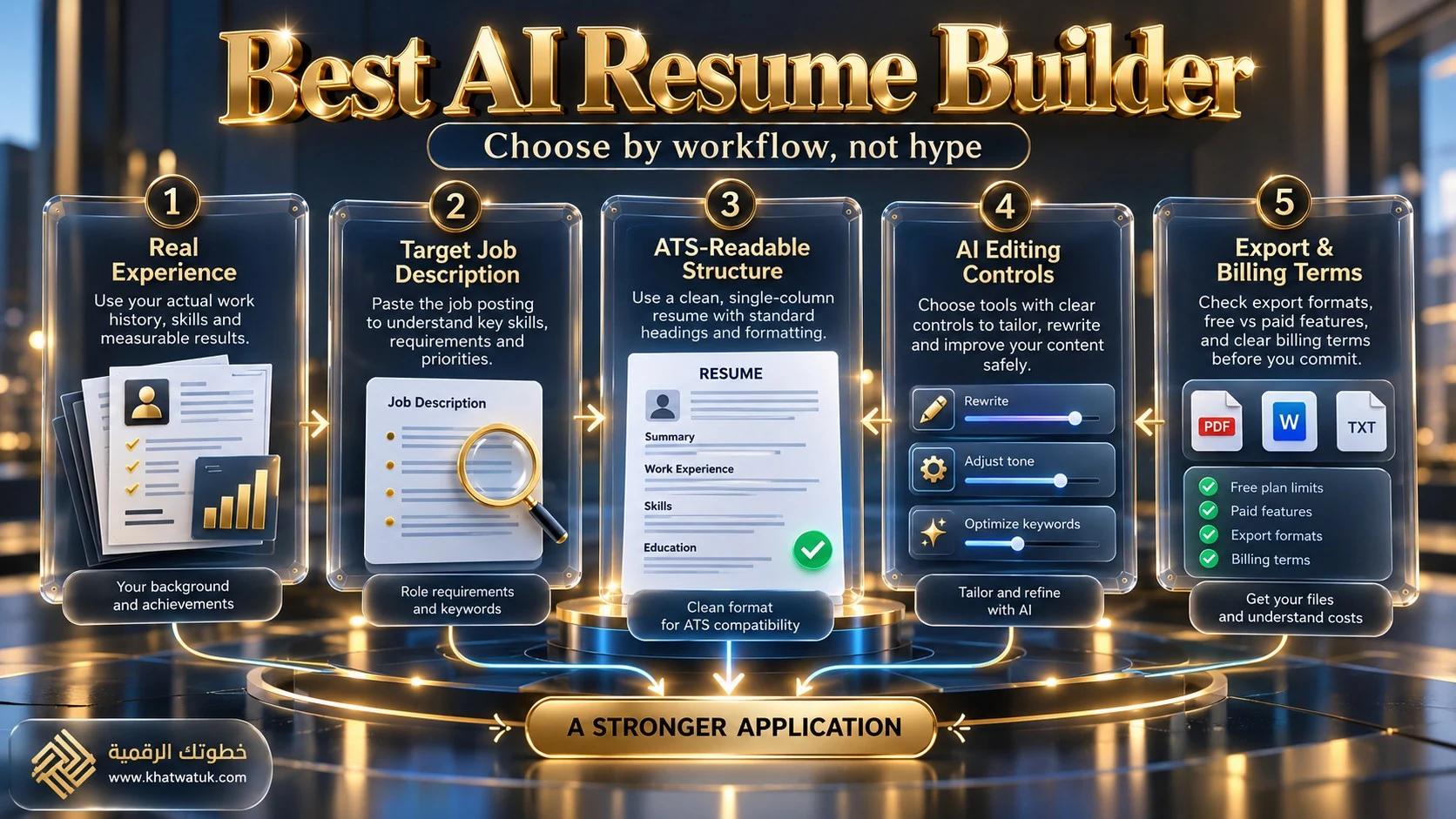
The best AI resume builder for you is the one that turns your real experience into a targeted, readable resume while keeping the final wording under your control. A builder should make the work faster without inventing employers, dates, credentials, achievements, skills, or metrics.
Current tools increasingly combine AI writing with job-description matching, ATS-oriented checks, templates, resume versioning, and application tracking. The differences are less about whether a product has AI and more about where AI appears in the workflow.
This guide treats the query as a workflow decision, not a popularity contest. It compares documented capabilities and current pricing paths, then maps common job-search situations to the type of builder that fits them.
Methodology note: The fresh research synthesizes 15 current sources using product pages, editorial comparisons, and test-driven reports. Several sources used standardized or same-input testing, including feeding the same career history into multiple builders. This article uses that evidence to compare workflows, but it does not claim that we independently re-ran the same-input test across every product. Product claims are treated as documented capabilities, while publisher-reported test observations are identified as such.
Table of contents
- What is the best AI resume builder in 2026?
- What an AI resume builder actually does
- AI resume builder comparison matrix
- How the AI workflow differs across builders
- ATS readability and job-specific tailoring
- AI writing quality, grounding, and user control
- Free plans, exports, and pricing traps
- Choose the workflow that matches your job search
- Design, templates, and mobile editing
- Edge cases and gotchas
- A practical six-step AI resume workflow
- Frequently asked questions
- Final takeaways
What an AI resume builder actually does
An AI resume builder combines resume structure with machine-assisted drafting, editing, matching, or checking. The useful products start from information you supply, then help translate that evidence into a document designed for a specific application.
Build from scratch vs improve an existing resume
Starting from zero is valuable when the blank page is the bottleneck. Teal documents a workflow that can start from scratch, import an existing resume, or import LinkedIn information. Rezi likewise supports creating from scratch, uploading, or importing from LinkedIn. The practical difference is how well the tool preserves the facts you already have while helping you rewrite them.
For an existing resume, look for targeted rewrite controls rather than a one-click rewrite that overwrites your original. A good workflow lets you keep a base version and create targeted variants without losing the evidence inventory behind it.
Tailor to a job description
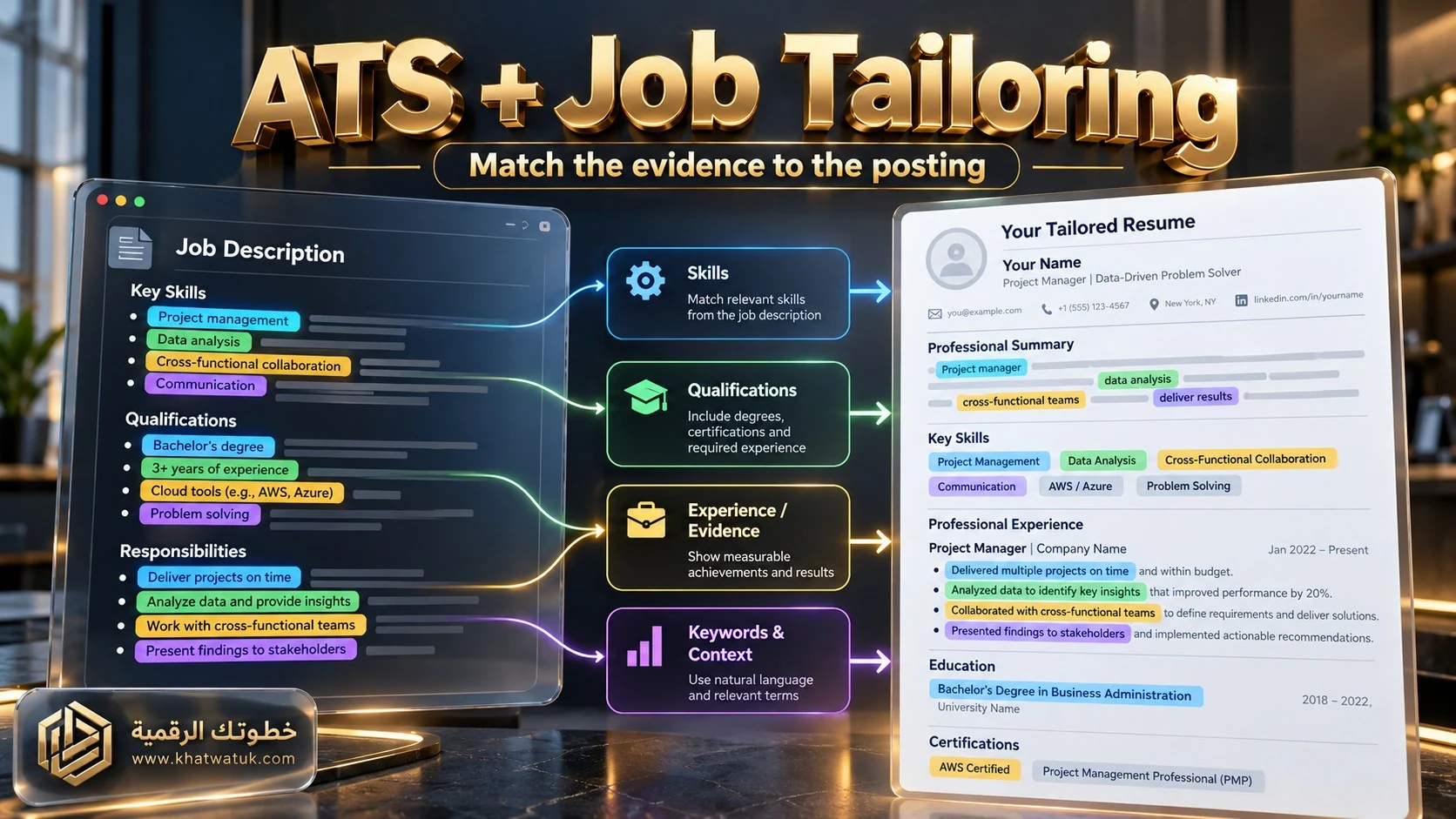
Job-specific tailoring is one of the clearest product differences in this category. Teal lets you attach a job description and see matching insights. Rezi's AI keyword targeting analyzes a posting and surfaces keywords to consider. Huntr describes a similar flow that connects responsibilities, qualifications, keywords, and achievements.
The quality test is simple: the tool should help you identify which real experiences deserve more emphasis, not merely paste every phrase from the posting into your resume.
Score, check, and export
Some products add a score or scanner after drafting. Rezi documents a section-by-section Rezi Score and an ATS-oriented checker. Jobscan's free scanner compares a resume with a job description and reports match rate, missing keywords, and formatting issues. Treat such scores as decision aids, not as a guarantee of recruiter action.
AI resume builder comparison matrix
The table below focuses on documented workflow characteristics rather than an overall ranking. The 10-product matrix is locked by the current outline; the other five research sources are used as supporting evidence. Pricing and free-plan details are included only where current source pages support them.
🔎 In-Depth Head-to-Head Comparisons & Specialized Guides
For detailed side-by-side breakdowns of specific tool pairs and targeted career paths, explore our dedicated reviews:
- Teal vs Rezi (2026): Application tracking workspace vs dedicated ATS keyword optimization.
- Jobscan vs Teal (2026): Deep ATS match scanning vs comprehensive job search tracking.
- Teal vs Kickresume (2026): Structured ATS workflows vs creative designer resume templates.
- Rezi vs Kickresume (2026): Mathematical ATS formatting score vs aesthetic visual design.
- Teal vs Enhancv: Free tiers, ATS compliance, and personality-driven resume layouts compared.
- Kickresume vs Enhancv: Visual storytelling and modern AI resume generation face-off.
- Huntr vs Teal (2026): High-volume Kanban pipeline tracker vs resume tailoring command center.
- Huntr vs Jobscan (2026): Workflow CRM and autofill vs precision keyword scan diagnostics.
- Best Resume Builder for Nurses (2026): Clinical certifications, hospital ATS screening, and RN workflows.
- Best Resume Builder for Students (2026): No-experience templates, student discounts, and academic formatting.
- Best AI Cover Letter Generator (2026): Free vs paid AI cover letter writers and recruiter frameworks.
- Best AI Meeting Assistant in 2026: 7 top tools tested & ranked for Zoom, Teams, real-time transcription, and automated action items.
- Best AI Job Search Tool in 2026: Top 7 platforms compared for automated discovery, application autofill, and tracking.
- How to Automate Your Job Search in 2026: Complete step-by-step blueprint to automate role discovery and form submissions without account bans.
Note: ATS-oriented means the vendor describes its workflow or templates as designed for parsing/readability. It does not mean every employer's ATS will produce the same result.
How the AI workflow differs across builders
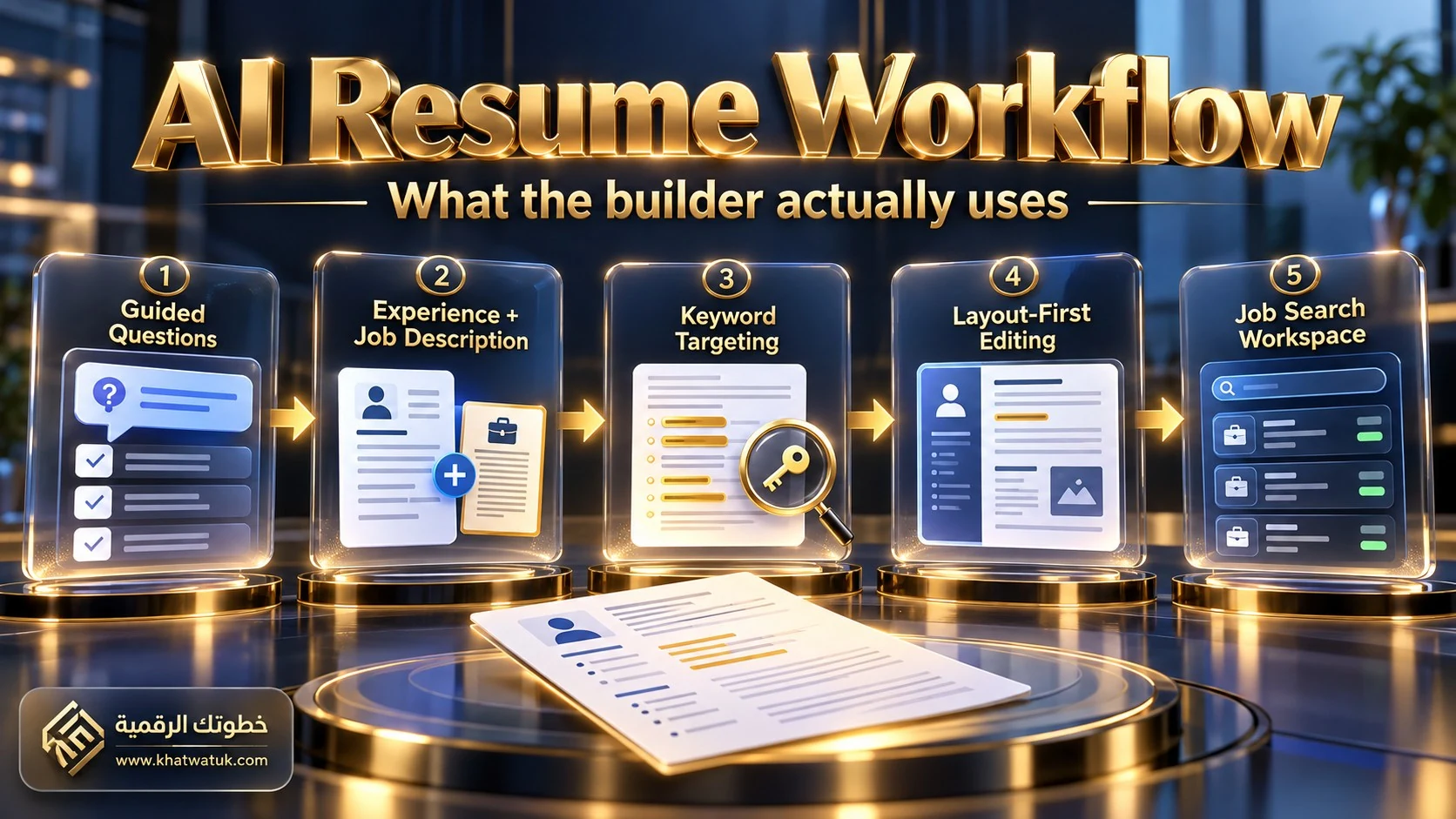
Two builders can both advertise an AI resume writer while asking for very different inputs. That upstream difference shapes the quality of the draft and the amount of editing you must do afterward.
Guided question-and-answer workflows
Jobscan describes an AI Resume Coach that asks focused questions and lets you accept, edit, or ignore suggestions. Zety places writing guidance inside a step-by-step builder. These systems reduce blank-page friction by collecting structured input before generating prose.
Experience plus the target posting
Teal, Rezi, and Huntr connect career history to a specific job description. This gives the AI two anchors: what you have actually done and what the employer says it needs.
Keyword targeting and scoring
Rezi's targeting tools and Jobscan's matching workflow use the job description as an explicit input. That can reveal missing terminology, but a missing keyword should trigger a truth check. Never add a qualification just because a scanner asks for it.
Layout-first editing
Enhancv gives substantial visual control while layering AI feedback and tailoring. Resume.io also uses a template-led flow. These approaches can help presentation, but exported text should still have a clear hierarchy and reading order.
A broader job-search workspace
Teal and Huntr extend beyond the document into job tracking and application organization. That becomes important when the hard part is keeping many resume versions tied to the correct postings. To streamline that stage, learn our complete framework on how to track job applications or explore vetted job application automation tools to accelerate repetitive submissions.
🎯 Recommended for Guided ATS Optimization: Jobscan
If your primary obstacle is passing recruiter screening filters and matching hard skills from the job posting, test your resume against real job descriptions.
Try Jobscan Free →ATS readability and job-specific tailoring
ATS-safe formatting is about readable structure: clear section labels, consistent dates, selectable text, sensible spacing, and content that matches the role without becoming a copy of the posting. A builder can assist, but no template guarantees a hiring outcome across every employer system.
What ATS-friendly formatting should mean
Use familiar headings such as Experience, Education, Skills, and Projects when they accurately describe your content. Keep the reading order obvious and avoid decorative structures that duplicate information. When an ATS checker is available, use it to catch parsing or structure problems before export.
ATS-safe vs ATS optimization: ATS-safe describes a resume whose structure, text, headings, dates, and reading order are easy for parsing software to interpret. ATS optimization goes further by tailoring legitimate experience and terminology to a specific job description. A readable resume can be ATS-safe without being optimized for one posting, and a keyword match score does not make an unsupported claim valid.
Why keyword matching is not enough
A keyword is useful only when the underlying experience supports it. The strongest evidence usually combines a real action, a tool or skill, the scope of work, and an outcome you can defend. Adding unsupported terms can make a resume look optimized while weakening credibility.
How to use the job description without stuffing
Separate the posting into requirements, recurring terminology, and proof points. Map each important requirement to a real experience example. If the role asks for stakeholder communication, choose a genuine project and describe what you actually did rather than repeating the label everywhere.
A useful match score tells you where to inspect the resume. It does not prove that the resume deserves an interview.
AI writing quality, grounding, and user control
The safest workflow treats generated language as editable draft material. Your career history remains the source of truth, while AI helps with structure, wording, emphasis, and relevance.
Avoid invented metrics and credentials
Never accept a generated percentage, revenue figure, team size, degree, certification, software skill, employer, or responsibility unless it came from your actual record. Review every AI suggestion against your evidence before exporting.
Review controls that matter
Prefer tools that let you edit individual bullets, regenerate one section, preserve the original, and compare a tailored copy with the base resume. For example, Jobscan describes an AI Resume Coach workflow where you can accept, edit, or ignore suggestions; Teal documents resume versions tied to job-search workflows; and Rezi exposes section-level writing and scoring tools. Version control matters more as application volume grows.
Humanize without deleting evidence
Humanizing does not mean stripping away specifics. Keep real evidence, then replace generic filler with direct language. A concise line with a defensible outcome is preferable to a longer sentence full of abstract claims.
⚡ Recommended for ATS-Safe AI Writing: Rezi
If you need instant AI bullet point generation tailored to specific keyword targets with guaranteed single-column ATS formatting.
Explore Rezi Free →Free plans, exports, and pricing traps
"Free AI resume builder" can describe several different offers: free account creation, free AI credits, free editing, or free PDF export. Compare those separately before investing time in a full document.
Free to build vs free to download
Teal currently documents a free resume workflow with PDF exports. Kickresume's official pricing page lists a free plan with four basic templates and unlimited downloads when you stay within free customization options. Resume.io documents one resume and one cover letter on its free plan, with TXT downloads while formatted PDF export is paid. Zety documents free build/edit with TXT output and paid PDF/Word export.
Trials, renewal cadence, and billing terms
Recurring billing is a practical issue, not a footnote. Teal's live pricing page currently shows $13 every 7 days, $29 every 30 days, or $79 every 90 days for Teal+. Kickresume currently lists $24 monthly, $18 per month on quarterly billing, and $8 per month on yearly billing. Resume.io lists a $2.95 seven-day trial and a separate quarterly plan, with renewal terms shown on its pricing page. These figures were checked live on September 23, 2026; vendors can localize or change them.
When a lifetime plan or free tool changes the economics
Rezi currently documents a $29 monthly Pro plan and a $149 Lifetime option. A lifetime product can suit a one-off purchase when you prefer to avoid recurring billing, while a free builder can be enough for a smaller application cycle. Compare the total workflow cost for your expected search, not the monthly headline alone.
Enhancv is a clear example of why live checking matters. Its accessible first-party pricing pages expose different current plan presentations, so this article does not present one disputed exact price as definitive. Use the current checkout page as the final source of truth.
Choose the workflow that matches your job search
There are several legitimate archetypes, and different products support different ones. Identify the workflow first, then compare the builders that match it.
Choose a job-search workspace if: you are applying to many roles, need multiple tailored versions, and want jobs, resumes, statuses, notes, and follow-up kept together.
Choose an ATS-first builder if: your priority is structured resume writing, keyword targeting, and a readable document you can inspect against the posting.
High-volume applicants: prioritize version management, job-description matching, and export speed. Teal and Huntr explicitly connect resume work with broader application organization.
ATS-focused editors: Rezi and Jobscan put more emphasis on analysis, matching, and formatting checks.
Resume Genius: its documented distinction in this comparison is a guided, prompt-led first-draft workflow; the article keeps its ATS detail marked as unverified because independent confirmation was not found. Novorésumé: its distinction is the combination of an AI assistant with readability-focused templates and guidance, making it more of a structured editing experience than a dedicated ATS scoring workflow.
Fast drafts and mobile use: Kickresume combines an AI writer with iOS and Android apps, which can matter when you update documents away from a desktop.
Visual customization: Enhancv gives more control over layout and visual structure, provided you still preserve a clear reading order.
Guided beginners: Zety and guided AI workflows such as Jobscan can reduce the cognitive load of deciding what to write first.
Minimal-cost workflow: compare what the free tier actually lets you export before paying. Free only matters when the final file is usable for the application you intend to submit.
⚡ Recommended for ATS-Safe AI Writing: Rezi
If you need instant AI bullet point generation tailored to specific keyword targets with guaranteed single-column ATS formatting.
Explore Rezi Free →Edge cases and gotchas
Most resume builders look similar during a clean demo. The difficult cases appear when the candidate's history is unusual, confidential, long, or spread across multiple roles.
- Career gaps: do not let AI invent activity to fill blank periods. Address the timeline honestly and use relevant real training, projects, or study when appropriate.
- Career changes: tailor the top of the resume around transferable evidence and target-role terminology rather than forcing old job titles into the new identity.
- Executives: prioritize scope, business impact, leadership, transformation, governance, and measurable outcomes. More words are not automatically more persuasive.
- International formatting: check whether the target market expects a photo, date order, phone format, address conventions, language variants, or other local resume norms. Keep the factual content consistent, but adapt formatting to the country and role instead of assuming U.S. conventions apply everywhere.
- Confidential work: use defensible, non-sensitive descriptions. Do not give confidential employer information to an AI tool just to make a bullet more specific.
- Portfolio-heavy roles: keep the resume readable and use a clearly labeled portfolio link where it adds evidence.
- Multiple versions: keep one factual master resume, then derive job-specific copies from it. Never make changes you cannot trace back to source facts.
- Stale postings: if a job description changes or is reposted, recheck target terms before submitting an older tailored version.
- Trial renewals: save the checkout terms before paying, especially when an introductory charge converts to recurring billing.
⚠️ Caution: Never let an AI builder add a credential or metric simply to improve a match score. A polished false claim can create a larger problem than a weak bullet.
A practical six-step AI resume workflow
The most reliable process separates evidence collection from language generation. That makes it easier to use any builder without surrendering control of the facts.
Collect evidence. Write down roles, dates, tools, responsibilities, projects, outcomes, and numbers you can prove.
Build the base resume. Use the builder to organize the evidence into a clean, editable structure.
Add the target posting. Paste the real job description so the AI can identify relevant language and missing evidence.
Tailor selectively. Strengthen bullets and the summary that are genuinely relevant; do not copy the posting wholesale.
Verify every claim. Compare every AI-generated sentence with your actual record. Delete anything unsupported.
Export and inspect. Review the PDF or DOCX visually, confirm reading order, then submit the version tied to that exact job.
Once your resume is optimized and generating callbacks, your focus shifts to interview performance. Whether you need an on-device technical coding copilot or an AI mock coach to master behavioral STAR storytelling, selecting the best AI interview assistant ensures you present your resume achievements with authentic confidence under pressure.
Transforming an ATS-compliant resume into interview callbacks is only half the battle; real-time conversational execution under pressure determines the final offer. For candidates debating assistive in-call technology, our comprehensive Final Round AI vs Parakeet AI comparison breaks down sub-second audio response speeds, resume grounding accuracy, and subscription billing differences.
Frequently asked questionsWhat is the best AI resume builder?
The right builder depends on your workflow. Compare job-specific tailoring, ATS-oriented checks, editing control, export terms, and version management rather than choosing by AI branding alone.
What is the best free AI resume builder?
Free varies by product. Teal currently documents a free resume workflow with PDF downloads, while Kickresume also documents free downloads within its free templates and customization limits. Check whether AI usage, PDF export, and resume versions are free for your use case.
Can AI resume builders optimize a resume for ATS?
They can help with structure, parsing checks, and job-description matching. That does not guarantee that every employer's system will rank the resume the same way, so review the final file yourself.
Can I tailor a resume to a specific job description?
Yes. Teal, Rezi, Jobscan, and Huntr document workflows that use a target job description to guide matching or tailoring. Only include terms that accurately describe your background.
Can an AI resume builder create a resume from scratch?
Yes. Teal and Rezi explicitly document start-from-scratch workflows, and Kickresume documents AI-assisted generation from job information. The output still needs real facts from the candidate.
Can I upload an existing resume and improve it?
Yes. Teal, Rezi, and Enhancv document import or upload workflows. Upload support is useful when you already have a reliable career history and want AI to focus on rewriting or tailoring.
How much does an AI resume builder cost?
Pricing ranges from free workflows to recurring subscriptions and one-time plans. Current examples include Teal+ at $13 every 7 days, $29 every 30 days, or $79 every 90 days; Rezi Pro at $29 per month plus a $149 Lifetime option; and Kickresume Premium at $24 monthly, $18 per month on quarterly billing, or $8 per month on yearly billing. Check the official page before purchase.
Do free resume builders let you download a PDF?
Some do and some do not. Teal and Kickresume currently document free download paths, while Resume.io documents TXT-only downloads on its free plan. Always check the exact export format before you finish a full resume.
How do I avoid AI-generated resume content sounding generic?
Give the AI concrete evidence, then edit for accuracy and plain language. Preserve real tools, scope, actions, and outcomes, and remove empty phrases that could describe almost anyone.
Should I use one resume for every application?
A single factual master resume is useful, but the submitted version should usually emphasize the experience and terminology most relevant to the target role. Keep the master file unchanged and create traceable tailored copies.
Is a visually designed resume safe for ATS systems?
Some designed resumes can remain readable to ATS software, but visual complexity adds more things to verify. Use clear section labels, selectable text, and a logical reading order, then test the exported file.
Can I create multiple tailored resume versions?
Yes. Teal and Huntr explicitly support multiple resume versions, while other builders allow repeated documents or copies through their editors. A versioned workflow is valuable when applications emphasize different parts of your background.
Final takeaways
The useful question is not which builder has the longest feature list. It is whether the product gives the AI enough real evidence to produce relevant language, lets you inspect changes, and gives you a clean final file for the application you actually plan to send.
For one-time creation, a simple builder may be enough. For repeated applications, versioning and job-specific matching become more important. For ATS-heavy environments, readable structure and evidence-based tailoring should take precedence over decorative complexity. For visually led roles, layout flexibility can matter more, provided parsing remains predictable.
The practical advantage comes from process discipline: keep a factual master resume, tailor from the real posting, verify every AI-generated claim, inspect the export, and record the exact version you submitted. That makes the builder a productivity tool rather than a substitute for judgment.
Official pages used for current product facts: Teal pricing, Rezi plan documentation, and Resume.io pricing.
[INTERNAL LINK: how to write an ATS-friendly resume]
[INTERNAL LINK: best resume templates for U.S. job applications]
If you are an experienced specialist seeking tailored executive and corporate templates, explore our dedicated benchmark of the Best Resume Builder for Professionals to match corporate hiring standards.
Capturing detailed interviewer feedback during candidate screening calls is critical for refining your career narrative. If you want automated meeting summaries without manual note-taking, explore our head-to-head Fathom vs Fireflies comparison to see which AI meeting notetaker best automates call notes.
