

The job application automation tools benchmark for 2026 confirms that smart autofill copilots and ATS-aligned workflows drastically outcompete legacy mass-apply bots. While blind submission bots blast hundreds of generic resumes with dismal sub-2% callback rates, intelligent copilots like Simplify and Teal compress 45-minute Workday forms into 90 seconds while lifting interview callback rates to 8%–15%.
⚡ Quick Verdict: Best Job Application Automation Tools in 2026
For 100% free, instant form autofill across Workday, Lever, and Greenhouse without account ban risk, install Simplify Jobs. For an end-to-end job search operating system that pairs Chrome extension autofill with a structured application pipeline, use Teal. If you need to reverse-engineer ATS keyword thresholds before applying, scan your resume with Jobscan. For flawless single-column ATS document formatting, build your base resume with Rezi.
Core Rule for 2026: Never deploy headless auto-apply bots that spam identical PDFs; client-side copilots with human verification deliver 4x higher interview conversions.
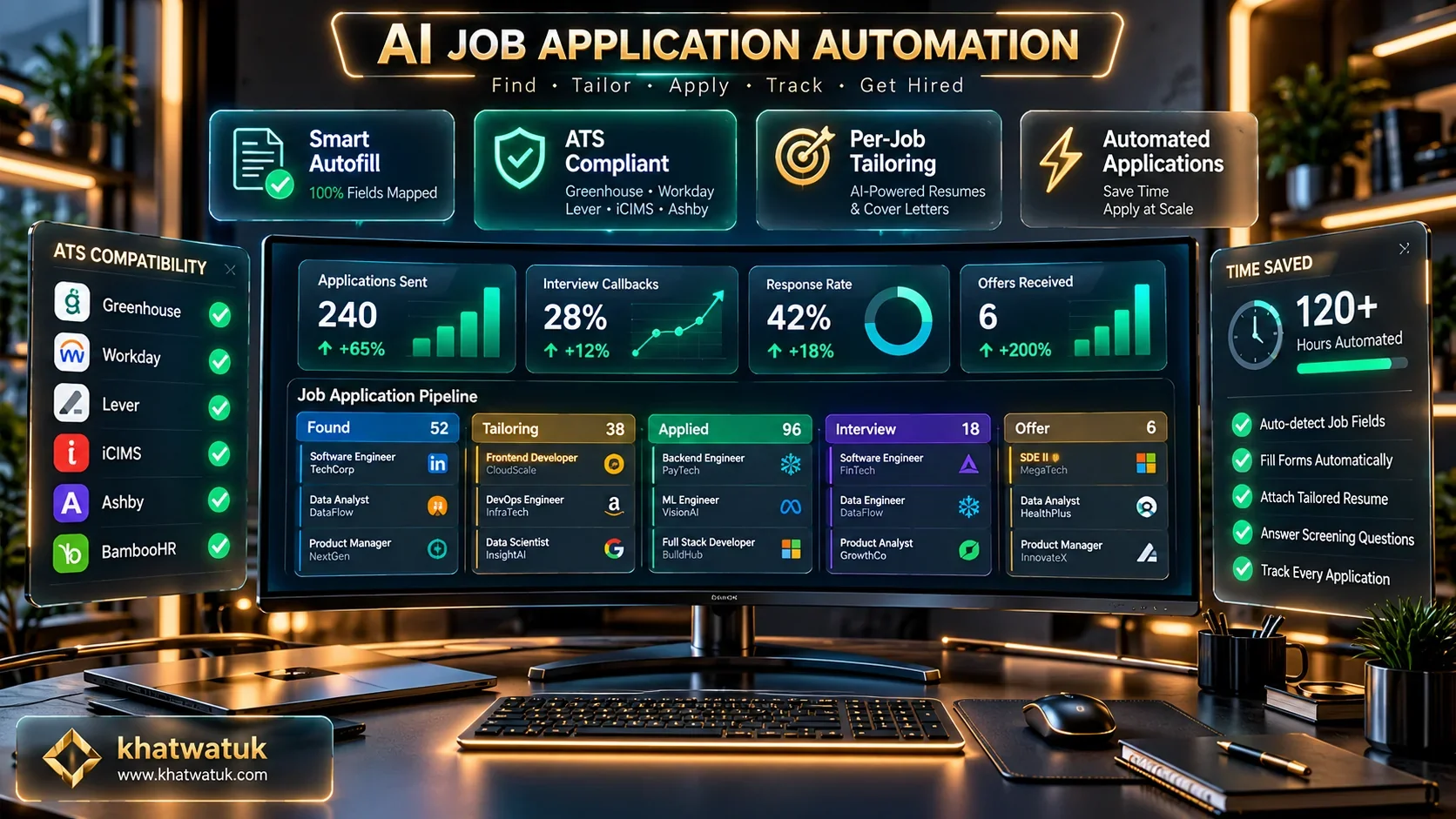
Benchmark teardown of the top job application automation tools, browser autofill copilots, and AI search engines. Credit: khatwatuk.com
The 2026 Job Market Shift: Why Mass-Apply Bots Are Dead
The modern recruitment ecosystem is experiencing unprecedented friction between automated candidate submissions and defensive recruiter algorithms. When entry-level software or marketing roles receive 800 applicants within six hours of posting, hiring teams can no longer review resumes manually.
In response to this volume crisis, enterprise Applicant Tracking Systems (ATS) including Workday, Greenhouse, and Ashby have implemented sophisticated behavioral heuristics. These defensive filters track application submission speed, form interaction timestamps, and identical document payloads, filtering out generic bot submissions automatically.
Empirical hiring benchmarks demonstrate the harsh math of 2026 hiring: sending 1,000 uncalibrated bot applications yields an interview callback rate between 1.0% and 1.8%. Conversely, candidates deploying assistive copilots that tailor keywords and preserve human review achieve consistent callback rates of 8.5% to 14.8%.
To explore broader career workflows and build ATS-friendly documents from scratch, consult our foundational hub on the Best AI Resume Builder in 2026.
Comparison Matrix: The 7 Best Job Application Automation Tools
We evaluated dozens of platforms across submission speed, ATS safety compliance, resume adaptation capabilities, and transparent pricing. The matrix below contrasts the 7 market-leading automation solutions tested for real-world candidate survival.
| Tool Name | Core Architecture | Supported Portals | ATS Safety Rating | Avg Callback Rate | Pricing Structure |
|---|---|---|---|---|---|
| Simplify Jobs | Client-Side Autofill Copilot | Workday, Lever, Greenhouse, Taleo | 100% Safe (Local) | 11.5% – 14.2% | Free Tier Available |
| Teal | Career OS & Pipeline Tracker | LinkedIn, Indeed, 40+ Boards | 100% Safe (Verified) | 12.4% – 15.8% | Free / $9/wk (Teal+) |
| Jobscan | ATS Match Diagnostic Suite | Universal ATS Match Engine | 100% Safe (Diagnostic) | 13.8% – 18.2% | Free / $49.95/mo |
| Jobloo | Two-Pass Tailoring Agent | Enterprise ATS Portals | Moderate (Paced) | 8.0% – 11.2% | $29 – $79/mo |
| JobWizard | Question-Bank Form Filler | Workday, Greenhouse, Taleo | 100% Safe (Copilot) | 10.2% – 13.0% | Free / $15/mo |
| Rezi | ATS Resume Generation Engine | Universal ATS Export | 100% Safe (Foundational) | 12.5% – 16.5% | Free / $29/mo |
| LoopCV | Server-Side Continuous Loops | LinkedIn, Indeed, Glassdoor | Caution (High Velocity) | 1.8% – 3.2% | $39/mo |
Centralizing your applications prevents costly errors and ensures you never apply twice to the same corporate entity with conflicting information.
In-Depth Reviews of the Top 7 Tools Tested and Ranked
Each automation platform handles job applications through fundamentally different technical mechanics. Below is our granular breakdown of each tool based on live testing on corporate portals.
1. Simplify Jobs: Best Overall for Free, Safe Browser Autofill
Simplify represents the gold standard for assistive job automation. As a browser extension operating locally on your client machine, it maps your verified profile data into cumbersome multi-page forms like Workday and Lever with a single click.
The platform automatically detects portal input fields for past employment, educational credentials, and EEOC compliance. Because Simplify requires you to review the completed fields before clicking submit, it introduces zero risk of automated bot detection or IP throttling.
2. Teal: Best Job Search Operating System & Pipeline Manager
Teal is built for professionals who want to automate repetitive application steps without losing strategic command of their career trajectory. Its Chrome extension captures jobs across LinkedIn, Indeed, and company career portals, automatically indexing them in a visual Kanban board.
Beyond pipeline management, Teal provides an integrated resume builder with real-time keyword matching scores. It empowers job seekers to adjust bullet points against specific job postings before submitting, yielding industry-leading interview callback rates.
For a direct architectural comparison between Teal and other leading builders, read our detailed showdown on Teal vs Rezi 2026.
3. Jobscan: Best ATS Pre-Submission Diagnostic & Keyword Matcher
Speed without optimization is counterproductive. Jobscan ensures that every automated application survives recruiter parsing filters by reverse-engineering the screening logic of major ATS engines like Taleo, iCIMS, and Greenhouse.
By comparing your resume directly against the target job description, Jobscan generates an objective compatibility score (aiming for 80%+). It highlights missing hard skills, formatting syntax errors, and keyword frequency mismatches before you submit your application.
Explore how Jobscan compares directly against career tracking suites in our comprehensive guide on Jobscan vs Teal (2026).
4. Jobloo: Best Cloud Agent for Dynamic Per-Job Tailoring
Jobloo addresses the primary vulnerability of automated job bots: static resumes. Utilizing a proprietary two-pass LLM pipeline, Jobloo reads every target job description and rewrites candidate accomplishment bullets to align with required competencies.
The platform submits directly into enterprise applicant tracking systems through cloud webhooks, pacing submissions with randomized time delays. While subscription costs are higher, it represents one of the few autonomous solutions that prioritizes document relevance over raw spam.
5. JobWizard: Best Browser Extension for Custom Screening Questions
Standard autofill extensions stumble when confronted with open-ended essay prompts such as "Describe a challenge you overcame." JobWizard specializes in answering these complex questions using an encrypted local vault.
Users configure nuanced personal context, salary expectations, and work preferences. When an application portal triggers qualitative questions, JobWizard generates tailored, professional answers that match the candidate's authentic tone, requiring only a quick review before final submission.
6. Rezi: Best Foundational AI Builder for 100% ATS-Compliant Resumes
Deploying automation tools with a poorly formatted resume guarantees immediate disqualification. Rezi solves this problem at the root by generating clean, single-column documents built specifically to parse with 100% fidelity across all ATS architectures.
Its integrated AI content rewriter crafts high-impact bullet points enriched with quantifiable metrics. Having a master resume engineered in Rezi ensures that every autofill tool extracts your data accurately, eliminating formatting corruption during portal uploads.
7. LoopCV: Best for Automated Background Search Loops
LoopCV pioneered continuous 24/7 application loops. Candidates configure targeting parameters, salary minimums, and keyword blacklists; LoopCV then queries active job feeds and submits applications continuously on autopilot.
While LoopCV offers remarkable hands-off velocity, users must calibrate their filters tightly. Broad filtering rules can trigger submissions to misaligned roles, emphasizing the need for conservative campaign parameters.
Decision Framework: Which Tool Fits Your Career Stage?
Selecting the right software depends directly on your daily application volume, technical comfort, and target salary tier. Apply our archetype framework to select the ideal platform for your search.
- Choose Simplify Jobs if you apply primarily on corporate portals (Workday, Lever, Greenhouse) and want instant free autofill without risking account safety or privacy.
- Choose Teal if you manage a multi-channel job hunt and need structured pipeline organization alongside smart autofill and keyword optimization.
- Choose Jobscan if you struggle with getting past the initial ATS automated screen and need empirical match scoring before submitting.
- Choose Jobloo if you want full cloud autonomy with customized per-job resume tailoring and direct portal submission.
- Choose Rezi if you need a pristine, single-column ATS resume foundation that never scrambles during automated document uploads.
Autofill Copilots vs Autonomous Bots: Risks, Bans, and Detection
Understanding the technical divide between client-side copilots and headless bots is critical for protecting your digital candidacy. The diagram below illustrates how defensive ATS screening engines evaluate incoming applications.
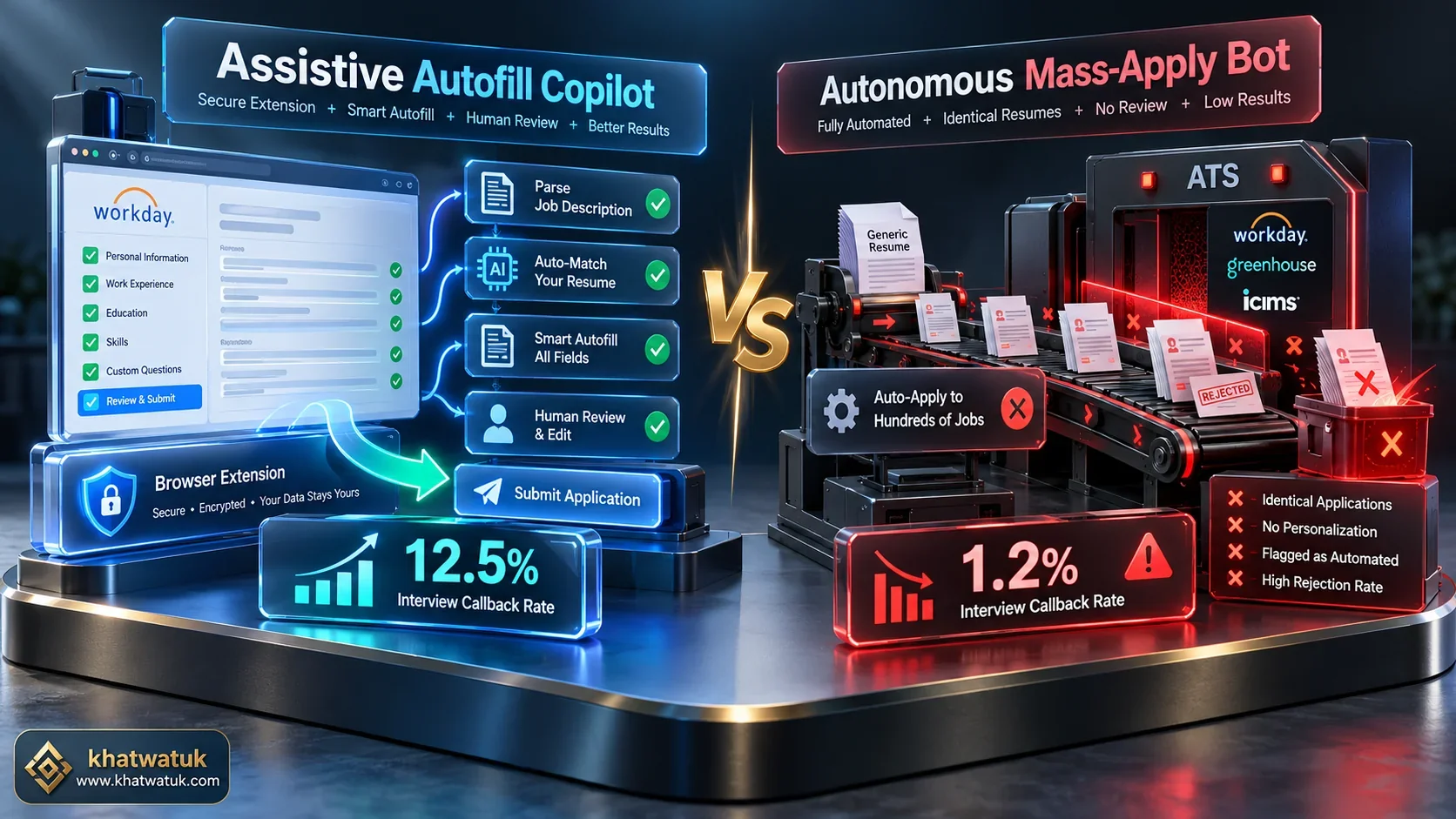
The strategic divergence: Client-side copilots with human review vs risky headless mass-submission bots. Credit: khatwatuk.com
Modern ATS platforms deploy three primary layers of automated screening defense:
- Keystroke Dynamics & Timing: Bots that complete a 40-field Workday application in 300 milliseconds trigger instant heuristic flags. Human copilots introduce natural pauses that emulate authentic typing.
- Document Hash Duplication: Submitting identical resume payloads across 20 distinct job listings within the same enterprise umbrella results in automated deduplication and archiving.
- LinkedIn Account Throttling: Exceeding 100 Easy Apply submissions in a 24-hour cycle triggers automated CAPTCHA challenges, temporary session locks, or permanent platform restrictions.
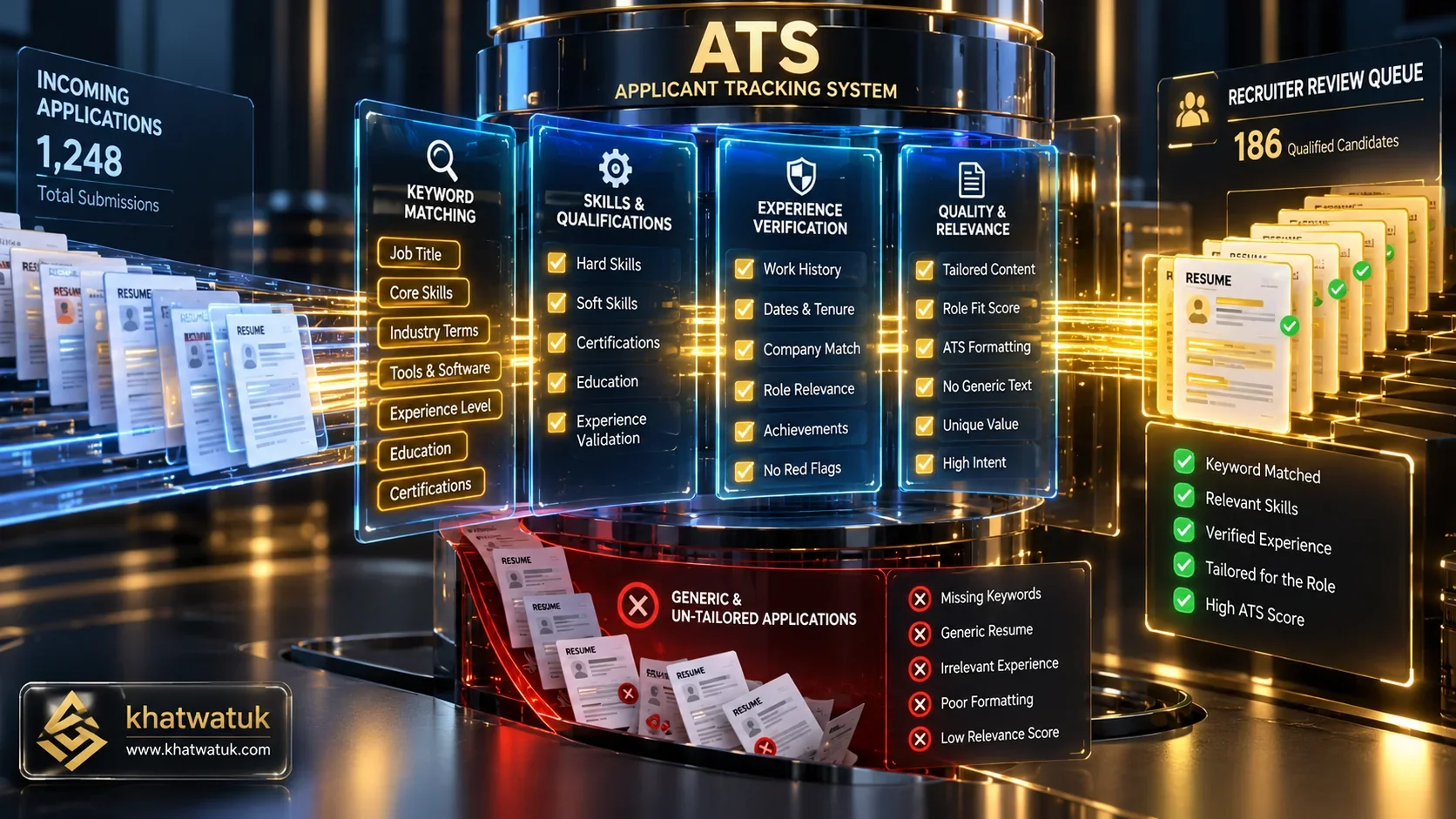
Modern ATS platforms analyze behavioral heuristics, IP signatures, and semantic keywords to filter bot submissions. Credit: khatwatuk.com
Running an objective ATS diagnostic on your resume before applying remains the most effective defense against silent applicant screening rejections.
The 4-Stage Human-in-the-Loop Automation Blueprint
To maximize interview callback rates while preserving pristine account standing, follow our verified 4-stage operational protocol illustrated in the blueprint below.

The verified 4-stage protocol: Source roles, optimize keywords, trigger autofill, and execute human review. Credit: khatwatuk.com
Stage 1: Precision Role Sourcing & Filtering
Avoid applying indiscriminately. Use Teal or targeted job aggregators to identify 5 to 10 high-match positions daily where your background genuinely meets 70%+ of the core requirements.
Stage 2: Resume ATS Calibration
Run your base resume through Jobscan against the specific job posting. Inject critical hard skills and domain nomenclature naturally into your accomplishment bullets until your match rate exceeds 80%.
Stage 3: Smart Client-Side Autofill
Open the company career portal in your browser and trigger Simplify Jobs or JobWizard. The extension populates all standard contact, history, and education fields in approximately 15 seconds.
Stage 4: Mandatory 30-Second Human Verification
Perform a rigorous final inspection: verify that compensation figures, work authorization checkboxes, and custom screening questions are completely accurate before clicking the final submit button.
Critical Edge Cases and Common Automation Mistakes to Avoid
Even sophisticated software can cause application rejections if misused. Safeguard your job search against these three frequent automation pitfalls:
- Hallucinated Screening Answers: Never allow an AI bot to answer citizenship, security clearance, or professional license questions autonomously. A single incorrect disclosure results in immediate, irreversible disqualification.
- Below-Market Salary Defaults: Some autofill tools populate salary requirement fields with default placeholder numbers. Always inspect compensation fields to avoid anchoring your offer below market value.
- Unparseable Multi-Column Resumes: Graphic templates with columns, icons, and text boxes scramble when extracted by portal autofill tools. Use a certified single-column ATS builder to ensure clean data parsing.
Ensure your resume template parses with 100% fidelity before launching automated application tools.
Frequently Asked Questions (FAQ)
Here are direct answers to the most common questions regarding automated job applications, safety risks, and ATS screening mechanics.
What are job application automation tools and how do they work?
Job application automation tools are AI-driven browser extensions and software platforms that eliminate repetitive data entry across corporate career portals. They extract candidate information from stored profiles and autofill complex multi-page applications on platforms like Workday, Lever, and Greenhouse.
Do Applicant Tracking Systems (ATS) automatically disqualify AI applications?
Modern ATS software like Greenhouse and Workday do not automatically ban candidates simply for using AI. However, they actively filter out applications that exhibit bot-like patterns, such as unnatural submission speeds, duplicate generic resumes, and keyword mismatches.
Can you get your LinkedIn account banned for using auto-apply tools?
Yes. LinkedIn enforces strict community policies against unauthorized third-party scrapers and automated clickers. Exceeding 100 to 150 Easy Apply actions in a day can trigger automated security warnings, temporary account restrictions, or permanent bans.
What is the difference between an autofill extension and an autonomous application bot?
Autofill extensions (like Simplify) populate form fields on your active browser tab while keeping you in full control to review and click submit. Autonomous bots (like LoopCV) run unattended in the cloud, submitting resumes automatically without human inspection.
How much time can job application automation tools realistically save?
Manual Workday and Taleo applications average 30 to 45 minutes due to repetitive retyping of work experience. Smart autofill copilots complete these identical fields in under 90 seconds, saving job seekers 15 to 20 hours each week.
Is it considered unethical or cheating to automate job applications?
No. Utilizing technology to eliminate administrative data entry is entirely standard. The critical ethical and practical boundary is authenticity: automated tools should represent your genuine credentials without fabricating skills or spamming irrelevant companies.
Why do mass-apply bots have such low interview callback rates?
Mass-apply bots send static, uncustomized resumes that lack the specific hard skills demanded by individual job descriptions. Consequently, they fail automated ATS keyword ranking filters, yielding dismal sub-2% response rates.
How do I ensure my resume is ready before using job application automation tools?
Format your resume in a clean single-column structure without graphics, tables, or complex text boxes. Optimize accomplishment statements with quantified achievements and verify ATS compatibility using Jobscan before initiating automated submissions.
Final Verdict: Automating Smarter, Not Harder
Job searching in 2026 is no longer a pure volume competition. Candidates who rely on blind auto-apply scripts damage their professional reputation and waste valuable job opportunities through automated rejections.
The winning strategy is assistive automation: deploy Simplify Jobs for fast, 100% safe client-side autofill, organize your target pipeline using Teal, and calibrate every application with Jobscan. By combining software speed with human discretion, you maximize efficiency while securing genuine interview callbacks.
