

Learning how to track job applications effectively is the single most critical habit separating disorganized job seekers from those who consistently convert submissions into lucrative interviews. Whether you deploy a streamlined 10-column spreadsheet for under 15 active roles or scale with a dedicated career CRM like Teal, maintaining disciplined stage management, archiving job descriptions, and scheduling 5-day recruiter follow-ups lifts callback conversions by up to 35%.
⚡ Quick Verdict: The Best Ways to Track Job Applications in 2026
For active searches across LinkedIn and career portals, deploy Teal for 1-click Chrome saving, Kanban stages, and resume matching. For agile task tracking with custom columns, choose Huntr. If applying to fewer than 15 positions, Google Sheets provides total control with zero overhead. For passive logging without manual entry, use Simplify Jobs.
Golden Threshold Rule: Use a spreadsheet for under 15 roles; upgrade to a dedicated career CRM once you exceed 15 active applications.
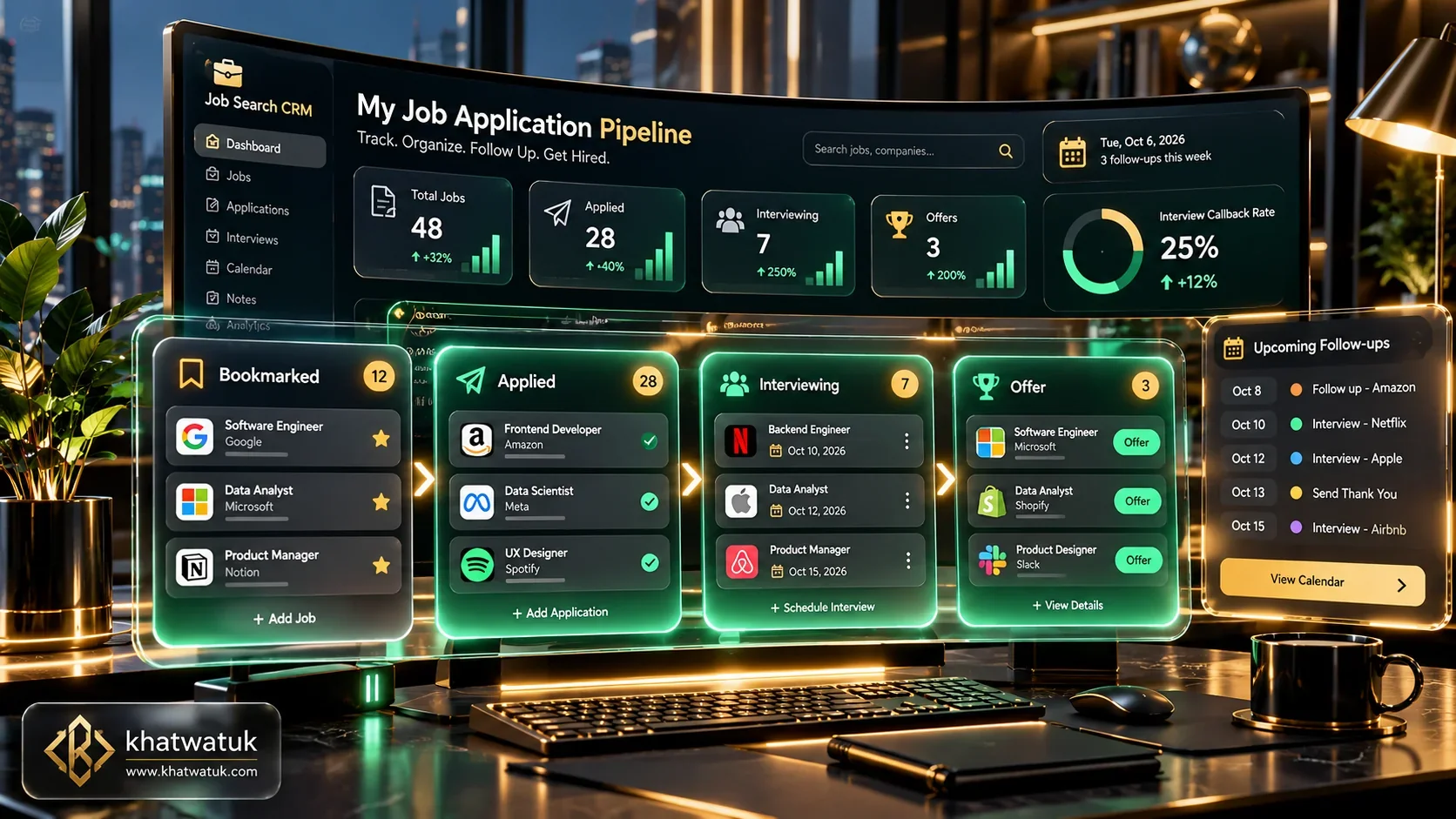
Modern job application tracking: Managing visual pipelines, browser clippers, and recruiter follow-ups. Credit: khatwatuk.com
Why Job Searches Fall Apart: The Real Cost of Disorganization
The modern employment market moves at blistering speed. When submitting dozens of applications across company portals, LinkedIn, and niche job boards, unorganized candidates inevitably face administrative chaos.
Disorganization manifests in three costly scenarios: answering a sudden recruiter phone screen without remembering the job description, forgetting to send a polite follow-up after an initial screening, or accidentally submitting duplicate applications with conflicting salary demands.
Industry surveys confirm that over 60% of job postings are taken down or archived before candidate interviews are scheduled. Without archiving the posting at the moment of submission, candidates walk into technical interviews blind.
To build ATS-compatible documents that convert submissions into calls, consult our comprehensive guide on the Best AI Resume Builder in 2026.
Comparison Matrix: Spreadsheets vs Dedicated Job Tracking Apps
We tested the most popular tracking methodologies across ingestion speed, mobile accessibility, automated follow-up reminders, and resume version control. The matrix below benchmarks the top 6 tracking solutions.
| Tracking Method | Ideal Volume Tier | Data Ingestion Speed | Follow-Up Alerts | Resume Versioning | Pricing Tier |
|---|---|---|---|---|---|
| Google Sheets / Excel | Fewer than 15 Roles | Manual Copy-Paste | None (Manual Dates) | Drive Hyperlinks | 100% Free |
| Teal | 15 to 100+ Roles | 1-Click Chrome Clipper | Automated Cadence | Integrated Builder & Match | Free / $9/wk (Teal+) |
| Huntr | 20 to 100+ Roles | Universal Web Clipper | Calendar Reminders | File Attachments | Free / $40/mo |
| Notion | Custom Power User | Notion Web Clipper | Formula Notifications | Relational Pages | Free / $10/mo |
| Airtable | Data-Centric Searches | Manual / Form Ingestion | Automated Webhooks | Native File Columns | Free / $20/mo |
| Simplify Jobs | Autofill Users | Automatic Submission Log | Basic Status Log | Profile Sync | 100% Free |
Upgrading from a static spreadsheet to an automated career CRM prevents missed opportunities and gives you instant visibility across your entire pipeline.
The Essential 10-Column Spreadsheet Anatomy (Free Blueprint)
If you prefer building your own tracking system in Google Sheets or Excel, you must capture the right data fields from day one. Below is the battle-tested 10-column framework used by professional career coaches:
- Column A — Company Name & Careers URL: The official corporate entity and direct careers portal link.
- Column B — Role Title & Department: Exact designation (e.g., "Senior Product Marketing Manager – B2B").
- Column C — Application Date: Exact timestamp to calculate follow-up windows accurately.
- Column D — Job Posting Archive Link: A Google Drive PDF backup of the job description before it expires.
- Column E — Resume Version Submitted: Document title (e.g., "Resume_ProductLead_Fintech_v3.pdf").
- Column F — Recruiter / Hiring Contact: Name, title, and LinkedIn profile of the designated recruiter.
- Column G — Current Pipeline Stage: Dropdown status (Wishlist, Applied, Screening, Panel Interview, Offer, Closed).
- Column H — Target Compensation: Stated salary range, equity bonus, and benefits notes.
- Column I — Next Action Deadline: Calendar date for follow-up emails or preparation tasks.
- Column J — Key Insights & Interview Notes: Strategic notes on company culture, core challenges, and referral connections.
In-Depth Reviews of the Best Job Tracking Apps in 2026
Dedicated job tracking platforms streamline data entry and link application management with live interview preparation. Below are our hands-on evaluations of the top digital tools.
1. Teal: Best Overall Job Search CRM & Extension
Teal functions as an all-in-one command center for modern professionals. Its browser extension enables candidates to bookmark job listings from LinkedIn, Indeed, and dozens of career boards with a single click.
Once saved, Teal automatically organizes listings into an interactive Kanban pipeline. Unlike spreadsheets, Teal includes an integrated AI resume builder that scores your resume against the bookmarked job description, ensuring tailored keywords are aligned before applying.
Compare how Teal stacks up against other specialized resume suites in our head-to-head breakdown on Teal vs Rezi 2026.
2. Huntr: Best Visual Kanban Board for Agile Job Hunting
Huntr is engineered around visual simplicity and task tracking. Its core interface mirrors developer Kanban boards, allowing job seekers to drag opportunity cards across custom pipeline stages.
The platform excels at logging detailed interview rounds, coding assessments, and contact cards. It is heavily utilized across top technical bootcamps, making it ideal for candidates managing multi-stage technical interview loops.
3. Notion: Best DIY Relational Database for Power Users
For professionals who demand total control over their data architecture, Notion provides unrivaled flexibility. Candidates can build relational databases connecting target companies directly to interview question vaults and recruiter contacts.
While Notion lacks built-in resume parsing algorithms, its database formula fields can calculate dynamic follow-up dates and display opportunities in gallery, calendar, or board views effortlessly.
4. Simplify Jobs: Best Zero-Friction Passive Application Logger
Simplify eliminates tracking friction altogether by recording applications passively. When you use Simplify to autofill Workday or Lever portals, the extension automatically records the job title, company name, and submission timestamp into your dashboard.
This completely solves data-entry fatigue for high-velocity candidates, providing an effortless submission history log without requiring manual spreadsheet updates.
Decision Framework: Which System Fits Your Job Search?
Choosing your tracking system depends on your target application volume and technical preferences. Apply our proven archetype decision framework:
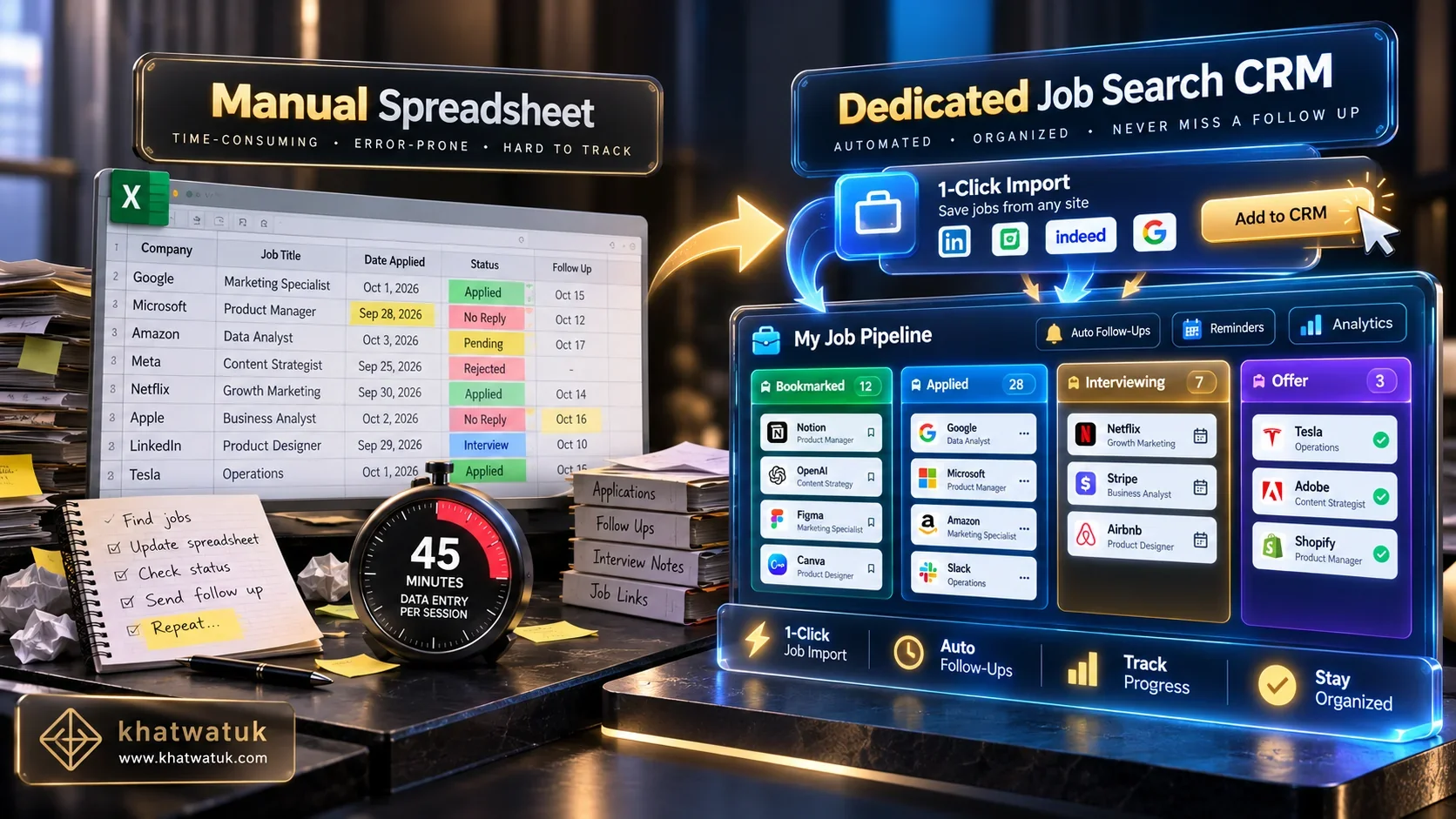
Strategic decision threshold: Simple spreadsheets for focused searches vs dedicated CRMs for scaling pipelines. Credit: khatwatuk.com
- Choose Google Sheets if you are pursuing fewer than 15 highly targeted positions and prefer zero setup friction or third-party app subscriptions.
- Choose Teal if you apply across multiple platforms and need 1-click Chrome bookmarking combined with resume keyword optimization in one place.
- Choose Huntr if you want an agile, visual Kanban interface with structured task checklists across complex technical interview rounds.
- Choose Notion if you enjoy building bespoke relational databases and want company research, salary offers, and notes unified in a single workspace.
The 5-Stage Job Search Pipeline Lifecycle
A high-converting job hunt functions like an enterprise sales pipeline. Every opportunity advances through five distinct operational stages shown below:

The 5-stage career pipeline: Capturing leads, tailoring resumes, logging submissions, managing interviews, and evaluating offers. Credit: khatwatuk.com
- Stage 1 — Discovery & Wishlist: Bookmark active job postings immediately without applying. Filter roles by alignment score and company stability.
- Stage 2 — Document Calibration & ATS Scan: Tailor accomplishment bullet points to match key job requirements, aiming for an 80%+ match score.
- Stage 3 — Submission & Archival: Submit the application, save a timestamped copy of the job description, and log the exact resume version sent.
- Stage 4 — Interview Loop & Tasks: Log recruiter screen questions, panel interviewer names, and presentation assignment deliverables.
- Stage 5 — Offer & Negotiation: Record base salary, equity, bonus tiers, and health benefits to benchmark competing offers objectively.
Ensure your tailored resume survives ATS parsing before marking any opportunity as submitted.
The Recruiter Follow-Up Cadence & Proven Email Templates
Tracking applications without disciplined follow-ups forfeits a 35% conversion lift. Use the roadmap below to schedule professional touchpoints:
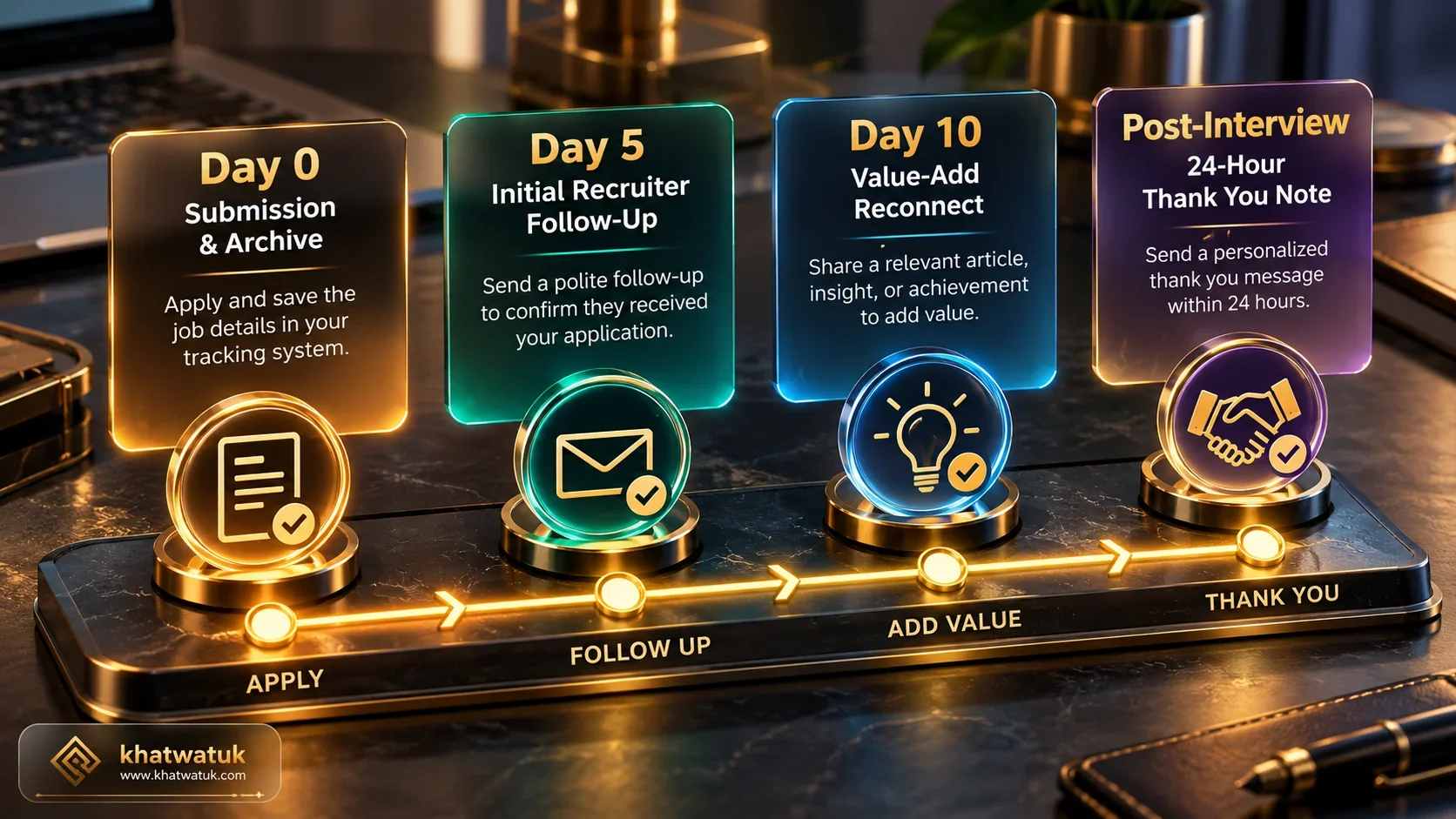
Strategic follow-up schedule: Application confirmation, 5-day polite check-in, and 10-day value reconnect. Credit: khatwatuk.com
Day 5 — The Polite Status Inquiry Email
Subject: Application Status — [Your Name] for [Job Title]
"Hi [Recruiter Name], following up on my application for the [Job Title] role. With my background in [1 Core Skill], I am eager to contribute to [Company Name]. Could you share an update on the interview timeline? Thank you for your consideration."
Day 10 — The Value-Add Reconnect Email
Subject: Quick follow-up regarding [Job Title] role
"Hi [Recruiter Name], following up on my application for the [Job Title] role. I recently read about [Company Name]'s recent initiative in [Company News Topic] and put together a few thoughts on how [Specific Problem] could be streamlined. I would welcome the opportunity to discuss this briefly whenever your team begins candidate screenings."
Clean, single-column resume formatting ensures recruiters find your qualifications immediately during follow-ups.
Critical Edge Cases and Common Tracking Mistakes to Avoid
Avoid these three frequent organizational missteps that undermine candidate success:
- The Expired Posting Dilemma: Never rely on live web links. Save full job description text or print to PDF on the day of application so you can review requirements before interviews.
- Version Control Blindness: If you tailor resumes for individual roles, record the exact file name submitted. Referencing the wrong accomplishments during an interview damages credibility immediately.
- Over-Tracking Low-Quality Leads: Logging 200 random jobs you have no intention of pursuing wastes mental bandwidth. Focus your tracking pipeline on high-conviction roles where you meet 70%+ of requirements.
For tools that compare ATS compatibility scores directly against career trackers, review our head-to-head analysis on Jobscan vs Teal (2026).
Frequently Asked Questions (FAQ)
Here are expert answers to the most common questions on organizing, tracking, and following up on job applications:
What is the best way to track job applications?
The best approach depends on volume. For fewer than 15 applications, a simple Google Sheets spreadsheet offers full control. For active searches exceeding 15 roles, a dedicated career CRM like Teal provides automated browser bookmarking, Kanban stages, and follow-up reminders that save hours of manual data entry.
What columns should I include in a job application tracker spreadsheet?
An effective tracker requires 10 essential columns: Company Name, Role Title, Date Applied, Job Posting URL/Archive, Resume Version Used, Recruiter Contact, Pipeline Stage, Salary Range, Next Follow-Up Deadline, and Interview Notes.
Should I use a spreadsheet or a dedicated job tracking app like Teal or Huntr?
Use a spreadsheet if you are applying deliberately to a small hand-picked list of companies. Upgrade to Teal or Huntr when managing applications across multiple job boards, as browser extensions eliminate manual copy-pasting and prevent missed deadlines.
How often should you follow up on a job application you are tracking?
Send an initial polite check-in 5 business days after submitting your application. If you receive no reply, send a second value-add message at the 10-business-day mark. Following interviews, send a personalized thank you email within 24 hours.
How do you track different versions of resumes submitted to different companies?
Adopt a strict naming convention including your name, company, and role (e.g., "Resume_Google_ProductManager_2026.pdf"). In your tracker, record the exact file name or link directly to the cloud document to review before interviews.
Is Teal Job Tracker completely free to use?
Yes. Teal offers a generous free tier that includes the full Job Application Tracker, Chrome extension bookmarking, and core resume builder features. Advanced features like unlimited keyword analysis are available via Teal+.
How many job applications should I track at the same time?
Aim to keep 20 to 40 active opportunities across your pipeline. High-volume searching without organization yields low conversion, whereas maintaining 30 active tracked roles allows diligent follow-ups and thorough preparation.
What should you do when a job posting you applied for gets taken down?
Job listings frequently close after reaching applicant quotas. Always archive the full job description text or print a PDF into your tracker on application day so you can reference qualifications when interview invitations arrive.
Final Verdict: Organization Is Your Competitive Advantage
Job hunting success is built on momentum, clarity, and accountability. Treating your career search like an organized pipeline eliminates stress, prevents missed opportunities, and positions you as a polished professional from first contact to final offer.
Deploy Google Sheets for deliberate targeted searches, or scale your pipeline effortlessly with Teal. By capturing listings instantly, archiving tailored resumes, and executing disciplined follow-ups, you gain complete control over your career trajectory.
