

The best free ats scanner in 2026 is Jobscan for enterprise keyword matching against systems like Workday and Taleo, followed by Teal for its generous free scanner and job tracker, and CVReviewer for 100% truly free, unlimited scans without paywalls. An effective free ATS scanner inspects your text layer against job descriptions, identifying missing skills and layout errors before recruiters review your application.
Navigating modern hiring algorithms requires knowing which diagnostic tools offer genuine keyword analysis and which merely act as paywalled lead-generation funnels. Understanding how corporate tracking systems parse text enables candidates to tailor resumes strategically without falling for misleading scoring gimmicks.
Quick Verdict: Best Free ATS Resume Scanners at a Glance
- Jobscan (Best for Enterprise ATS Simulation): Unmatched accuracy for reverse-engineering Workday, Taleo, and Greenhouse parsers, though limited to 5 free scans.
- Teal (Best for Application Tracking & Keyword Matching): Free Chrome extension matching live job postings directly from LinkedIn with an integrated career CRM.
- CVReviewer (Best 100% Truly Free Scanner): Zero paywalls, zero scan limits, and no credit card required for instant keyword gap analysis.
- Resume Worded (Best for Bullet Point Quality): Deep diagnostic feedback targeting the Google XYZ formula and quantifiable achievement metrics.
- SkillSyncer (Best for Fast Skill Matching): Lightweight, distraction-free hard skill comparison with recurring monthly free scan renewals.
- Rezi (Best for Real-Time ATS Score Meter): Real-time compliance scoring within a strictly standardized single-column resume environment.
- Kickresume (Best for Dual Formatting & AI Review): Evaluates typographical readability and grammatical precision alongside automated parsing safety.
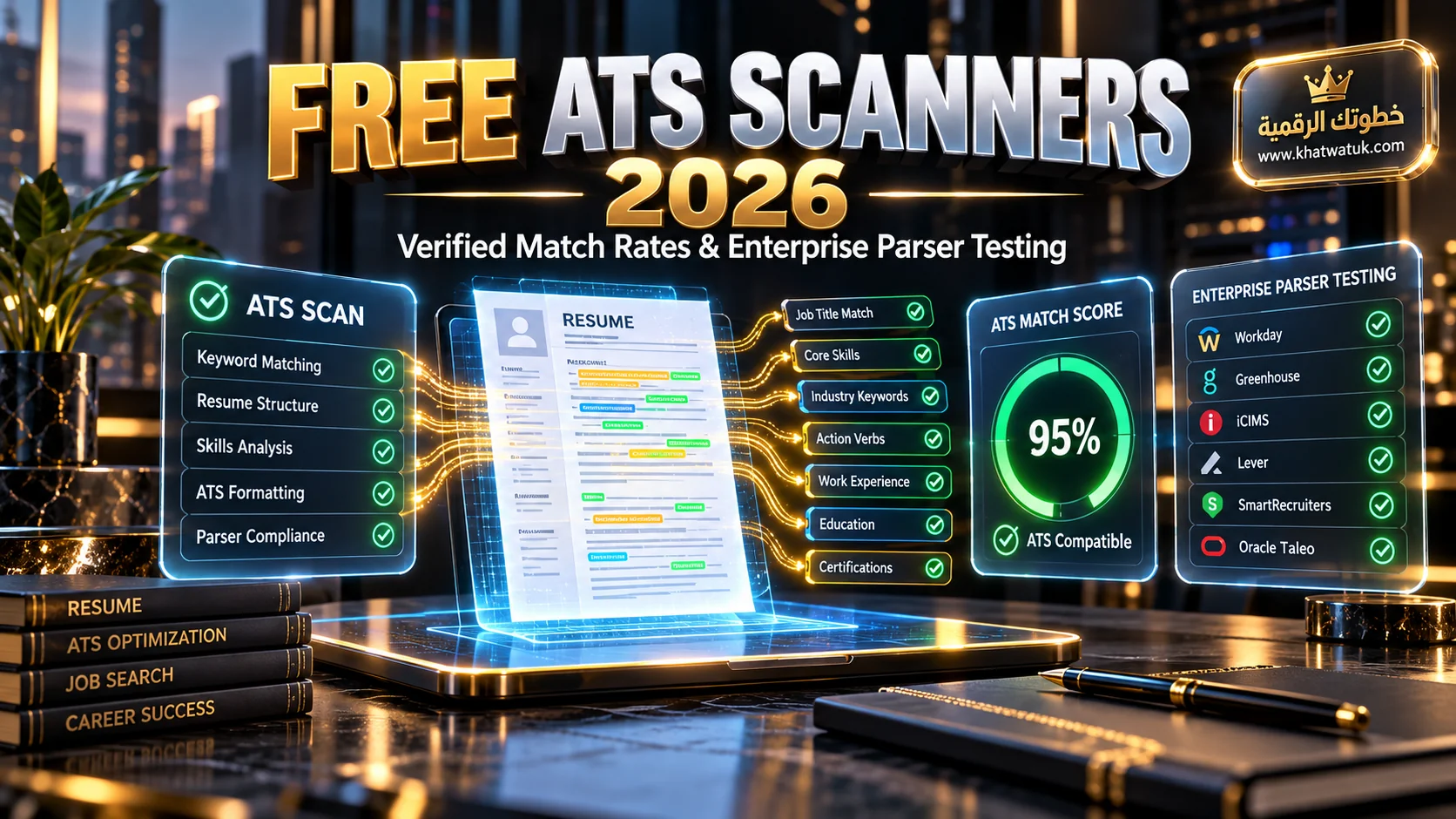
Verified free ATS resume scanners tested for keyword matching and enterprise parser compliance. Credit: khatwatuk.com
What Is an ATS Resume Scanner and How Does It Actually Work?
An Applicant Tracking System (ATS) resume scanner is a diagnostic software application designed to simulate how corporate talent acquisition systems ingest candidate files. Instead of judging your career achievements like a human hiring manager, these tools evaluate document readability, section tagging, and hard-skill frequency against targeted job requirements.
Understanding this algorithmic pipeline clarifies why even decorated executives experience automated rejection. When you submit a document online, enterprise tools like Workday and Greenhouse convert the file into digital data points. To explore end-to-end resume preparation, review our comprehensive AI resume builder guide for verified benchmarks.
Tokenization, Keyword Extraction, and Parsing Engines
Modern parsing engines rely on natural language processing (NLP) tokenization to break your resume into discrete semantic units. The software identifies standard headers like Work Experience, Education, and Skills, subsequently mapping your dates, employers, and bullet points into indexed database fields.
Once tokenized, the system matches your extracted terms against recruiter queries. If a job opening specifies certifications such as PMP, AWS Certified Solutions Architect, or Python, the database searches for those exact phrases. Scanners benchmark your text against these criteria to identify gaps.
Why Over 70% of Resumes Experience Automated Extraction Errors
Extraction errors occur when automated parsers cannot decipher text streams due to non-standard visual formatting. When candidates use graphic elements, multi-column tables, or decorative icons, the software frequently merges unrelated text lines or discards entire sections altogether.
A resume that looks immaculate to human eyes can produce completely scrambled database records. When a recruiter searches for candidates with five years of experience, a misparsed date can cause an otherwise qualified applicant to be filtered out entirely before human evaluation.
The ATS Score Myth: How Enterprise Recruiters Actually Screen Resumes
One of the most persistent myths across career forums is that applicant tracking software assigns an automated score from 0 to 100 that rejects candidates automatically. In reality, commercial scanning vendors created these numerical scores as proprietary benchmarks to guide resume optimization.
Enterprise software operates as an organized database rather than an autonomous artificial intelligence judge. Understanding this operational reality prevents job seekers from obsessing over achieving a perfect 100% match score through unnatural keyword stuffing that repels human recruiters.
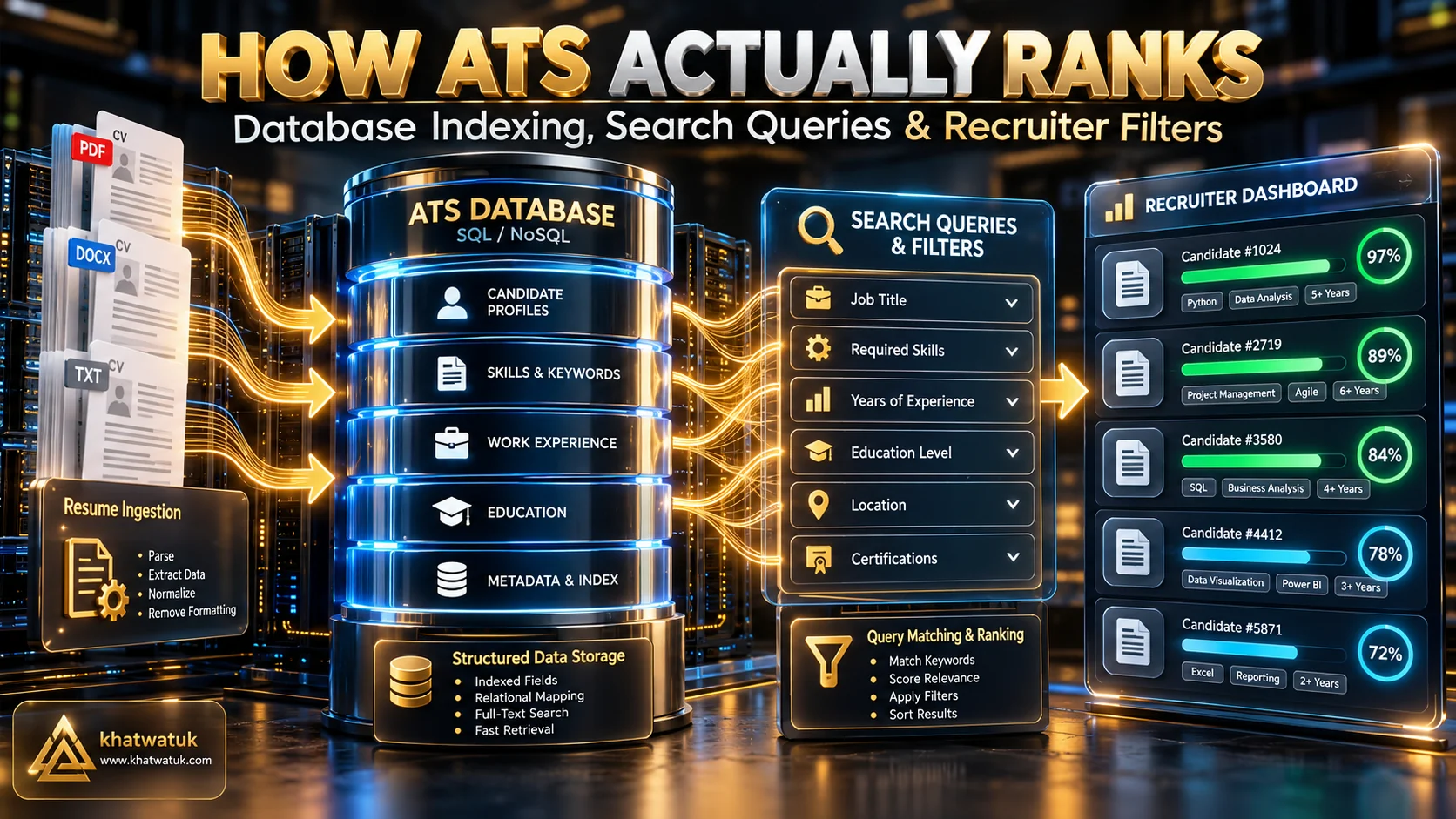
Debunking the score myth: how enterprise applicant tracking software indexes candidate qualifications. Credit: khatwatuk.com
Why Workday and Greenhouse Do Not Have a "Secret 0-100 Rejection Score"
Enterprise platforms like Workday, Greenhouse, Taleo, and iCIMS do not automatically discard resumes that score below a specific threshold. Instead, they organize applicant submissions into structured profiles accessible to human recruiters who manage individual requisition pipelines. To optimize your document organically without robotic keyword stuffing, pairing your scanner feedback with an AI resume optimizer or an AI resume rewriter allows you to align bullet points with target job descriptions while retaining human readability.
When companies receive hundreds of applications, recruiters filter candidates by searching for specific qualifications, target job titles, and hard skills. For a granular head-to-head comparison of how tools handle keyword tracking, see our analysis in Jobscan vs Teal.
Database Search Queries vs Algorithmic Rejection Bots
Recruiters interact with talent software much like researchers use search engines. They apply filters for years of experience, geographic location, educational degrees, and essential software competencies to generate a qualified shortlist of candidate profiles for immediate review.
Your objective when using a free scanner is ensuring your resume includes relevant terms naturally, allowing your document to appear in recruiter search queries. Chasing arbitrary score metrics often leads to awkward phrasing that damages your credibility during in-person interviews.
Comparison Matrix: Top 7 Free ATS Scanners Tested for 2026
We evaluated the top free and freemium ATS scanners across dozens of test resumes and authentic enterprise job descriptions. Our testing measured keyword extraction accuracy, parsing fidelity across complex layouts, scan limits, and paywall transparency to identify the top tools.
The comparison matrix below highlights the operational features, free tier allowances, and specific strengths of the top seven platforms currently available to candidates.
| Tool | Best For | Free Scan Allowance | Hard Skills Match | Enterprise Simulation | Pricing Upgrade |
|---|---|---|---|---|---|
| Jobscan | Enterprise ATS Simulation | 5 free scans / month | Exceptional | Workday, Taleo, Greenhouse | $49.95/mo (quarterly) |
| Resume Worded | Line-by-Line Bullet Quality | 1 free overall score audit | Very Good | Standard Parsing | $49/mo Pro |
| Teal | Job Tracking & In-Line Match | Generous free core scanner | Excellent | Modern Web ATS | $9/week ($36/mo) |
| SkillSyncer | Fast Keyword Comparison | Monthly free renew allowance | Excellent | Keyword Matching | $14.95/mo Pro |
| CVReviewer | 100% Truly Free Unlimited | Unlimited free scans | Good | Text-Layer Audit | 100% Free Forever |
| Rezi | Real-Time Score Meter | Free tier score checks | Very Good | Taleo & Workday Standard | $29/mo or $129 Lifetime |
| Kickresume | Visual Design & Grammar | Basic free audit check | Good | Standard Parsing | $19/mo or $96/yr |
In-Depth Reviews: The 7 Best Free ATS Resume Scanners Ranked
To help you select the ideal scanner for your specific application campaign, we performed hands-on audits of each platform. Each review highlights free allowances, diagnostic strengths, limitations, and operational trade-offs so you can optimize your time effectively.
Whether you need an unlimited utility to check high-volume job applications or a deep diagnostic tool to polish your dream role submission, these detailed breakdowns outline what to expect.
1. Jobscan — Best for Enterprise ATS Simulation & Hard Skills Match
Jobscan remains the industry standard for simulating corporate applicant tracking software. The platform reverse-engineers parsing algorithms used by Workday, Taleo, and Greenhouse, analyzing hard skills, job titles, and education against the specific job description you paste.
Its diagnostic report breaks keyword matches into hard technical skills and soft skills, warning you if essential terms appear infrequently. While the free allowance is capped at five scans per month, it provides unmatched algorithmic depth for high-priority applications.
2. Resume Worded — Best for Line-by-Line Bullet Point Impact & Scoring
Engineered by former executive recruiters, Resume Worded focuses heavily on bullet point quality alongside ATS formatting. The tool scores candidate resumes across impact, brevity, style, and section structure, delivering actionable feedback to improve executive positioning.
Its engine verifies compliance with the Google XYZ formula, ensuring achievements demonstrate measurable business outcomes. The free tier provides an overall score and high-level feedback, making it ideal for candidates who need help quantifying their professional contributions.
3. Teal — Best for Chrome Extension Job Matching & Application CRM
Teal delivers an exceptional all-in-one career platform combining resume scanning with an integrated job tracking CRM. Using Teal's free Chrome extension, candidates can bookmark job postings directly from LinkedIn and immediately scan their resume against required qualifications.
The tool provides clear keyword matching without aggressive paywalls locking basic functionality. For candidates managing multi-stage job searches who want to test their resume directly in their browser, sign up through the Teal application platform to begin scanning immediately.
4. SkillSyncer — Best for Fast Keyword-Gap & Skill Matching
SkillSyncer is a lightweight diagnostic scanner built specifically to identify missing keywords and technical proficiencies between your resume and a job posting. Its interface presents a clean side-by-side comparison that highlights exact phrase matches and skill omissions.
Unlike platforms that push heavy upselling, SkillSyncer provides recurring free monthly scan allowances. While it does not offer extensive writing guidance or visual template editing, it is one of the fastest utilities for conducting pre-application keyword audits.
5. CVReviewer — Best Truly Free & Unlimited ATS Scanner
CVReviewer stands out as one of the few platforms offering truly unlimited ATS resume scans with zero paywalls. Candidates can upload their resume and paste target job descriptions as many times as needed without providing a credit card or registering a paid subscription.
The tool evaluates keyword coverage, checks section headers, and confirms that text layers parse cleanly. For job seekers submitting dozens of tailored applications who cannot afford costly recurring subscriptions, CVReviewer provides refreshing transparency and essential diagnostic value.
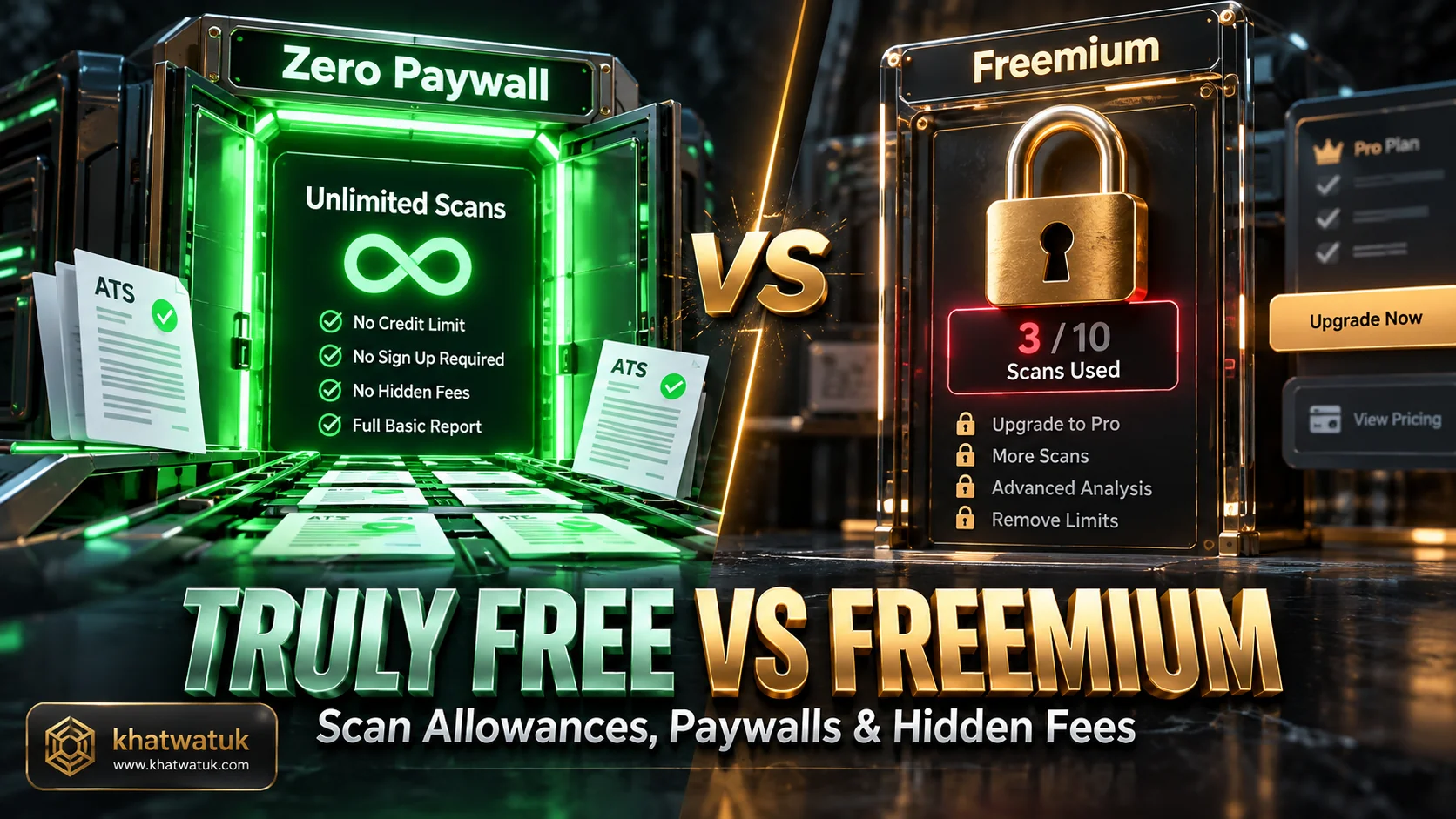
Paywall transparency: comparing truly free unlimited tools with freemium scanners that restrict monthly checks. Credit: khatwatuk.com
6. Rezi — Best for Real-Time ATS Score Meter & Single-Column Formatting
Rezi integrates automated ATS scoring directly into its standardized single-column resume builder. As you draft your experience bullets and incorporate job keywords, Rezi's real-time score meter updates dynamically from 0 to 100 to reflect machine readability and content density.
Its strict adherence to single-column architecture ensures that your exported files parse cleanly through enterprise systems without column-scrambling traps. To test how Rezi compares directly against other leading builders, read our head-to-head analysis in Teal vs Rezi, or try the platform directly at Rezi ATS Builder.
7. Kickresume — Best for Dual Formatting & AI Grammar Review
Kickresume offers a free ATS checker designed to strike a balance between machine parsability and visual aesthetics. Its auditing algorithm checks document margins, font compatibility, section headers, and common grammatical errors that could diminish candidate credibility.
While advanced AI bullet rewriting requires a premium upgrade, the free audit provides helpful feedback on whether your design choices risk breaking automated parser filters. It is especially useful for creative candidates who want modern styling without sacrificing machine readability.
Choose Option A if / Choose Option B if Archetype Guide
Selecting the right scanning tool depends on your current job-search volume, budget, and specific optimization needs. Candidates applying to a few specialized leadership positions require different diagnostic capabilities than those submitting dozens of weekly corporate applications.
Use the targeted decision rules below to determine which free scanning platform aligns perfectly with your immediate career objectives.
- Choose Jobscan if you are preparing applications for your top three dream enterprise companies and need rigorous simulation against Workday or Taleo parsing logic.
- Choose Teal if you want an integrated career management hub that tracks your job pipeline and matches keywords directly through a browser extension.
- Choose CVReviewer if you need 100% free, unlimited resume scans without subscription barriers, credit card requests, or monthly allowances.
- Choose Resume Worded if your document formatting is already clean and you need targeted feedback to sharpen quantifiable metrics and bullet point impact.
The 30-Second Notepad Test: How to Verify Your Resume Free Without Software
You do not need to rely exclusively on automated online tools to confirm whether your resume is ATS-compliant. A simple manual diagnostic protocol known as the Notepad Test allows you to verify your file's text layer in thirty seconds using standard desktop software.
This straightforward test reveals exactly what enterprise parsing engines see when they ingest your file, identifying scrambled sections, broken character sets, and corrupted layout boundaries before you submit your document online.
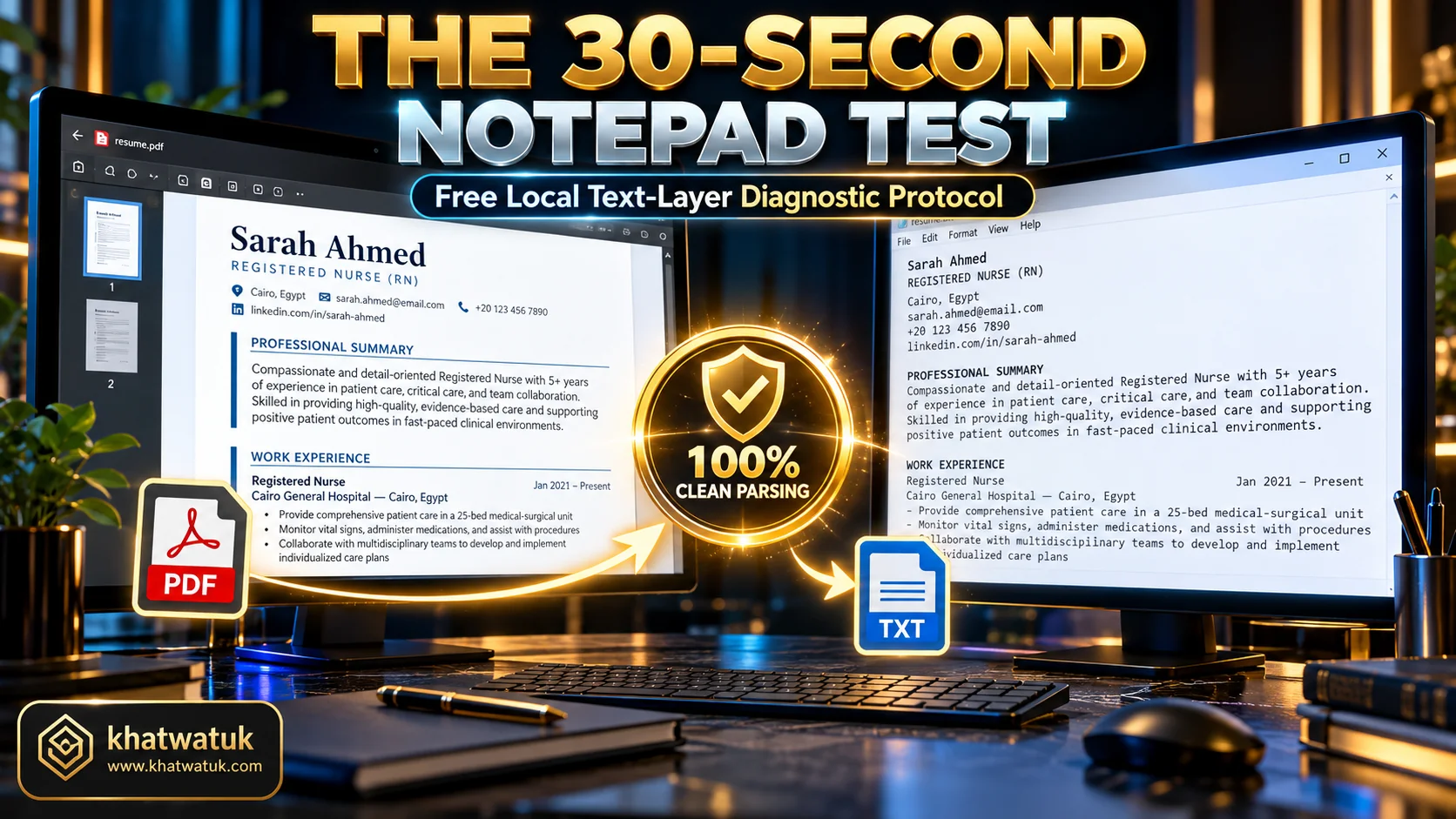
The Notepad test: verifying that your resume text layer parses cleanly without broken characters. Credit: khatwatuk.com
Step-by-Step Plain Text Layer Verification Protocol
To perform the test, open your exported PDF resume in any standard viewer like Adobe Acrobat or Google Chrome. Press Ctrl+A (or Command+A on Mac) to select all contents, copy the selection, and paste it into a plain text editor like Notepad or TextEdit.
Review the pasted text carefully. If your section headings appear in logical order, job titles align with correct employers, and bullet points remain readable without strange symbols, your document possesses a clean text layer that enterprise ATS software can parse effortlessly.
PDF vs Word (DOCX): Which File Format Passes Scanners Safely?
A frequent point of confusion among candidates is whether to submit PDF or Word DOCX files. Historically, older applicant tracking systems struggled with complex PDF encodings, making DOCX the safer fallback option for corporate applications.
In 2026, modern enterprise tracking systems parse vector-based text PDFs reliably, provided the file was generated with a true digital text layer rather than flattened as an image. If a job portal explicitly requests DOCX, always follow their stated instruction.
Common ATS Formatting Mistakes and Edge Case Traps That Trigger Scanner Errors
When candidates experience parsing errors on free scanners, visual formatting choices are almost always the underlying cause. To prevent structural rejection before running diagnostic scans, assembling your base document with one of the best ATS-friendly resume builders ensures a clean single-column structure, standard typography, and clean text extraction. Many resume templates prioritize decorative elements that confuse the linear reading algorithms employed by corporate recruiting platforms.
Identifying these edge cases and common mistake scenarios ensures your document retains maximum machine readability across every applicant tracking platform in the hiring ecosystem.
The Multi-Column Layout and Text Box Trap
Multi-column layouts are the single most common cause of parsing failure in legacy applicant tracking systems. Many older parsers read documents horizontally across the entire page rather than descending vertically down individual columns, causing text to scramble into incomprehensible sentences.
Similarly, floating text boxes and graphic sidebar frames are frequently ignored entirely by automated extraction engines. Adhering to a clean, single-column linear layout guarantees that your career history is parsed in the exact sequence you intended.
Unscannable Icons, Graphics, and Custom Fonts
Graphic skill meters (such as displaying four out of five stars for Excel) provide zero indexable text for tracking software. An ATS cannot interpret an image of a progress bar; it requires explicit textual phrases like "Advanced Microsoft Excel proficiency" to populate candidate skill records.
Custom non-standard web fonts can also cause encoding glitches during character extraction. Sticking to standard, widely supported fonts like Arial, Calibri, Helvetica, or Georgia ensures your text characters map accurately into corporate databases.
Headers, Footers, and Missing Contact Information
Placing your phone number, email address, or LinkedIn profile inside the document header or footer is a widespread error. Many automated parsing algorithms deliberately skip page header and footer zones to prevent repeating metadata from corrupting work history records.
Always place your contact details within the main body text at the top of page one. This guarantees that recruiting systems correctly extract your email and telephone number, allowing hiring coordinators to contact you for preliminary interviews.
Frequently Asked Questions About Free ATS Scanners
Below are answers to the most common questions candidates ask regarding free ATS resume checkers, parsing algorithms, and keyword optimization strategies.
What is the best truly free ATS resume scanner without a paywall?
CVReviewer is widely considered the best truly free ATS scanner because it provides unlimited resume scans against job descriptions with zero paywalls, credit card requirements, or scan caps. Teal also offers a generous free scanner integrated with a job tracker.
How accurate are free online ATS resume scanners compared to real enterprise software?
Free online scanners accurately simulate how enterprise tracking systems extract text layers and identify keyword matches. However, no external scanner possesses proprietary access to an individual employer's custom hiring configuration or specific recruiter search queries.
Does Jobscan or Resume Worded offer a truly free version for job seekers?
Both platforms operate on a freemium model. Jobscan provides five free scans per month upon registration, while Resume Worded allows one free overall score audit. Advanced keyword recommendations and line-by-line rewriting require paid premium subscriptions.
Do applicant tracking systems automatically reject resumes for low keyword scores?
No. Enterprise ATS platforms like Workday, Greenhouse, and Taleo function as structured databases rather than autonomous rejection bots. Resumes are stored and searched by human recruiters using filters; they are not automatically discarded for arbitrary score numbers.
How does an ATS score and rank candidate resumes against a job description?
An ATS tokenizes resume text into fields like experience, education, and skills. When recruiters search for candidates, the database ranks profiles based on exact keyword matches, job title relevance, years of experience, and proximity to required competencies.
Is PDF or Word (DOCX) better when uploading to an ATS resume checker?
Both formats work effectively in modern systems. Clean vector-based PDFs preserve visual formatting and parse accurately across contemporary platforms like Greenhouse and Workday. However, if a legacy portal specifies DOCX, submitting Word avoids encoding errors.
What are the most common formatting errors flagged by free ATS checkers?
The most frequent errors include multi-column layouts, text boxes, contact details trapped in headers or footers, graphic skill bars, non-standard section titles, and flattened raster image files that lack a digital text layer.
Can an ATS scanner detect AI-written or ChatGPT-generated resume bullets?
Applicant tracking systems do not filter out resumes for containing AI-assisted phrasing. However, human recruiters readily identify generic, cliché-ridden AI bullet points that lack quantifiable business outcomes, specific metrics, and genuine professional accomplishments.
