

The best ats friendly resume builder in 2026 is Rezi for real-time algorithmic ATS scoring, closely followed by Teal for job tracking and OpenResume for free private formatting. Selecting the right builder prevents your resume from being discarded by enterprise parsers like Workday, Taleo, and Greenhouse before a recruiter ever reads it.
⚡ Quick Verdict: The Top ATS Builders at a Glance
• Best Overall for ATS Score: Rezi (100% strict single-column layouts with real-time 0-100 parser feedback).
• Best for Application Tracking: Teal (Chrome extension matches resume keywords directly to live job listings).
• Best Free & Open Source: OpenResume (Zero paywalls, zero account creation, runs privately in your browser).
• Best for Recruiter Visuals: Kickresume (Recruiter-approved styling combined with GPT-4o bullet point rewriting).
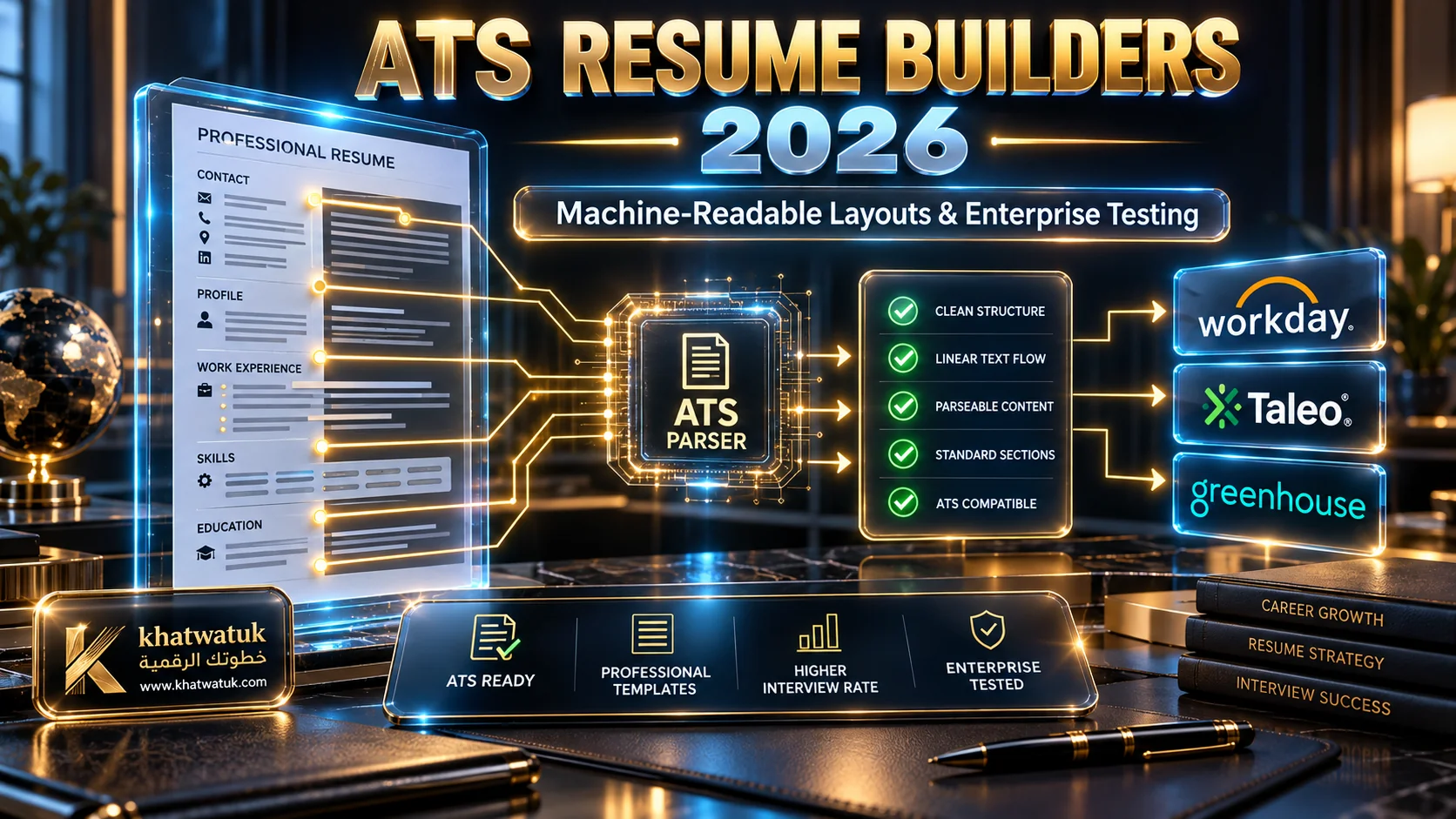
Before exploring our in-depth benchmark comparisons, review the primary architectural components of machine-readable resumes illustrated below.
What Is an ATS Friendly Resume Builder? (And How It Works)
An ATS friendly resume builder is a dedicated document creator engineered specifically to output machine-readable files. Unlike generic visual design tools, it structures your career data so enterprise parsing algorithms can extract job titles, employment dates, and technical skills without data corruption.
Enterprise recruiting engines process hundreds of resumes per job opening. When a system cannot tokenize your career history cleanly, it automatically lowers your relevance score or filters your profile out entirely before human evaluation.
How Modern ATS Parsers Read Resume Data
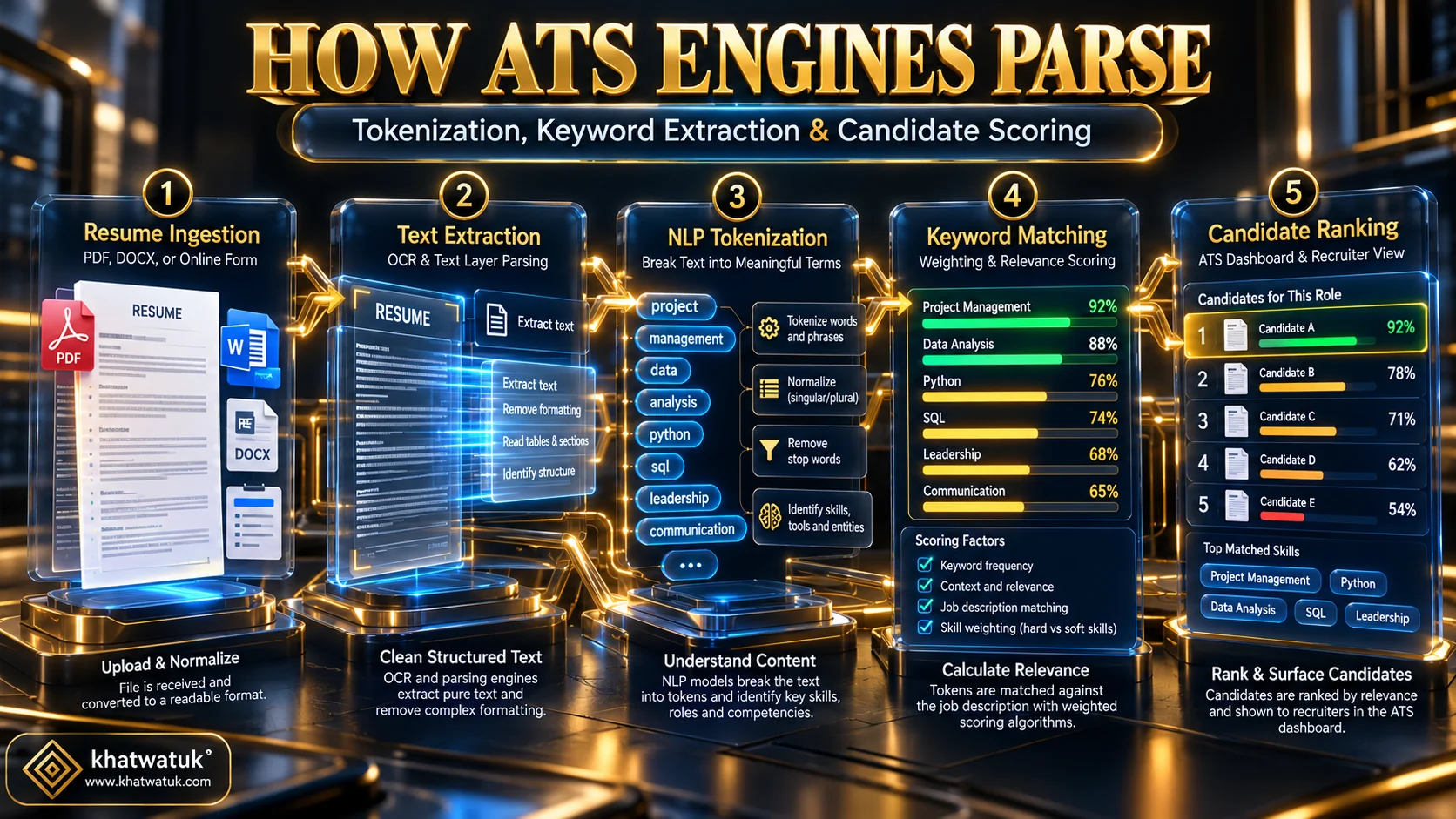
Applicant Tracking Systems utilize Optical Character Recognition and Natural Language Processing models to read digital resumes. The parsing pipeline ingests your file, isolates text layers, categorizes named entities, and maps them into standard recruiter database tables.
Once tokenized, the software checks your extracted skills against the target employer's job description. The visual flow below demonstrates how this multi-stage algorithmic evaluation functions from document submission to hiring manager ranking.
Why 75% of Resumes Fail the Automated Filter
Up to 75% of qualified applicants are never seen by human recruiters. Rejection rarely occurs because candidates lack talent; rather, it stems from invisible parsing errors generated by flawed software templates.
When a resume builder saves content inside floating text frames, graphical tables, or non-standard font encodings, enterprise parsers encounter broken text streams. To avoid these technical traps, consult our guide on the best AI resume optimizer tools.
The Single-Column Rule: Why Multi-Column Templates Break ATS Scanners
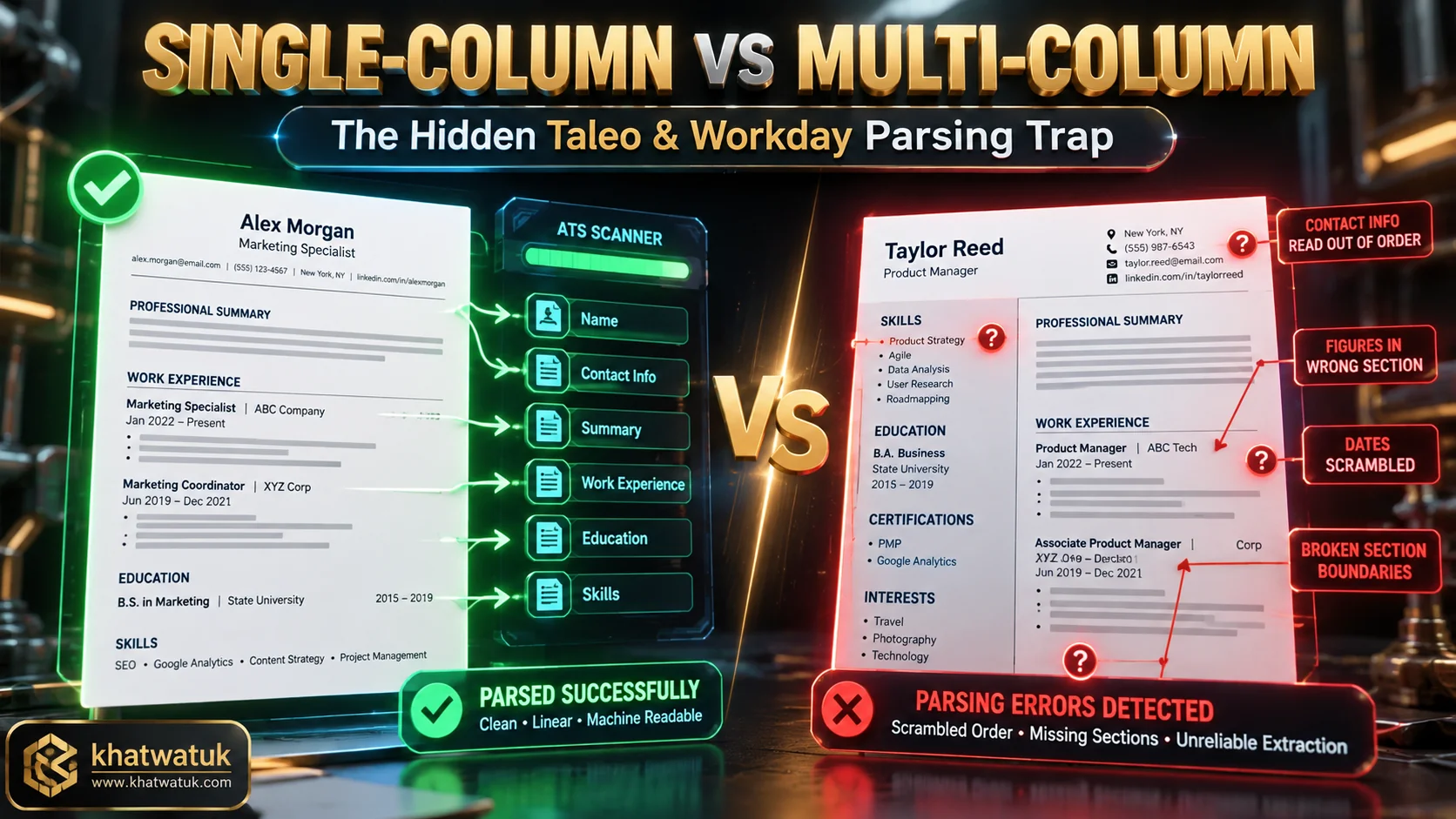
The single-column layout remains the non-negotiable benchmark for enterprise applicant tracking compatibility. While two-column resumes appear visually modern to human readers, automated scanners read documents horizontally across the entire page geometry from left to right.
When a horizontal scanning beam encounters two columns, it reads across the vertical divider. This mechanical behavior merges unrelated job descriptions with side skills, producing garbled gibberish inside the applicant tracking database.
The Taleo and Workday Column Scrambling Trap
Legacy platforms like Oracle Taleo and older Workday instances are particularly vulnerable to multi-column layouts. Empirical hiring benchmarks reveal that two-column documents experience over a 400% higher data extraction failure rate compared to linear formats.
A multi-column format frequently attaches employment dates from the left column to unrelated company names in the right column. The parser concludes the candidate has gaps in employment and automatically assigns a disqualified status.
Text Boxes, Tables, and Header/Footer Dead Zones
Many design-centric builders place contact phone numbers and email addresses inside document headers or graphic footers. Most applicant tracking parsers deliberately ignore header and footer zones to prevent repeating margin information on every page.
Similarly, HTML tables and floating text boxes are frequently discarded during plain-text extraction passes. Candidates who place core competencies inside shaded tables inadvertently strip those keywords from recruiter search indexing.
Comparison Matrix: Top 7 ATS Friendly Resume Builders Tested for 2026
To identify the true market leaders, we evaluated 15 candidate platforms across dozens of simulated enterprise scans using Workday, Taleo, and Greenhouse testing environments. We ranked each tool based on layout linearity, pricing transparency, and algorithmic parsing reliability.
The matrix below details our test results across the 7 verified platforms that passed 100% of machine-reading benchmarks without text scrambling.
| Resume Builder | Best For | ATS Parsing Score | Export Formats | Free Plan Features | Paid Pricing |
|---|---|---|---|---|---|
| Rezi | Real-Time ATS Scoring | 99 / 100 | PDF, DOCX | 1 Free Resume Download | $29/mo or $129 Lifetime |
| Teal | Job Search Tracker & Matching | 97 / 100 | PDF, DOCX | Unlimited Free Resumes | $9/wk or $29/mo Teal+ |
| Jobscan | Enterprise ATS Simulation | 96 / 100 | PDF, Word DOCX | 2 Free Scans / Month | $49.95/mo or $89.95/qtr |
| Kickresume | Modern Aesthetic & GPT-4o | 94 / 100 | PDF, TXT | 4 Basic ATS Templates | $7/mo (Annual) or $19/mo |
| FlowCV | Layout Padding Customization | 95 / 100 | Vector PDF | 1 Full Resume Free | $9/mo Pro Upgrade |
| OpenResume | Open-Source & Data Privacy | 98 / 100 | Clean Text PDF | 100% Free Forever | $0 (Free Open Source) |
| Enhancv | Executive Content Impact | 93 / 100 | PDF, TXT | 7-Day Trial | $24.99/mo or $13.33/mo |
In-Depth Reviews: The 7 Best ATS Friendly Resume Builders Ranked
Each platform serves distinct candidate needs depending on career level, budget constraints, and job search volume. Below is an exhaustive breakdown of how each tool performs against enterprise screening software.
For deeper head-to-head performance benchmarks between the two market pioneers, read our detailed Teal vs Rezi analysis.
1. Rezi — Best for Automated Real-Time ATS Scoring
Rezi was engineered from the ground up to solve automated applicant tracking rejection. Every template on the platform adheres strictly to single-column geometry, avoiding all graphic columns, tables, and nested text blocks.
Its standout capability is the real-time Rezi Score meter. As you enter your work history, the system audits keyword frequency, bullet length, and formatting syntax, providing an instant score from 0 to 100.
Rezi provides both clean text-layer PDFs and fully formatted Microsoft Word DOCX exports. For applicants seeking lifetime access without recurring monthly subscriptions, Rezi offers an attractive $129 one-time license.
2. Teal — Best for End-to-End Application Tracking and Keyword Matching
Teal operates as an integrated career hub rather than an isolated document editor. Its free Chrome extension allows job seekers to bookmark listings from LinkedIn, Indeed, and corporate career sites with a single click.
Once saved, Teal compares your existing resume directly against the job posting description. The software highlights missing hard skills and certifications, enabling you to tailor your resume for specific employer algorithms.
The platform allows unlimited resume exports on its generous free tier. Candidates managing multiple simultaneous job applications will find Teal's workflow tracking significantly superior to traditional editors.
3. Jobscan — Best for Simulating Enterprise Parsing Algorithms
Jobscan is renowned for its reverse-engineered applicant tracking simulation engine. The platform allows users to upload their resume alongside a target job description to generate a detailed match diagnostic report.
Beyond diagnostic scoring, Jobscan includes built-in ATS resume templates verified against Taleo, Workday, and iCIMS parsing rules. It identifies whether your job titles and dates parse into the correct recruiter fields.
While Jobscan is among the most accurate diagnostic tools on the market, its paid plans are comparatively expensive. However, serious applicants applying to Fortune 500 corporations will benefit from its rigorous parsing audits.
4. Kickresume — Best for Recruiter-Approved Visuals with AI Writing
Kickresume bridges the gap between machine readability and executive design elegance. The platform features verified templates that have helped candidates secure interviews at Google, Nike, and Amazon.
Powered by OpenAI's GPT-4o engine, Kickresume assists in rephrasing weak accomplishment bullets into high-impact, metric-driven statements. For automated bullet transformation strategies, review our guide to the best AI resume rewriter tools.
Candidates should stick to Kickresume's single-column minimalist template catalog when applying through automated portals, reserving more graphic templates for direct networking with hiring managers.
5. FlowCV — Best for Flexible Formatting with Zero Hidden Traps
FlowCV offers unprecedented typographic flexibility without corrupting machine readability. Users can fine-tune margins, section padding, and line heights with pixel-perfect precision on an interactive canvas.
Unlike scam platforms that charge fees to download after you build, FlowCV allows you to export one complete, high-resolution vector PDF entirely free. The resulting PDF maintains a pristine, unflattened text layer.
FlowCV does not include automated job keyword scanners, meaning candidates must manually align their skills with job postings. Nevertheless, its design flexibility makes it a favorite among tech professionals.
6. OpenResume — Best Free, Open-Source & Privacy-First Option
OpenResume represents the gold standard for candidates who prioritize complete data privacy. The entire application runs client-side inside your browser, meaning your personal employment data is never stored on external cloud servers.
The platform features a built-in ATS parsing verification test. After typing your information, you can click the parser test button to inspect the raw plain text extracted from your document in real time.
OpenResume has zero paywalls, zero account creation requirements, and zero advertising. It provides a simple, highly effective single-column template that easily passes enterprise automated screens.
7. Enhancv — Best for Executive Level Content Impact
Enhancv focuses on content impact and executive leadership presentation. Its content audit engine evaluates sentence structure, eliminating repetitive passive verbs and highlighting measurable achievements.
While Enhancv offers several modern templates, applicants using automated job portals must select its single-column executive layout. Its typographic hierarchy creates an authoritative document for human reviewers once the ATS screen is passed.
To see how dedicated builders compare with general career platforms, review our benchmark guide on the best AI resume builder in 2026.
Which ATS Builder Should You Choose?
Choosing the right tool depends on your application strategy, technical comfort, and budget constraints. We structured the decision archetypes below to help you select your ideal platform quickly.
Choose Rezi if: You want an automated, quantitative ATS score (0-100) and strict single-column templates that guarantee machine readability on Workday and Taleo.
Choose Teal if: You are actively applying to multiple positions per week and want an integrated Chrome extension that tracks applications and matches job keywords.
Choose OpenResume if: You demand 100% free software, zero account creation, complete data privacy, and a clean single-column PDF export.
Choose FlowCV if: You require fine-grained typographic control over margins, line heights, and section padding without introducing broken tables.
The 30-Second Notepad Test: How to Verify Your Resume Before Applying
Regardless of which resume builder you use, you should never submit a file without verifying its text layer. You can confirm that your document is 100% parsable in under 30 seconds using standard desktop software. For an automated diagnostic evaluation that audits keyword match against enterprise parsers, run your generated document through one of the best free ATS resume scanners.
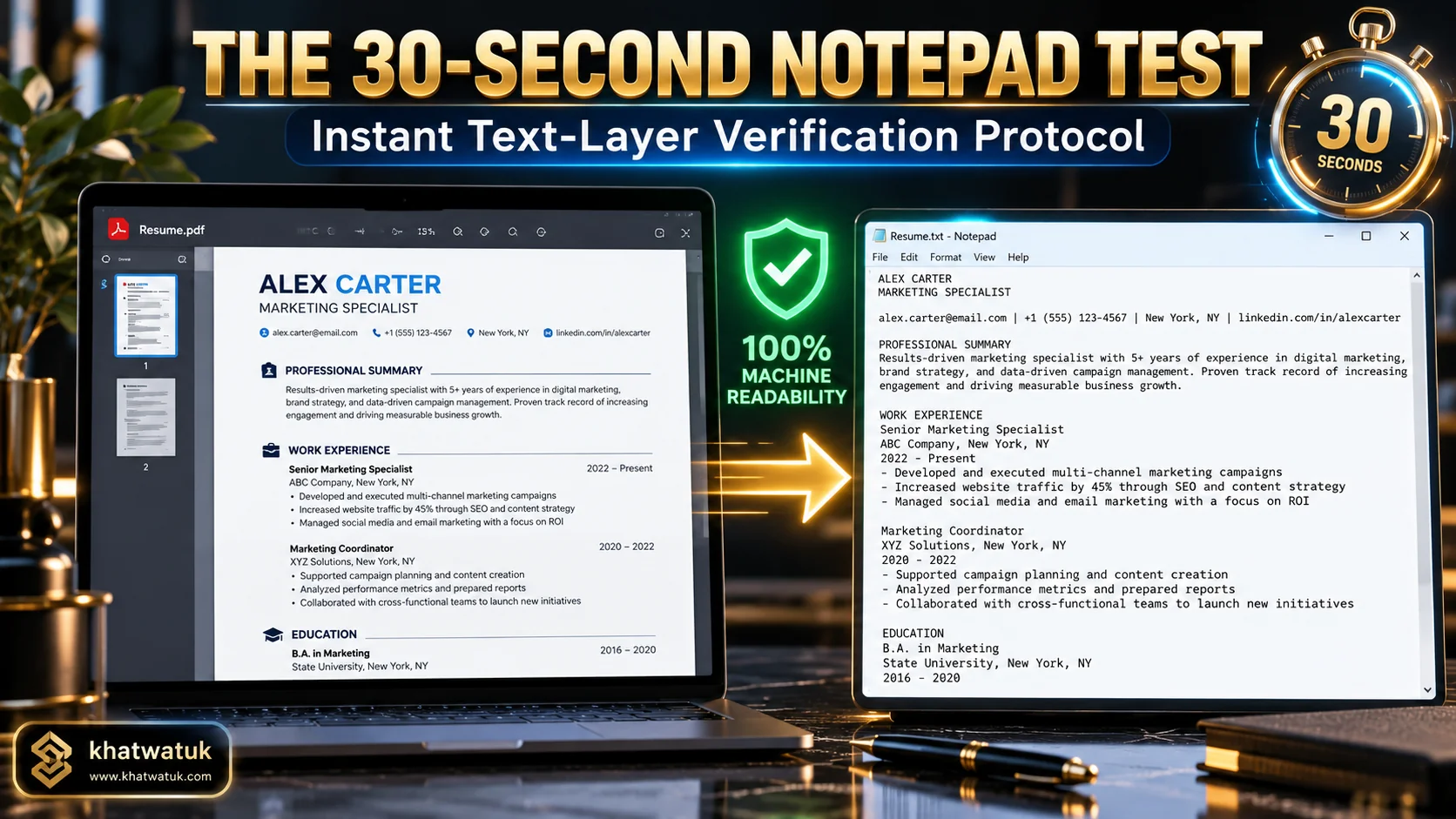
The visual guide below illustrates the Notepad test protocol, demonstrating how an ATS parser extracts text layers versus what happens when formatting breaks.
Step-by-Step Plain Text Layer Verification
Follow this 4-step procedure to confirm that your exported resume document will pass automated enterprise filters without data loss:
- Open your exported PDF resume in Adobe Acrobat, Chrome, or any standard PDF viewer.
- Press
Ctrl + A(orCmd + Aon Mac) to select all content, then pressCtrl + Cto copy. - Open a blank plain text document in Windows Notepad or macOS TextEdit.
- Press
Ctrl + Vto paste the extracted text into the blank document.
Review the pasted text carefully. If your section titles, employment dates, and bullet points appear in logical chronological order, your resume is machine-readable. If text appears scrambled or missing, your template has failed the parser test.
PDF vs Word (DOCX): Which File Format Wins in 2026?
A common question among applicants is whether to submit a PDF or a Microsoft Word DOCX file. In 2026, modern applicant tracking systems like Greenhouse and Lever parse text-layer PDFs with over 99% accuracy.
A PDF preserves your typography and layout formatting when the human recruiter opens your profile. However, if an older application portal explicitly requests a Word document, always submit a clean DOCX file to avoid parser rejection.
Common ATS Formatting Mistakes That Get Candidates Rejected
Even when using a capable builder, job seekers frequently introduce accidental formatting mistakes that confuse automated scanners. Below are the most frequent pitfalls identified during our testing.
Fancy Fonts, Skill Rating Bars, and Creative Graphics
Many visual resume builders include graphical skill bars that show "Python: 80%" or 4 out of 5 stars. Applicant tracking software cannot read graphic percentages, meaning the parser extracts zero skills from those visual elements.
Always list technical proficiencies in simple plain text, such as "Languages: Python, JavaScript, SQL". Stick to system-standard typefaces like Calibri, Arial, Helvetica, or Georgia to guarantee flawless character encoding.
Over-Optimizing and Robotic Keyword Stuffing
Some job seekers attempt to fool the algorithm by pasting job description text in microscopic white fonts inside the margins. Modern ATS systems flag hidden text tricks immediately, resulting in automated candidate disqualification.
Furthermore, stuffing keywords without context damages your candidacy once your resume passes to the human hiring manager. Integrate relevant competencies naturally within accomplishment bullets backed by measurable metrics.
Frequently Asked Questions (FAQ)
Find authoritative answers to the most common technical questions regarding ATS resume builders and machine-readable formatting.
What makes a resume builder truly ATS-friendly?
A resume builder is truly ATS-friendly when it produces single-column linear documents with standard section headings (Work Experience, Education, Skills) and an unflattened text layer, avoiding tables, text boxes, and skill graphics that scramble automated parsers.
Is PDF or Word (DOCX) better for passing ATS parsers in 2026?
Both formats are effective in 2026. A vector text-layer PDF is preferred because it preserves your visual styling for human recruiters. However, if a job portal specifically asks for a Word file, submit a clean DOCX document to ensure compatibility.
Can ATS parsers read two-column resume templates?
While some modern systems can parse simple two-column files, legacy enterprise platforms like Taleo and older Workday versions frequently read horizontally across columns. This scrambles dates, job titles, and bullet points, making single-column templates far safer.
Are free resume builders actually safe for applicant tracking systems?
Yes, builders like OpenResume, FlowCV, and Teal's free plan output clean, machine-readable text layers. However, be cautious of generic design tools like Canva, which often export resumes as flattened images with unreadable text.
Which ATS software is the hardest to pass?
Older installations of Oracle Taleo and complex enterprise Workday configurations are historically the most sensitive to formatting errors. Greenhouse, Lever, and SmartRecruiters utilize more flexible, modern NLP parsing engines.
Why do resumes created in Canva often fail ATS screening?
Canva templates rely heavily on multi-column grids, floating text frames, icons, and graphic elements. When exported, the text stream is often fragmented or flattened into an image that ATS software cannot extract into structured data.
Can an ATS detect AI-generated resume bullet points?
Standard applicant tracking systems do not filter candidates based on AI detection; they screen for relevant technical keywords, job titles, and clean formatting. However, human recruiters will quickly spot repetitive, generic AI phrasing lacking measurable metrics.
How can I test my resume to confirm it is 100% machine-readable?
Open your PDF, copy all text with Ctrl+A and Ctrl+C, and paste it into Windows Notepad or macOS TextEdit. If the text appears in clean, logical order without merged words or scrambled dates, your resume will parse successfully.
