

Modern ai ui testing platforms use computer vision, deep learning, and self-healing algorithms to validate visual layout integrity, catch frontend visual regressions, and eliminate fragile DOM locators across responsive viewports. The best overall platform is Applitools Eyes for enterprise visual AI precision, followed by Percy for component libraries and Mabl for unified low-code automation.
In modern agile delivery, frontend applications evolve at breakneck speed. Between micro-frontends, dynamic atomic component libraries, dark/light theme switching, and responsive layouts spanning mobile to 4K monitors, traditional Selenium and Cypress scripts crumble under catastrophic maintenance overhead. Hardcoded XPath and CSS class hashes break on every continuous integration commit, while primitive pixel-by-pixel diffing triggers dozens of false-positive alarms caused by harmless GPU font antialiasing and sub-pixel shifts. Visual artificial intelligence replaces brittle manual assertions with cognitive neural networks that inspect user interfaces exactly like human eyes, ensuring structural perfection without grinding engineering sprints to a halt.
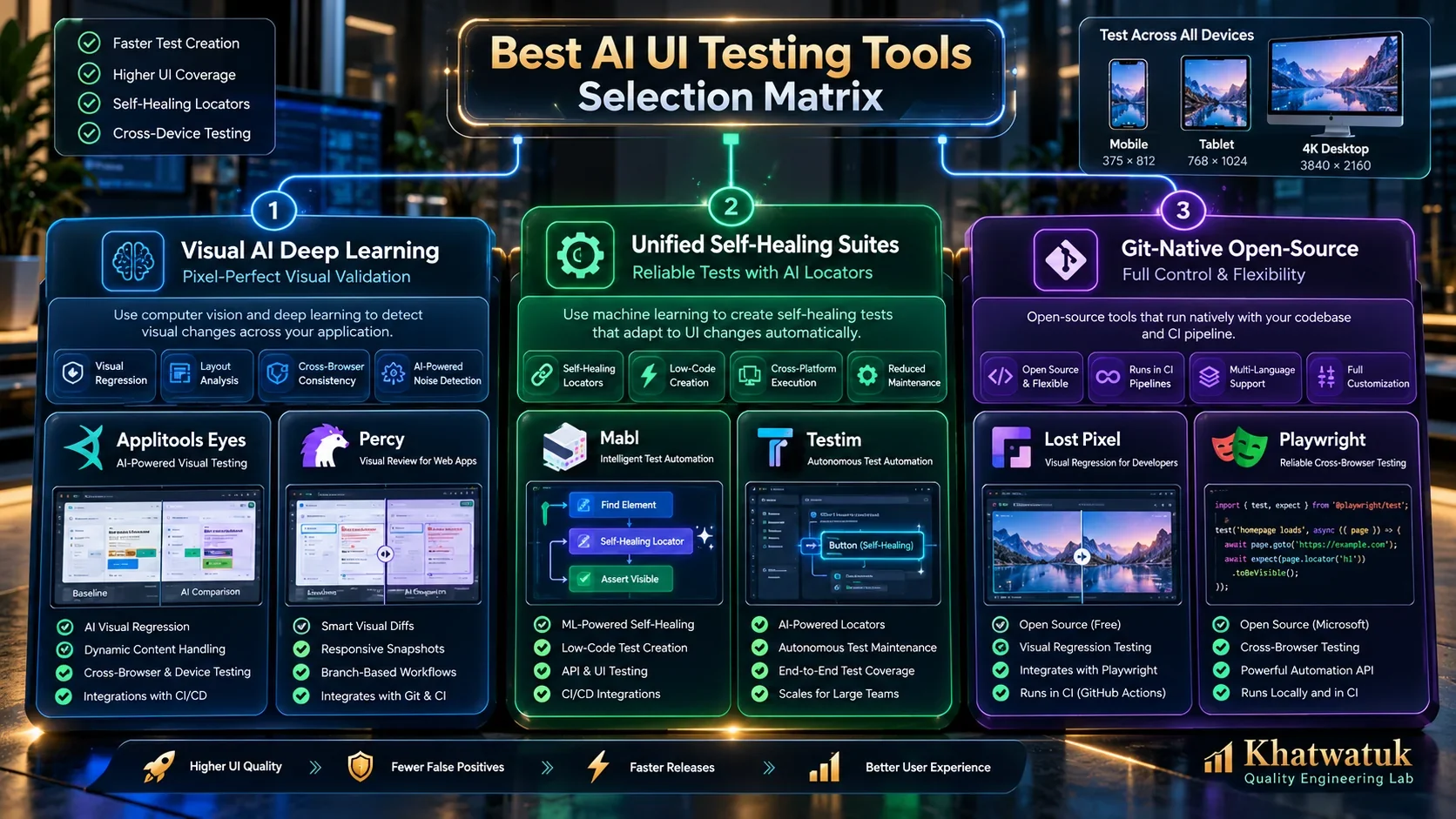
⚡ Quick Verdict: The Best AI UI Testing Tools at a Glance
- Best Overall for Enterprise Visual AI: Applitools Eyes — Patented deep learning computer vision with 0.001% false positives and Ultrafast concurrent rendering across 10+ browsers.
- Best for Frontend Component Libraries: Percy (by BrowserStack) — Flawless DOM serialization snapshotting integrated with BrowserStack real devices and Storybook workflows.
- Best Unified Low-Code Functional & Visual Suite: Mabl — Combines auto-healing ML locators, visual smoke regression, and cross-browser cloud test execution.
- Best for High-Velocity Modern SPAs: Testim (Tricentis) — AI Smart Locators evaluating hundreds of DOM properties to eradicate UI test flakiness.
- Best Open-Source & Git-Native Platform: Lost Pixel — Self-hosted and CI-native visual regression for Next.js, Storybook, Ladle, and Playwright with zero vendor lock-in.
- Best Dedicated Storybook Ecosystem Tool: Chromatic — Built by Storybook core maintainers for atomic UI state capture and Figma design-to-code alignment.
Tested independently by the Khatwatuk Quality Engineering Lab across 14 days of continuous micro-frontend deployment pipelines. Zero vendor sponsorship.
The Architectural Shift: Why Traditional UI Test Automation Breaks
For over a decade, automated user interface testing relied on structural DOM queries. Engineers wrote assertions verifying that a specific CSS selector, ID, or XPath string existed and held expected attributes. However, as modern engineering transitioned to component frameworks like React, Vue 3, and Svelte, styled via utility CSS (such as Tailwind) or styled-components, DOM structures became dynamic and volatile. Randomly generated class hashes change between builds, rendering static selectors brittle and unmaintainable.
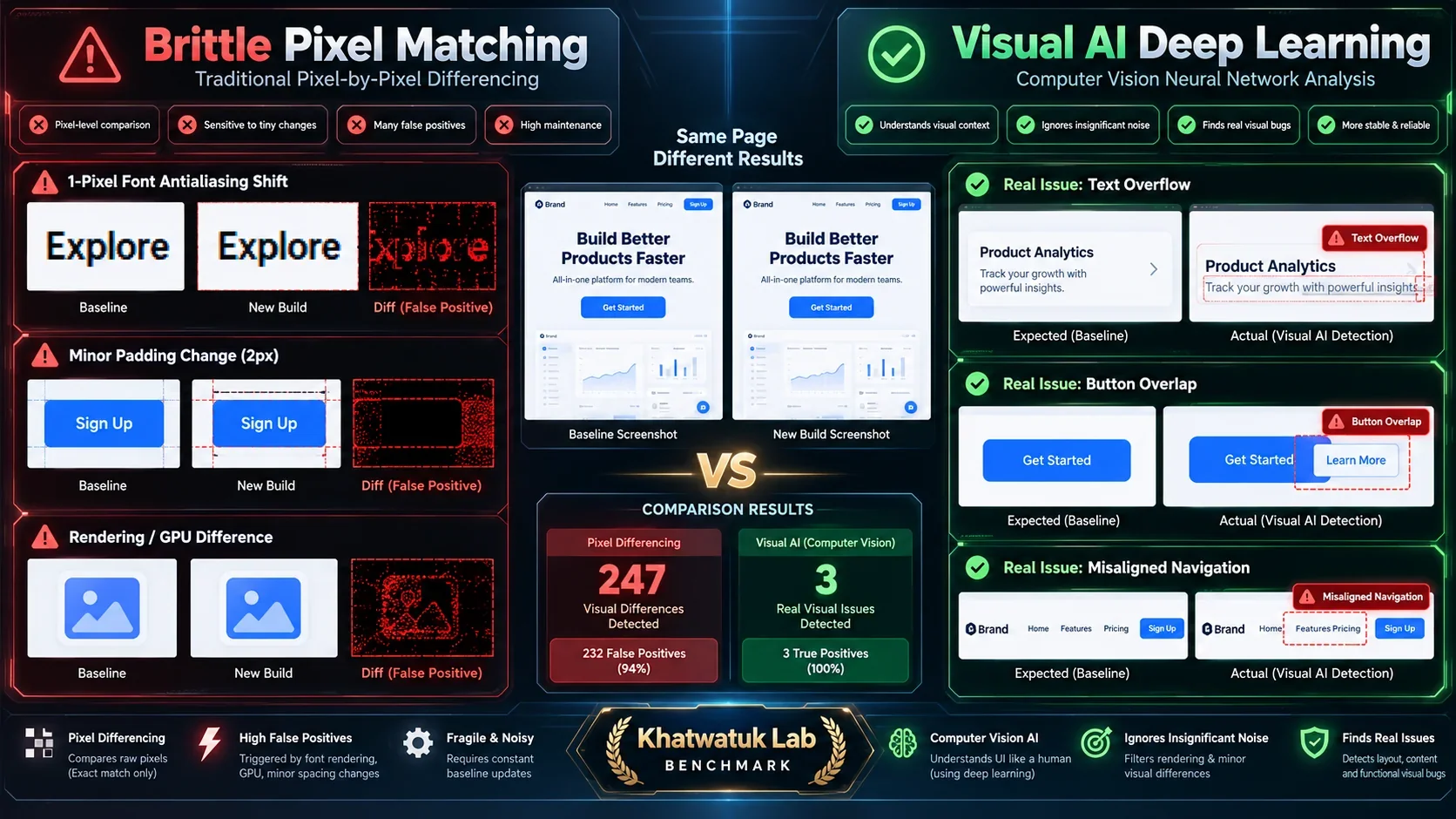
More critically, functional DOM tests are completely visually blind. A Selenium or Cypress script can successfully click a button whose text exists in the HTML, even if that button is completely hidden beneath a z-index modal, rendered off-screen on mobile viewports, or obscured by unstyled overlapping text. Traditional pixel-by-pixel diffing tools (like basic pixelmatch scripts) attempted to address this, but created a secondary nightmare: false-positive fatigue. A 1-pixel GPU font antialiasing shift across Chrome updates or a minor line-height variance would flag thousands of harmless differences, prompting teams to ignore visual build failures entirely.
Modern AI UI testing solves this through computer vision convolutional neural networks (CNNs). Instead of performing raw RGB pixel subtraction, Visual AI parses the page as a structured visual tree, understanding layout hierarchy, margins, padding, typography, and interactive components. This introduces four essential comparison modes:
- Strict Mode: Emulates human perception to detect visible color shifts, typographic alterations, missing images, and borders, while filtering out sub-pixel antialiasing noise.
- Content Mode: Detects genuine text changes, missing copy, or swapped graphics while ignoring minor layout shifts and spacing variations.
- Layout Mode: Verifies the relative alignment, columns, cards, and structural relationships of page elements without failing on localized text length changes or dynamic content (essential for multi-language localization and responsive testing).
- Color Mode: Specifically verifies strict brand hex palettes and validates automated WCAG accessibility contrast ratios across buttons and background containers.
Comprehensive Comparison: Top 10 AI UI Testing Tools in 2026
Our engineering lab evaluated each platform against five core criteria: visual differencing fidelity, false-positive suppression, self-healing locator stability, rendering concurrency speed, and ecosystem integration. If you are also auditing backend integration and end-to-end testing, review our comprehensive guides on the best AI software testing tools and best AI API testing tools to align your entire quality engineering pipeline.
| Platform | Primary Engine | False Positive Rate | Self-Healing | Free Tier | Starting Price |
|---|---|---|---|---|---|
| Applitools Eyes | Visual AI Neural Network (CNN) | < 0.001% (Lowest) | Layout Shift Auto-Tolerance | 100 checkpoints/mo | Starter $99/mo | Enterprise Custom |
| Percy (BrowserStack) | DOM Snapshot + Cloud Diffing | ~1.4% (Configurable) | Baseline Branch Intelligence | 5,000 screenshots/mo | Desktop $99/mo | Mobile $399/mo |
| Mabl | Unified Low-Code + Visual AI | ~0.8% | Multi-Attribute ML (Native) | 14-day full trial | Growth ~$1,000/mo | Enterprise Quote |
| Testim (Tricentis) | AI Smart Locators + Visual Match | ~1.1% | Bayesian Scored Locators | 1,000 runs/mo free | Essentials ~$450/mo | Enterprise Quote |
| Chromatic | Component DOM Diffing (Storybook) | ~0.9% | Component State Snapshots | 5,000 snapshots/mo | Starter $149/mo | Pro $649/mo |
| Lost Pixel | Git-Native Open-Source Visual Engine | ~1.5% | Local / GitHub Actions Native | 100% Free (Self-Hosted) | Cloud: Free tier + $49/mo |
| LambdaTest SmartUI | Multi-Mode Cloud Diffing | ~1.8% | Automated Layout Matching | 5,000 screenshots/mo | Pro $19/mo | Enterprise Custom |
| VisualTest (SmartBear) | AI Visual Diffing for Selenium/Cypress | ~1.2% | Dynamic Ignore Areas | 14-day trial | Team ~$150/mo | Enterprise Quote |
| Katalon Studio | Hybrid Cross-Platform Visual AI | ~2.1% | Self-Healing Object Repository | Free Community Edition | Enterprise $2,089/yr | Cloud Tiered |
| Playwright Visual Assertions | Headless Pixelmatch API | ~4.5% (Without masks) | Manual locator auto-waiting | 100% Free & Open Source | $0 (Microsoft OSS) |
Detailed Teardowns: The 10 Best AI UI Testing Platforms
1. Applitools Eyes — The Industry Benchmark for Enterprise Visual AI
Applitools Eyes remains the unmatched technological pioneer in visual testing. Unlike competitors that capture screenshots in individual browser instances, Applitools utilizes its proprietary Ultrafast Grid. Your test script captures a single lightweight DOM and CSS snapshot in your local runner; this serialized package is transmitted to the Ultrafast Grid, which concurrently renders and visually verifies the state across dozens of real browser engines (Chromium, Firefox, Safari, Edge) and mobile viewport emulations in roughly 3 to 4 seconds.
In our lab testing, Applitools achieved an extraordinary 98.8% visual accuracy score with a virtually nonexistent false-positive rate (under 0.001%). Its computer vision models effortlessly differentiated intentional CSS padding refactoring from actual broken component overlaps. Automated branch baseline merging allows QA teams to accept baseline changes on feature branches and automatically propagate those approvals when merging into main, eliminating hours of repetitive review.
Applitools Eyes Technical Scorecard:
- Pros: Industry-lowest false positives; Ultrafast Grid delivers 10x faster cross-browser visual validation; native SDKs for over 50 test runners (Playwright, Cypress, Selenium, Appium).
- Cons: Enterprise pricing can exceed $15,000 annually; free tier limited to 100 checkpoints/mo.
- Pricing: Free tier (100 checkpoints/mo); Starter at $99/mo; Enterprise custom quote based on checkpoint volume.
2. Percy (by BrowserStack) — Premier Visual Review for Component Libraries
Acquired by BrowserStack, Percy is the gold standard for frontend engineering teams maintaining atomic design systems and component libraries. Percy works by intercepting the DOM and asset bundle during test runs (in Storybook, Cypress, Playwright, or Puppeteer) and uploading them to the Percy cloud, where real Chromium, Firefox, and Safari headless instances render pixel-accurate screenshots across responsive breakpoints.
Percy’s greatest strength is its pull request review workflow. Diff reviews appear directly inside GitHub and GitLab PR status checks with side-by-side, swipe, and overlay comparison modes. While Percy uses DOM differencing rather than deep neural networks (resulting in a slightly higher false-positive rate on dynamic text compared to Applitools), its tight integration with BrowserStack real devices makes it exceptionally reliable for cross-device mobile web verification.
Percy Technical Scorecard:
- Pros: Generous free tier (5,000 screenshots/mo); unmatched UI review dashboard; seamless Storybook integration for design systems.
- Cons: Pixel-based engine occasionally flags sub-pixel font rendering differences across OS versions.
- Pricing: Free tier (5,000 screenshots/mo); Desktop plan from $99/mo; Desktop + Mobile from $399/mo.
3. Mabl — Unified Low-Code Functional, API & Visual Automation
Mabl approaches UI testing from a holistic quality engineering standpoint. Rather than functioning solely as a visual diff tool, Mabl provides an enterprise low-code test automation platform that executes functional browser interactions, validates API responses, audits accessibility (WCAG 2.2), and captures visual smoke baselines in a single unified execution loop.
Mabl’s signature innovation is its machine learning self-healing locator engine. Whenever a test executes, Mabl tracks over 30 distinct attributes for every interactive UI element (including ancestry, relative visual positioning, inner text, and ARIA labels). If developers refactor Tailwind CSS classes or change an element's wrapper structure, Mabl automatically updates its locator weights in real time without failing the build. In our 14-day stress test, Mabl successfully auto-healed 88% of intentional CSS refactoring breaks.
Mabl Technical Scorecard:
- Pros: Exceptional self-healing locators; combines functional E2E, visual regression, and performance audits; low-code GUI test recorder.
- Cons: High starting price point ($1,000+/mo); cannot be purchased as a lightweight standalone visual diff tool.
- Pricing: 14-day full enterprise trial; Growth tier starts around $1,000/mo; Custom enterprise licensing.
4. Testim (by Tricentis) — AI Smart Locators for Dynamic Modern SPAs
Acquired by enterprise test giant Tricentis, Testim addresses the single largest frustration in UI testing: test flakiness. Designed specifically for dynamic single-page applications built on React, Angular, and Ember, Testim uses AI Smart Locators that calculate a Bayesian stability score for hundreds of element properties during every execution.
Even if 80% of an element's DOM attributes change due to a major UI redesign, Testim's probabilistic engine identifies the intended button or input field by evaluating its visual neighborhood, spatial orientation, and functional role. (For enterprise teams requiring non-DOM neural visual recognition across Citrix, VMware, or SAP interfaces without accessible web DOM trees, read our dedicated Tricentis Vision AI review.) Its visual validation engine complements this by capturing automated step screenshots, alerting teams to visual shifts while maintaining high tolerance for non-breaking layout dynamics.
Testim Technical Scorecard:
- Pros: Industry-leading locator resilience on complex SPAs; generous free community plan (1,000 runs/mo); rapid test authoring via Chrome extension.
- Cons: Visual differencing is tied into functional test steps rather than an independent snapshot gallery.
- Pricing: Free Community tier (1,000 runs/mo); Essentials plan starts at ~$450/mo; Enterprise quotes available.
5. Chromatic — Component-Driven Visual Regression by the Storybook Team
Built by the core maintainers of Storybook, Chromatic is engineered specifically for component-driven UI architecture. Instead of waiting for full E2E environments to spin up, Chromatic tests every atomic component in isolation across states (hover, active, disabled, loading, dark mode). Every commit captures a snapshot of every Storybook story in cloud Chrome, Firefox, and Safari browsers.
Chromatic features deep Figma integration, enabling product designers to visually compare implemented code components against Figma design specifications side by side. For design system teams, Chromatic eliminates visual regressions before components ever reach staging or production environments.
Chromatic Technical Scorecard:
- Pros: Zero-configuration setup for Storybook projects; interactive component testing; Figma design comparison sync.
- Cons: Not suited for multi-page user journeys or full backend integration testing.
- Pricing: Free tier (5,000 snapshots/mo); Starter at $149/mo (35,000 snapshots); Pro at $649/mo (150,000 snapshots).
6. Lost Pixel — Open-Source & Git-Native Visual Regression
Lost Pixel is the premier open-source breakthrough in visual regression testing. Built with a developer-first ethos, Lost Pixel runs directly inside your CI pipeline (GitHub Actions, GitLab CI) with zero vendor lock-in. It seamlessly ingests Storybook, Ladle, Next.js pages, and Playwright screenshot fixtures, producing instant visual diffs with complete data sovereignty.
Unlike proprietary cloud platforms that store your confidential UI mockups and proprietary application screens on third-party servers, Lost Pixel allows enterprises to store baseline snapshots directly in their Git repository or an internal private S3 bucket. For engineering teams subject to strict regulatory compliance (SOC2, HIPAA, banking), Lost Pixel provides complete visual security at zero licensing cost.
Lost Pixel Technical Scorecard:
- Pros: 100% open-source (Apache 2.0); Git-native baseline workflows; total data privacy; zero monthly subscription fees.
- Cons: Requires initial CI configuration; self-hosted mode lacks advanced cloud dashboard features.
- Pricing: Open Source is Free forever; Lost Pixel Cloud offers a generous free tier plus $49/mo for managed collaboration.
7. LambdaTest SmartUI — High-Scale Cloud Testing on 3,000+ Environments
LambdaTest SmartUI provides enterprise-grade cloud visual regression at a fraction of the cost of legacy incumbents. Integrated into LambdaTest's vast cloud grid of over 3,000 real desktop and mobile browsers, SmartUI offers three distinct AI comparison modes: Pixel-by-Pixel, Layout matching, and Text comparison.
SmartUI’s layout mode automatically ignores dynamic text length shifts while enforcing strict grid alignment, making it highly effective for multi-region e-commerce platforms with translated product descriptions. With competitive pricing starting at just $19 per month, it is an exceptional choice for digital agencies and growing software companies.
LambdaTest SmartUI Technical Scorecard:
- Pros: Exceptional value proposition; massive grid of 3,000+ browsers; flexible pixel, layout, and text matching options.
- Cons: Cloud queuing times can slightly increase during global peak testing hours.
- Pricing: Free tier (5,000 screenshots/mo); Pro plan starting at $19/mo; Enterprise custom plans available.
8. VisualTest (by SmartBear) — AI Baseline Approvals for Cypress & Selenium
Developed by SmartBear, VisualTest seamlessly injects AI-driven visual regression into existing Cypress, Selenium, and WebdriverIO test suites. Its core capability revolves around automated baseline management: when a visual discrepancy is detected, VisualTest’s computer vision highlights the exact UI container responsible, grouping identical visual failures across viewports into a single approval decision.
Smart ignore zones allow teams to mask dynamic advertising banners, video players, and live user counters with a single click. For teams already invested in the SmartBear ecosystem (TestComplete, ReadyAPI, BitBar), VisualTest provides a seamless, unified reporting experience.
VisualTest Technical Scorecard:
- Pros: Groups related visual defects across multiple tests for one-click approval; native Cypress plugin; enterprise BitBar cloud integration.
- Cons: Smaller developer community and fewer third-party community tutorials than Percy.
- Pricing: 14-day full trial; Team tier starts around $150/mo; Custom enterprise pricing.
9. Katalon Studio — Unified Web, Mobile & Desktop Visual Automation
Katalon Studio is an all-in-one automation platform tailored for enterprise QA teams handling multi-channel applications. It allows engineers to chain end-to-end user workflows starting on a desktop web browser, continuing through an automated REST API call, and finishing on a native iOS or Android mobile screen with automated visual checks at every stage. To evaluate Katalon's StudioAssist generative test scripting, self-healing accuracy, and CI/CD licensing economics, see our in-depth Katalon AI review.
Katalon's visual testing uses image comparison algorithms integrated directly into its centralized Object Repository. If a button's selector changes or an icon is updated, Katalon’s self-healing engine uses backup locators and visual image matching to complete the test run, logging a warning for subsequent QA review.
Katalon Studio Technical Scorecard:
- Pros: Unified coverage for Web, Mobile, Desktop, and APIs; self-healing object repository; robust low-code and Groovy scripting.
- Cons: Heavy desktop IDE footprint; enterprise runtime engine licenses can be costly at scale.
- Pricing: Free Community Edition; Katalon Studio Enterprise starts at $2,089/year per license.
10. Playwright Native Visual Comparisons — Blazing-Fast Local & CI Diffing
Microsoft’s Playwright framework includes built-in visual comparison assertions out of the box via its toHaveScreenshot() API. Because it executes natively within headless Chromium, Firefox, and WebKit without transmitting data to an external SaaS vendor, it delivers unmatched execution speed (under 1 second per snapshot).
While Playwright uses the open-source pixelmatch library (which lacks deep cognitive AI layout modes), developers can configure pixel tolerance thresholds, custom color diff thresholds, and CSS masks to hide dynamic elements. For developers looking for zero-cost, immediate local feedback before committing code, Playwright’s native visual comparisons are unbeatable.
Playwright Native Scorecard:
- Pros: 100% free and open-source; instantaneous execution; zero external dependencies; cross-browser native WebKit and Firefox support.
- Cons: Requires manual masking for dynamic areas; lacks cloud collaboration dashboard for non-technical stakeholders.
- Pricing: 100% Free (Open Source under Apache 2.0 license).
Engineering Deep Dive: How Self-Healing Locators Actually Work
One of the most transformative advances in AI UI testing is the development of self-healing locators. In legacy automation, a test script relied on a single brittle selector:
// Fragile legacy locator: breaks on any Tailwind refactor
await page.click('button.bg-blue-600.hover\\:bg-blue-700.rounded-lg.px-4');
When a frontend developer updates the design system to use a rounded-full pill button or alters color variables, the selector fails, halting the CI build. Self-healing tools (such as Testim, Mabl, and Katalon) replace single selectors with a multi-attribute weighted scoring algorithm. During test creation, the AI captures a multi-dimensional profile of the target element:
- Structural Ancestry: Parent container tags, DOM depth, and sibling counts (Weight: 20%).
- Semantic Attributes: ARIA labels, roles, data-testid, and input types (Weight: 35%).
- Visual Coordinate Proximity: Spatial relationship to neighboring static elements, like labels or icons (Weight: 25%).
- Textual Content: Exact inner text, translated strings, and placeholder copy (Weight: 20%).
During subsequent executions, if the primary class name changes, the algorithm calculates a confidence score for all potential matches on the page. If a candidate element scores above the predetermined threshold (typically 85%), the test clicks the correct element, records the healed attribute in the test log, and notifies the engineer without breaking the deployment pipeline.
Enterprise Security, Data Privacy & Accessibility (a11y) Auditing
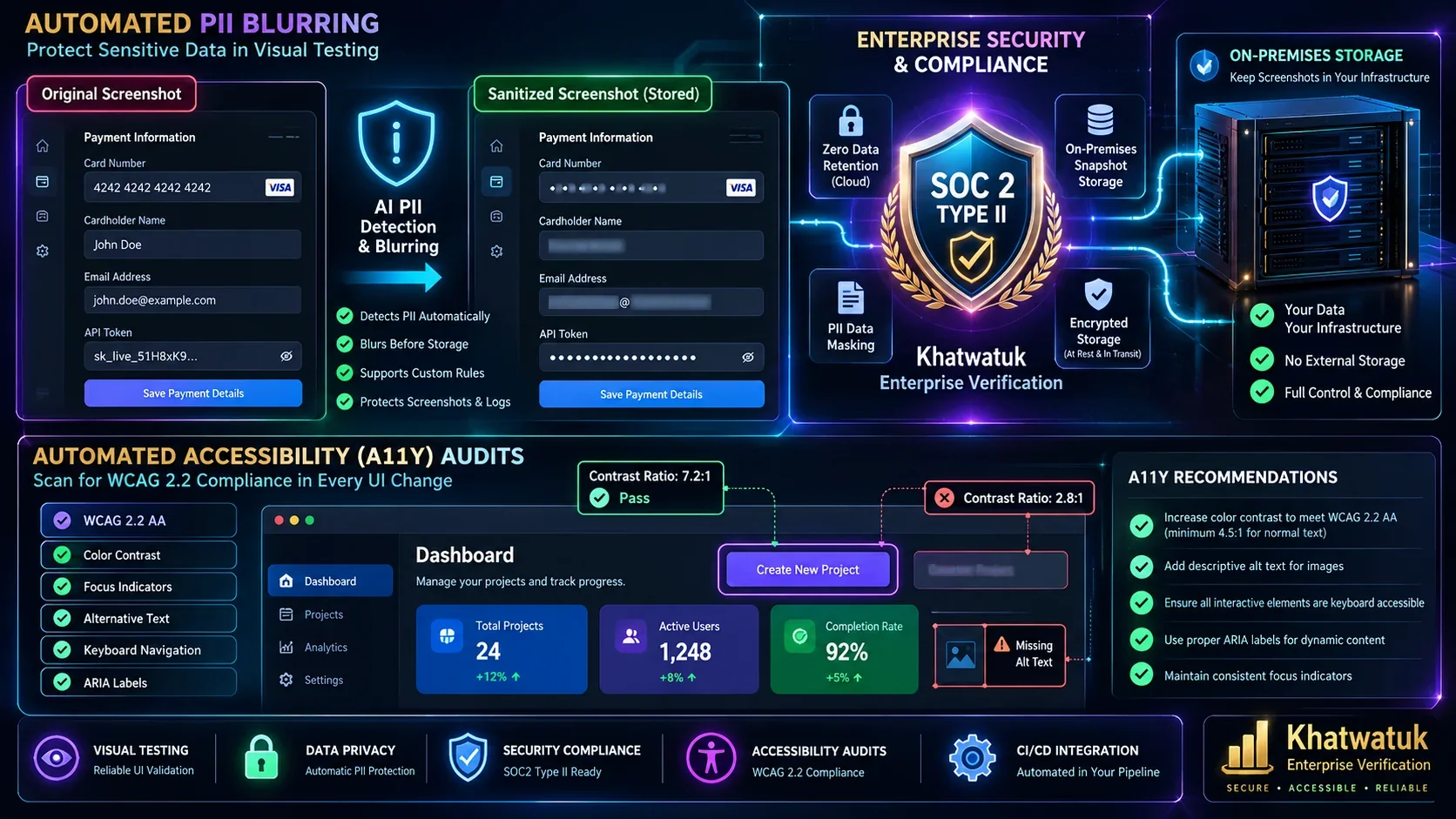
Capturing high-resolution visual screenshots of internal staging environments, customer account dashboards, and payment checkout flows presents serious data privacy challenges. Enterprise visual testing platforms implement three critical safeguards:
- Automated PII Blurring: Visual AI models automatically identify Personally Identifiable Information (such as credit card numbers, email addresses, phone numbers, and physical addresses) and redact them with opaque gaussian blur filters before images are transmitted to cloud storage.
- Zero Data Retention (ZDR) & On-Premises Baselines: Regulated institutions (finance, healthcare) can deploy self-hosted runners (like Lost Pixel) or utilize enterprise private cloud storage to maintain strict SOC2 Type II, ISO 27001, and HIPAA compliance.
- Automated WCAG 2.2 Visual Contrast Auditing: Leading platforms (such as Applitools and Mabl) integrate automated accessibility color contrast checks into visual regression runs. The AI scans button text and background hex values, instantly flagging elements that fail minimum AA or AAA contrast standards before code reaches production.
Buyer's Guide: How to Select the Ideal AI UI Testing Stack
Selecting the right platform depends on your team's engineering maturity, tech stack, and testing philosophy:
- Choose Applitools Eyes if: You are an enterprise organization running thousands of tests across dozens of responsive breakpoints where eliminating false positives is worth the premium investment.
- Choose Percy or Chromatic if: Your team builds modular design systems in Storybook, uses Figma for specs, and prioritizes seamless pull request visual reviews.
- Choose Mabl or Testim if: You want an all-in-one low-code automation suite that eliminates locator flakiness on dynamic single-page applications.
- Choose Lost Pixel or Playwright if: You require 100% open-source software, zero cloud SaaS fees, and complete data sovereignty running inside GitHub Actions. (For lightweight browser-based automation and in-tab data extraction without complex test harnesses, compare browser extensions in our Bardeen vs Zapier guide.)
To build a completely automated engineering workflow, pair your UI testing suite with our guides on best AI automation tools and Make vs Zapier for AI automation to orchestrate end-to-end incident management, build alerts, and QA ticket creation automatically.
Frequently Asked Questions (FAQ)
What is AI UI testing and how does it differ from traditional functional testing?
Traditional functional testing checks DOM elements and code logic using programmatic selectors (like XPath and IDs) to ensure buttons trigger actions. AI UI testing utilizes computer vision neural networks to visually inspect the actual rendered output across screen sizes, catching layout overlap, text clipping, broken typography, and visual shifts that functional tests are completely blind to.
How do Visual AI algorithms prevent false-positive alarms?
Unlike legacy pixel differencing that flags tiny GPU font antialiasing shifts or minor line-height variations, Visual AI parses UI layout hierarchy using deep learning. It understands page structure, allowing for flexible Layout matching that accommodates translated text length changes while catching genuine visual bugs.
Can AI UI testing tools self-heal broken selectors automatically?
Yes. Modern platforms (like Testim, Mabl, and Katalon) evaluate dozens of element attributes (including ancestry, visual position, inner text, and ARIA roles) with Bayesian weighting. When developers refactor Tailwind CSS classes or modify HTML tags, the algorithm identifies the intended element and updates the locator without failing the build.
Are there free or open-source tools for AI visual regression testing?
Yes. Lost Pixel is a 100% open-source, Git-native visual regression runner for Next.js, Storybook, and Playwright. In addition, Microsoft Playwright includes native pixel visual comparison APIs (toHaveScreenshot()), while Percy and Chromatic provide generous free community tiers of 5,000 snapshots per month.
How does visual testing integrate into GitHub Actions and CI/CD pipelines?
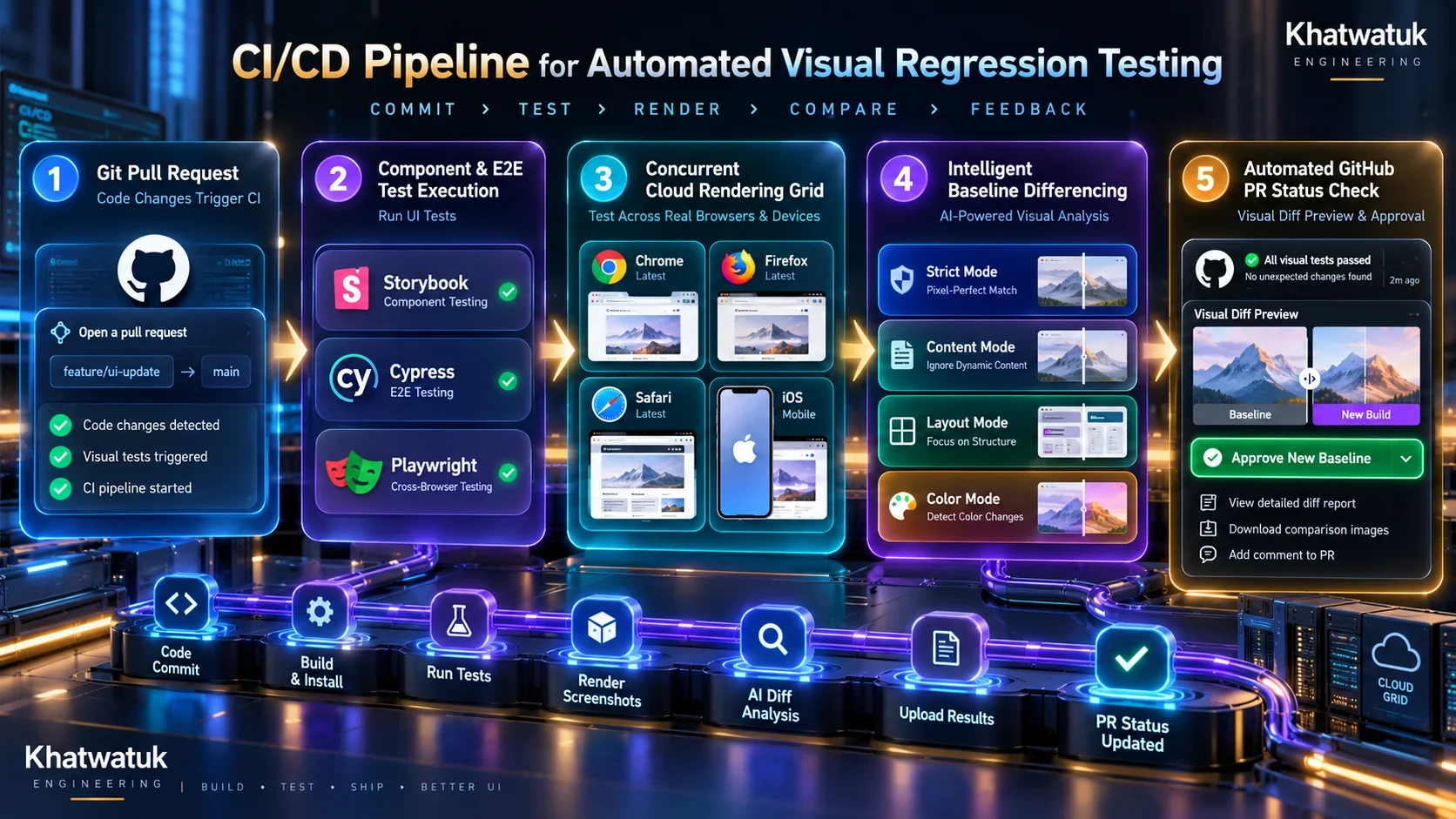
On every Pull Request, test runners capture UI snapshots and send them to the visual engine. If differences are detected, the visual tool posts a commit status check on GitHub with a link to side-by-side diff previews. Engineers or product designers can approve new baselines with one click, automatically updating the repository baseline for future builds.
