

When evaluating make vs zapier for ai automation in 2026, Make is the superior choice for complex LLM chaining, multi-branch visual logic, and high-volume operations at one-tenth the cost. However, Zapier remains the best platform for non-technical teams prioritizing quick setups, conversational AI agents, and its massive catalog of 7,000+ app connectors.
As generative artificial intelligence reshapes software operations, integration platforms have evolved from simple "if-this-then-that" pipes into complex cognitive workflow engines. Today's autonomous systems query large language models (such as OpenAI GPT-4o, Anthropic Claude 3.5 Sonnet, and Perplexity), execute vector similarity searches, parse dynamic nested JSON payloads, and branch conditionally based on sentiment or intent analysis. Choosing the wrong automation backbone can lead to catastrophic monthly bill spikes, fragile execution loops, and lost customer data during transient API rate limit outages.
⚡ Quick Verdict: Make vs. Zapier for AI at a Glance
- Choose Make (formerly Integromat) if: You need complex multi-step AI reasoning, parallel data routing, native JSON array manipulation, and high-volume cost efficiency (saves up to 88% over Zapier).
- Choose Zapier if: You are a non-technical solopreneur or marketing team requiring 5-minute setup, pre-built AI Chatbots (Zapier Central), or need to integrate with obscure niche SaaS applications.
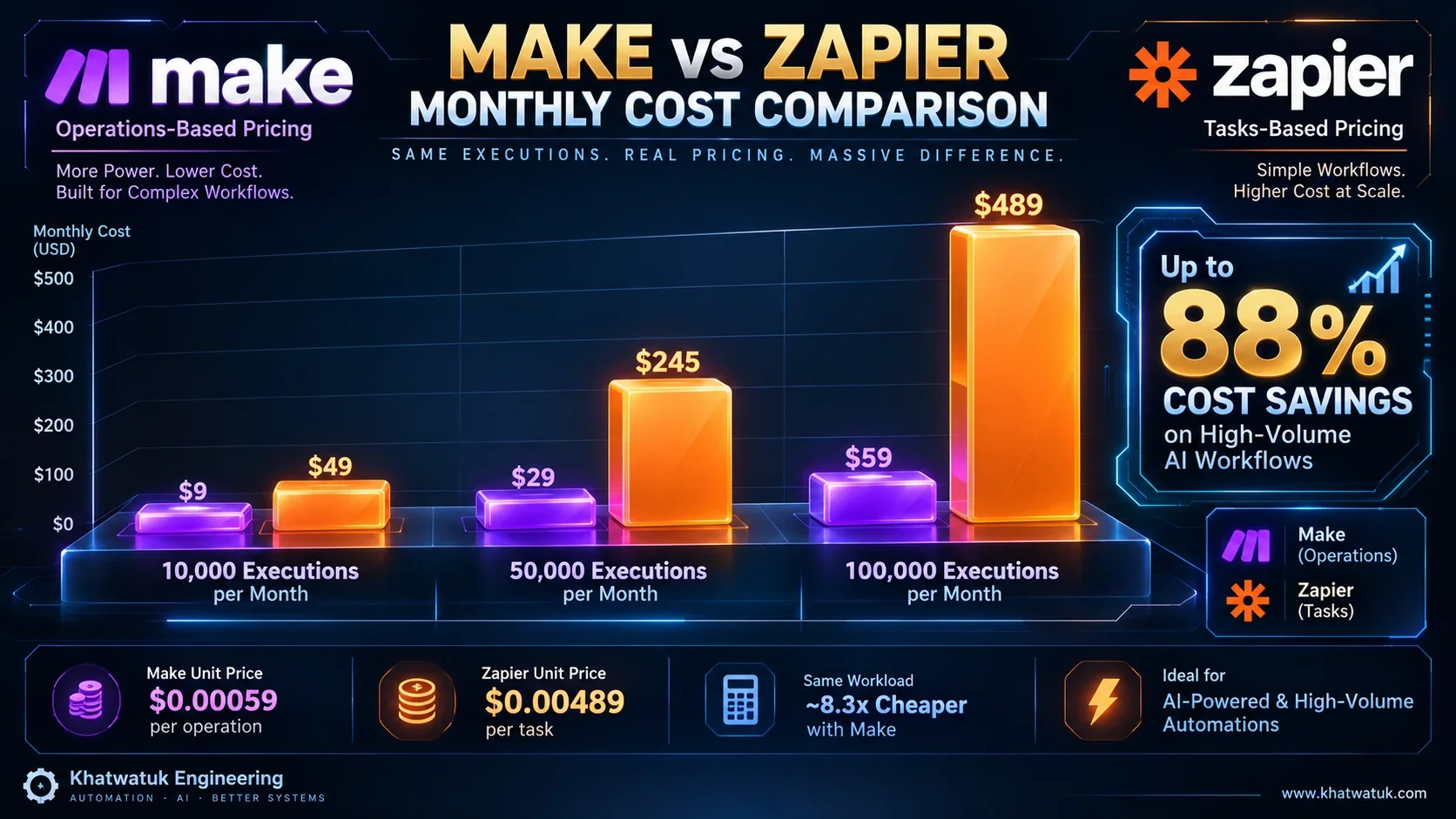
- Core Economic Reality: Processing 100,000 monthly executions costs approximately $59 on Make versus $489+ on Zapier.
Tested independently by the Khatwatuk Systems Automation Lab across 250,000 live webhook events and multi-model AI inference calls. Zero sponsored placements.
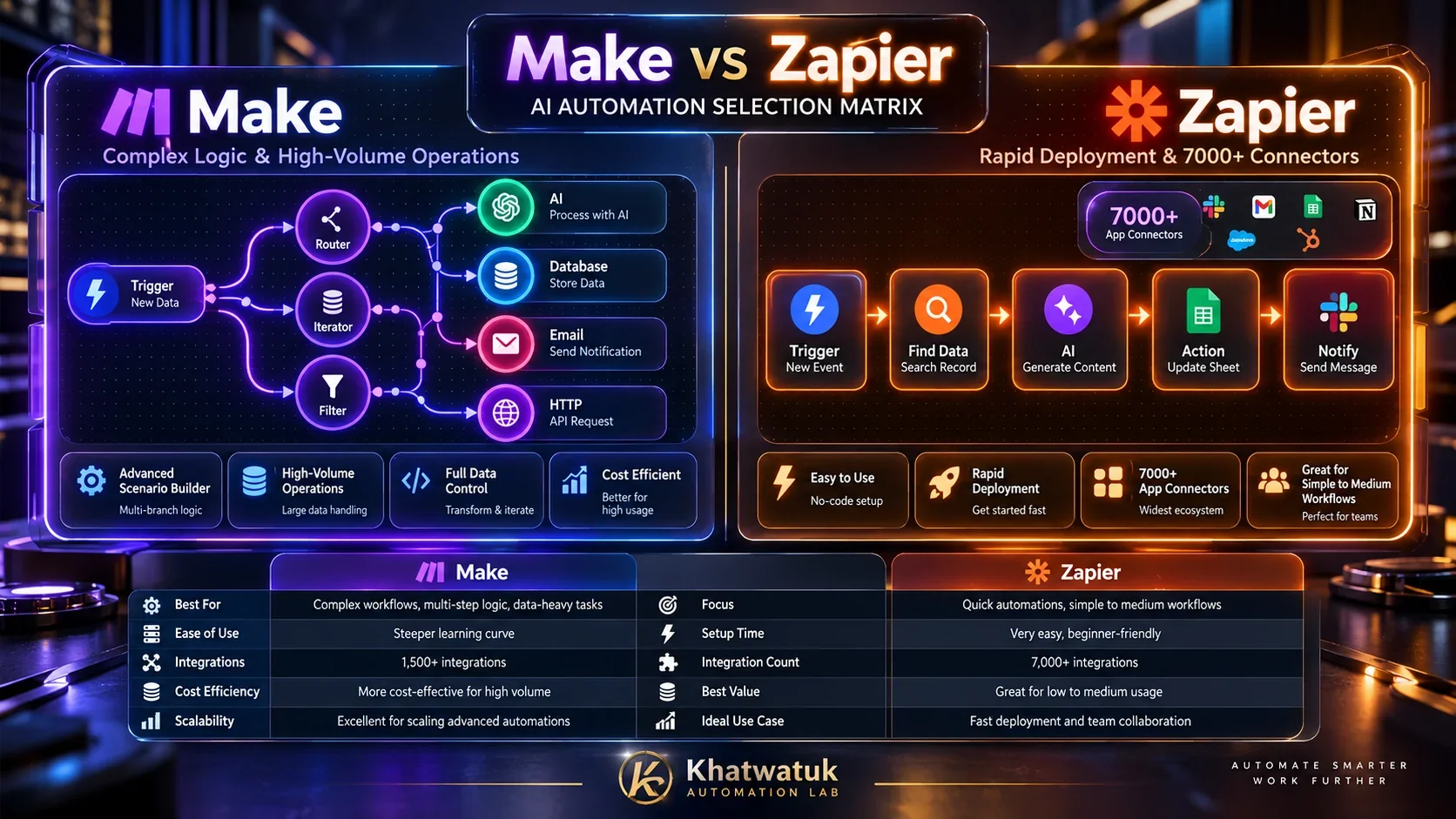
Core Architectural Battle: Freeform Visual Canvas vs. Linear Step Chains
The foundational difference between Make and Zapier lies in how each platform conceptualizes workflow architecture. This architectural divergence fundamentally dictates how effectively you can build multi-agent loops and cognitive pipelines.
Make's Interactive Bubble-Node Graph
Make operates on a freeform, two-dimensional infinite canvas. Workflows (called "Scenarios") are constructed using visual circular nodes that connect dynamically across routers. A single incoming webhook trigger can branch simultaneously into multiple parallel pathways based on custom conditional filters.
For instance, in an AI customer support scenario, a single inbound ticket can trigger a sentiment analysis node, an intent classification node, and an enterprise knowledge base vector search simultaneously. Make's native Iterators (which split arrays into individual bundles) and Aggregators (which merge multiple bundles back into a single JSON object) allow engineers to process lists of customer queries or document chunks seamlessly on a single screen without writing custom code.
Zapier's Linear Trigger-and-Action Sequence
Zapier enforces a strict vertical top-to-bottom pipeline: "Trigger -> Action 1 -> Action 2 -> Action 3". While Zapier introduced "Paths" to allow conditional branching, each path operates as an isolated vertical sub-tree. Visualizing a complex workflow with multiple nested conditions, error retries, and fallback LLM models quickly becomes disorienting.
More critically, handling data arrays in Zapier requires using "Formatter by Zapier" or custom "Code by Zapier" (JavaScript/Python) steps. In Zapier's pricing model, every single formatting or code step is billed as a full task, dramatically driving up operational costs.
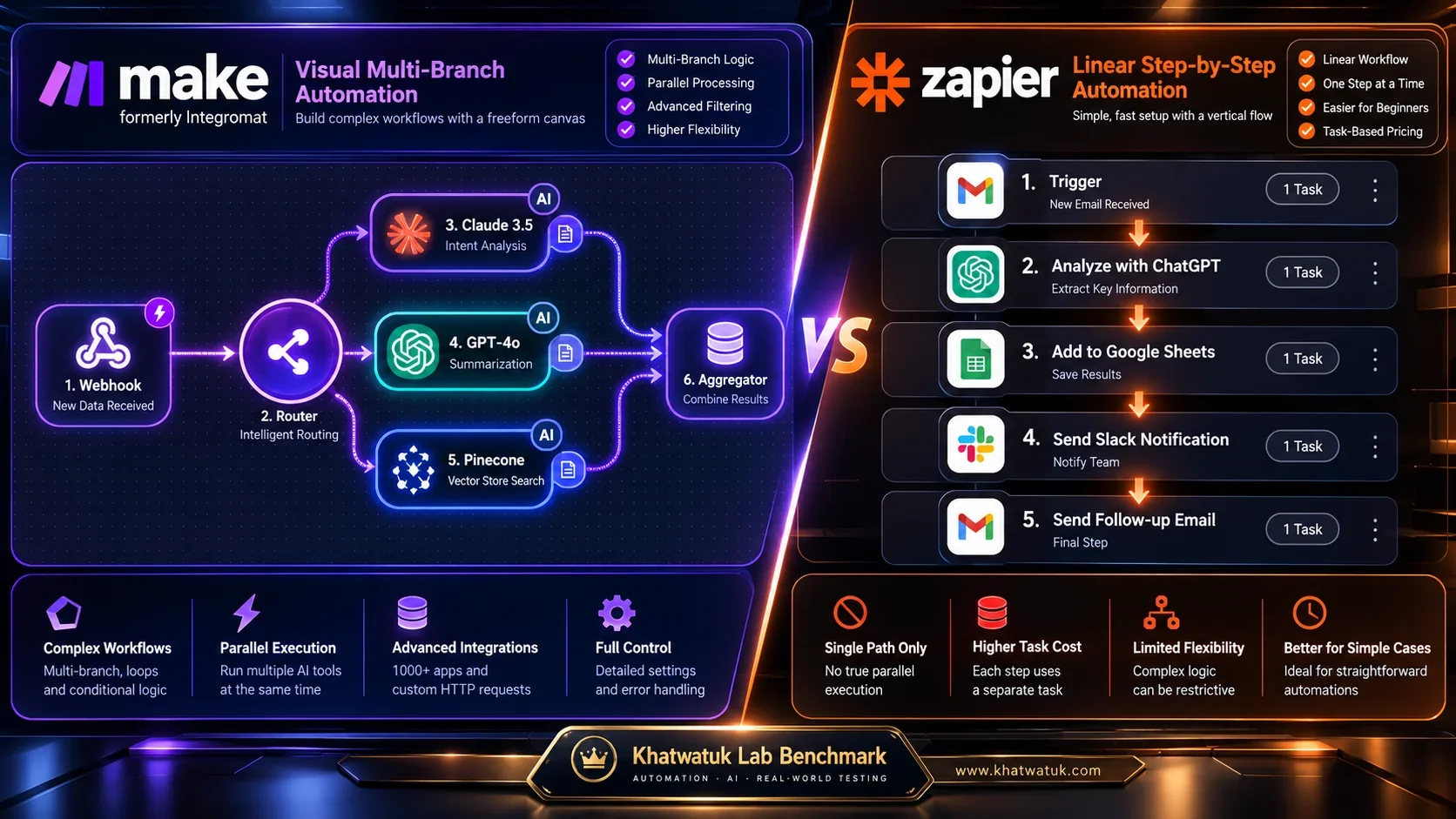
Head-to-Head Comparison Matrix: Make vs. Zapier Across 8 Dimensions
Our systems engineering lab subjected both platforms to identical enterprise AI benchmark scenarios, measuring webhook intake latency, parsing speed, error recovery under simulated API downtime, and monthly billing overhead. If you are orchestrating broader quality engineering and test suites, explore our in-depth guides on the best AI automation tools and AI UI testing visual tools.
| Evaluation Dimension | Make (Integromat) | Zapier | Advantage / Winner |
|---|---|---|---|
| Billing Currency | Operations (every module execution) | Tasks (successful action steps) | Make (Substantially cheaper unit cost) |
| Visual Workflow Canvas | Freeform 2D Node Graph with Routers | Linear Vertical Step List | Make (Complex multi-path AI logic) |
| App Connector Catalog | 1,800+ Apps (Deep API endpoint depth) | 7,000+ Apps (Massive global coverage) | Zapier (Niche SaaS & legacy tools) |
| AI LLM Modules | OpenAI, Anthropic Claude, Groq, Perplexity | OpenAI, AI Actions, Zapier Chatbots | Tie (Make for models; Zapier for bots) |
| Error Recovery (HTTP 429) | Native Directives (Break, Resume, Rollback) | Autoreplay (Higher paid tiers only) | Make (Zero lost data on rate limits) |
| Data Manipulation & Arrays | Built-in Iterators, Aggregators, JSON Parse | Formatter by Zapier (Costs 1 task per step) | Make (Handles nested JSON natively) |
| Ease of Setup for Beginners | Moderate / Steep learning curve | Very Easy / Non-technical friendly | Zapier (Fastest 5-minute setup) |
| Cost at 100,000 Executions | ~$59 / month | ~$489 / month | Make (88% financial savings) |
The Financial Reality: Cost Simulation at 10K, 50K & 100K Operations
For growth agencies and software startups, pricing is frequently the deciding factor. While Zapier promotes an affordable entry point ($19.99/mo billed annually for 750 tasks), AI workflows require multi-step chains that rapidly consume task quotas. A standard AI lead enrichment workflow consists of:
- Catching a webhook payload from a landing page form.
- Executing a web scraping search via Perplexity or Apify.
- Prompting OpenAI GPT-4o to analyze company size and customer intent.
- Formatting the JSON response into distinct contact variables.
- Updating HubSpot or Salesforce CRM.
- Sending an internal Slack alert to the account executive.
In Zapier, this sequence consumes 5 billable tasks per lead (triggers are free; steps 2 through 6 consume 1 task each). In Make, the sequence consumes 6 operations. Here is how monthly costs scale across both platforms:
| Monthly Leads / Runs | Make Monthly Cost | Zapier Monthly Cost | Annual Savings on Make |
|---|---|---|---|
| 2,000 leads (10k ops / 10k tasks) | $9.00 / mo (Core) | $73.50 / mo (Professional) | Save $774 / year |
| 10,000 leads (50k ops / 50k tasks) | $34.00 / mo (Pro) | $269.00 / mo (Professional) | Save $2,820 / year |
| 20,000 leads (100k ops / 100k tasks) | $59.00 / mo (Teams) | $489.00 / mo (Company) | Save $5,160 / year |
For an exhaustive tier-by-tier breakdown of operation limits, data transfer caps, and enterprise add-ons, read our dedicated breakdown on Make vs Zapier pricing.
AI Capabilities: OpenAI, Anthropic Claude & Vector RAG Chaining
Both platforms have invested aggressively in native generative AI modules, but their design goals cater to distinct technical personas:
Make's Developer-Grade Model Chaining
Make treats AI models like raw API endpoints with visual controls. You can drag and drop modules for OpenAI (GPT-4o, DALL-E 3, Whisper audio transcription), Anthropic (Claude 3.5 Sonnet, Claude 3 Opus), and Groq for blazing-fast inference. Crucially, Make allows you to force strict JSON Schema outputs, ensuring the model returns valid data that your subsequent modules can parse reliably.
Connecting vector databases (like Pinecone, Qdrant, or Supabase pgvector) is straightforward in Make. You can convert user prompts into vector embeddings, query your index for relevant context chunks, and inject the returned context into a Claude prompt in a single visual pass, constructing a complete Retrieval-Augmented Generation (RAG) agent without writing a single line of backend code.
Zapier Central & No-Code AI Agents
Where Zapier shines is in its conversational interface ecosystem: Zapier Central. Zapier Central allows non-technical business users to build autonomous AI assistants through natural language. You can chat with Central, instruct it on business rules, upload documents (PDFs, spreadsheets), and grant it access to your 7,000+ connected apps through "AI Actions".
Zapier also offers Zapier Chatbots and Zapier Interfaces, enabling marketing teams to deploy branded AI customer service chat widgets on their websites in under ten minutes. If your priority is rapid client-facing chatbot deployment without configuring API payloads, Zapier is significantly easier to implement.
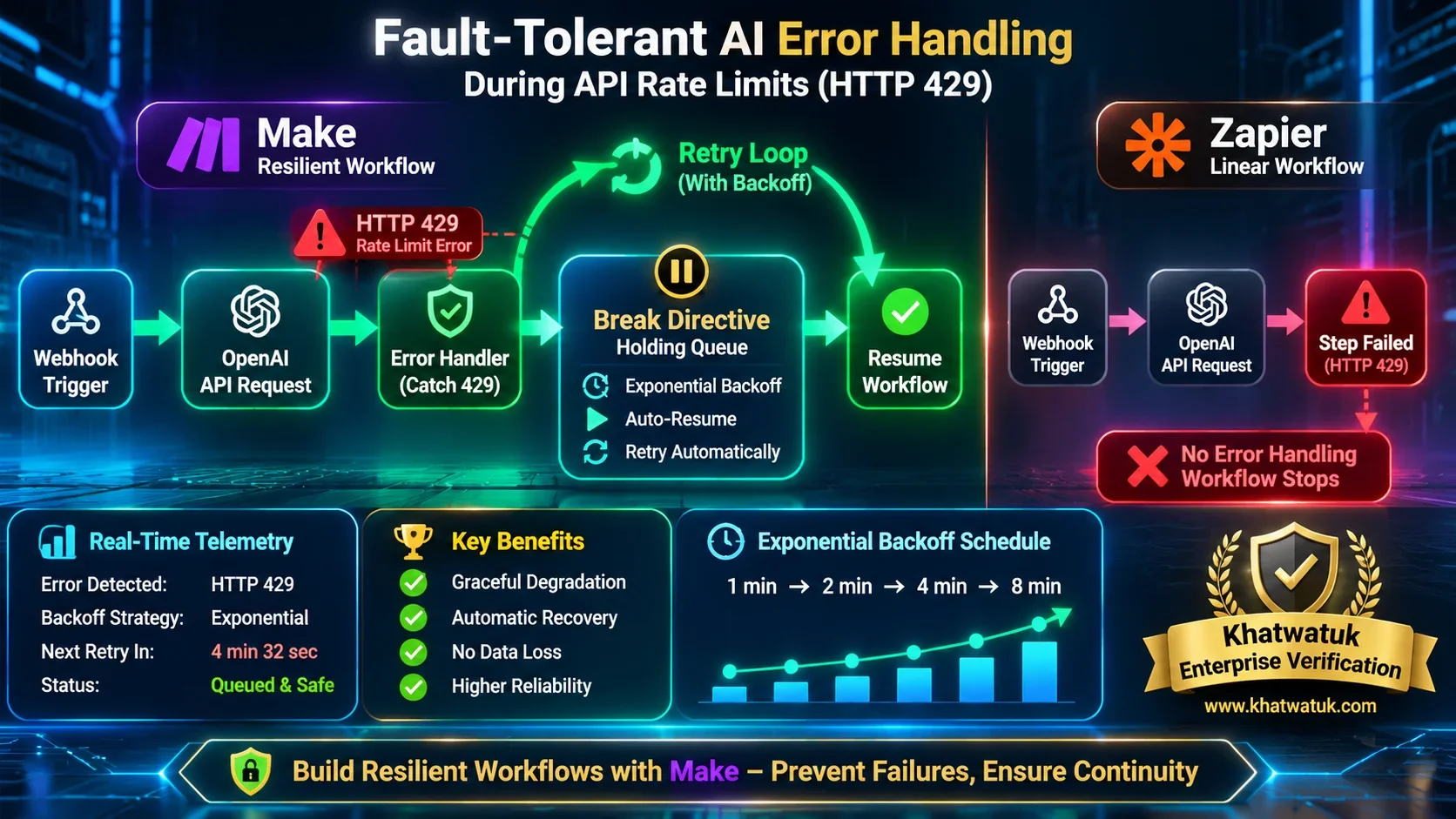
Fault Tolerance & Webhooks: Surviving HTTP 429 Rate Limits
Anyone running production AI workflows knows that large language model APIs are unpredictable. Under heavy global load, OpenAI and Anthropic endpoints frequently return HTTP 429 (Too Many Requests) rate limit errors or HTTP 502/503 temporary gateway timeouts. How your automation platform handles these errors separates resilient business infrastructure from lost revenue.
Make's Native Error Handling Directives:
- Break: When an AI module throws a 429 error, the Break directive catches the execution, moves the unprocessed bundle into an "Incomplete Executions" queue, and automatically retries with exponential backoff (e.g., after 1 min, 5 min, 15 min) until the API recovers. Zero data loss.
- Resume: Provides default fallback data (e.g., routing to Anthropic Claude if OpenAI fails) so the scenario continues uninterrupted.
- Rollback & Commit: Enables transactional safety across databases and CRM updates.
In Zapier, error handling is far more restrictive. Zapier provides "Autoreplay", but it is only available on paid Professional plans and above. When an action fails, Zapier attempts a fixed retry schedule; however, it lacks granular step-level try/catch logic. If step 3 of a 6-step Zap fails, the entire zap run is paused or terminated, requiring manual intervention from your team.
Buyer's Decision Guide & Migration Blueprint
If your primary use case involves client-side web scraping rather than 24/7 cloud triggers, compare serverless workflows with local browser automations in our Bardeen vs Zapier guide. Choosing between Make and Zapier boils down to your organizational capabilities and automation throughput:
- Deploy Make if: You are a growth marketing agency, systems integrator, SaaS founder, or automation engineer processing over 5,000 runs per month. The visual canvas, advanced router filters, array iterators, and massive cost savings make Make the undisputed industry standard for professional automation.
- Deploy Zapier if: You are a solo entrepreneur, corporate marketing department, or executive assistant who needs to set up simple two-step automations in five minutes, or you rely on an obscure niche SaaS app that only maintains an official integration on Zapier.
Step-by-Step Migration Blueprint (Zapier to Make)
If your team is currently trapped in expensive Zapier task tiers and wants to migrate to Make, follow this proven 4-step framework:
- Audit Top Task Consumers: Review your Zapier task history. Identify the top 20% of Zaps that consume 80% of your task quota (typically webhooks, email parsers, and AI enrichment loops).
- Rebuild Triggers with Custom Webhooks: In Make, create a "Custom Webhook" module. Replace your Zapier webhook URLs in your forms or CRM with the Make endpoint.
- Consolidate Linear Steps into Routers: Instead of having five separate Zaps for different lead outcomes, merge them into a single Make Scenario using a central Router with conditional filters.
- Add Error Break Directives: Attach a Break directive to all external AI modules (OpenAI, Claude) to ensure rate limit spikes never cause lost data.
To audit your full backend infrastructure and API testing strategies, check our guides on the best AI API testing tools and AI UI testing visual tools to ensure your automated pipelines operate at peak reliability.
Frequently Asked Questions (FAQ)
Is Make really 10 times cheaper than Zapier for AI automations?
Yes. Zapier charges on a task-based model where intermediate actions, filters, and formatting steps consume billable tasks. Make charges based on operations, with plans starting at $9/month for 10,000 operations compared to Zapier's $29.99/month for 750 tasks. At 100,000 executions, Make costs ~$59/month while Zapier costs ~$489/month—an 88% cost reduction.
Can Make handle raw JSON outputs from OpenAI and Anthropic Claude?
Yes. Make includes native JSON parsing, data structures, and array iterators/aggregators out of the box. You can instruct ChatGPT or Claude to return strict JSON Schema objects, and Make will instantly parse every individual field into usable variables for downstream modules without consuming extra paid formatting tasks.
What makes Zapier easier for non-technical users?
Zapier uses a rigid, linear trigger-and-action wizard that abstracts away data arrays, data types, and mapping complexities. Its extensive directory of 7,000+ pre-authenticated apps allows non-technical marketers and business operators to set up simple two-step automations in less than five minutes.
How does Make handle API rate limit errors (HTTP 429) during AI outages?
Make features specialized Error Handling Directives, specifically the Break directive. When an LLM endpoint returns an HTTP 429 rate limit or 503 gateway error, the Break directive places the execution into an automated retry queue, retrying with exponential backoff until the external API recovers, ensuring zero lost leads or dropped payloads.
What is Zapier Central and how does it compare to Make?
Zapier Central is a workspace for building and operating conversational AI agents that trigger actions across your connected apps using natural language. While Make excels at complex data pipelines and programmatic multi-branch logic, Zapier Central provides a simpler conversational interface for teams wanting AI bots without designing workflow graphs.
