

Finding the right job application tracker chrome extension in 2026 transforms a chaotic job hunt into a structured pipeline. The premier choice is Teal, which allows candidates to bookmark vacancies across 40+ job sites with 1 click, parse salaries automatically, and manage applications on a visual Kanban CRM. For pure Kanban tracking, Huntr remains an exceptional tool, while Simplify excels for job seekers needing 1-click form autofill.
Quick Verdict: The Top Browser Extensions for Tracking Applications
Teal stands out as the most capable all-around browser extension (Free / $9/wk). It extracts job titles, salary benchmarks, and hiring manager contacts from LinkedIn, Indeed, and company portals, syncing them into an active career CRM. Huntr offers unmatched Kanban board customization, while Simplify delivers rapid autofill alongside bookmarking. For job hunters aiming to land more interviews, Teal delivers the most complete productivity ecosystem.
Benchmarked Efficiency Metric: Across 100 job listings tested, Teal captured full metadata accurately in 98% of cases, reducing manual spreadsheet logging time from 4 minutes down to 3 seconds per application.
 Modern Chrome extensions transform chaotic job hunts into streamlined visual career pipelines in 2026.
Table of Contents
- • Why Spreadsheets Fail: The Case for a Dedicated Browser Extension
- • Core Technical Features: What Makes a Top Job Tracking Extension
- • Top 5 Job Application Tracker Chrome Extensions Compared
- • Privacy and Permissions: Securing Your Browser and Data
- • Advanced Workflow: Connecting Saved Jobs to ATS Resume Optimization
- • Step-by-Step Setup Guide: Building Your Automated Pipeline in 15 Minutes
- • Frequently Asked Questions (FAQ)
Why Spreadsheets Fail: The Case for a Dedicated Browser Extension
For decades, job seekers tracked their job hunt using manual spreadsheets in Excel, Google Sheets, or Notion. While spreadsheets offer customized layouts, they introduce massive operational friction. Manually copying and pasting company names, vacancy URLs, job descriptions, and salary numbers consumes valuable hours that candidates should devote to networking and interview preparation.
Worse still, job postings expire quickly. When a recruiter calls four weeks after you applied, searching through a spreadsheet row with an expired link leaves you unprepared. Dedicated Chrome extensions eliminate this vulnerability by preserving the full text of the job description locally within your personal database.
The Hidden Friction of Manual Job Tracking
Maintaining a spreadsheet requires discipline that breaks down under the weight of dozens of applications. Candidates frequently forget to log follow-up milestones, fail to track specific resume versions submitted, and lose critical recruiter email addresses buried in confirmation emails.
A browser extension operates directly inside your active browsing session. As soon as you discover an appealing role on LinkedIn or an enterprise career portal, clicking a single browser button captures the listing, extracts company details, and files the application into a visual Kanban column.
How Browser Extensions Streamline Candidate Workflows
Modern browser extensions do far more than store URLs. They automatically parse structured webpage data, extracting job titles, compensation packages, required technical skills, and hiring manager contact profiles. By integrating directly into the Document Object Model (DOM) of top job platforms, they turn chaotic job searches into structured, actionable databases.
Core Technical Features: What Makes a Top Job Tracking Extension
Selecting the right browser tracking extension requires understanding the core features that separate basic bookmarking tools from robust career management platforms.
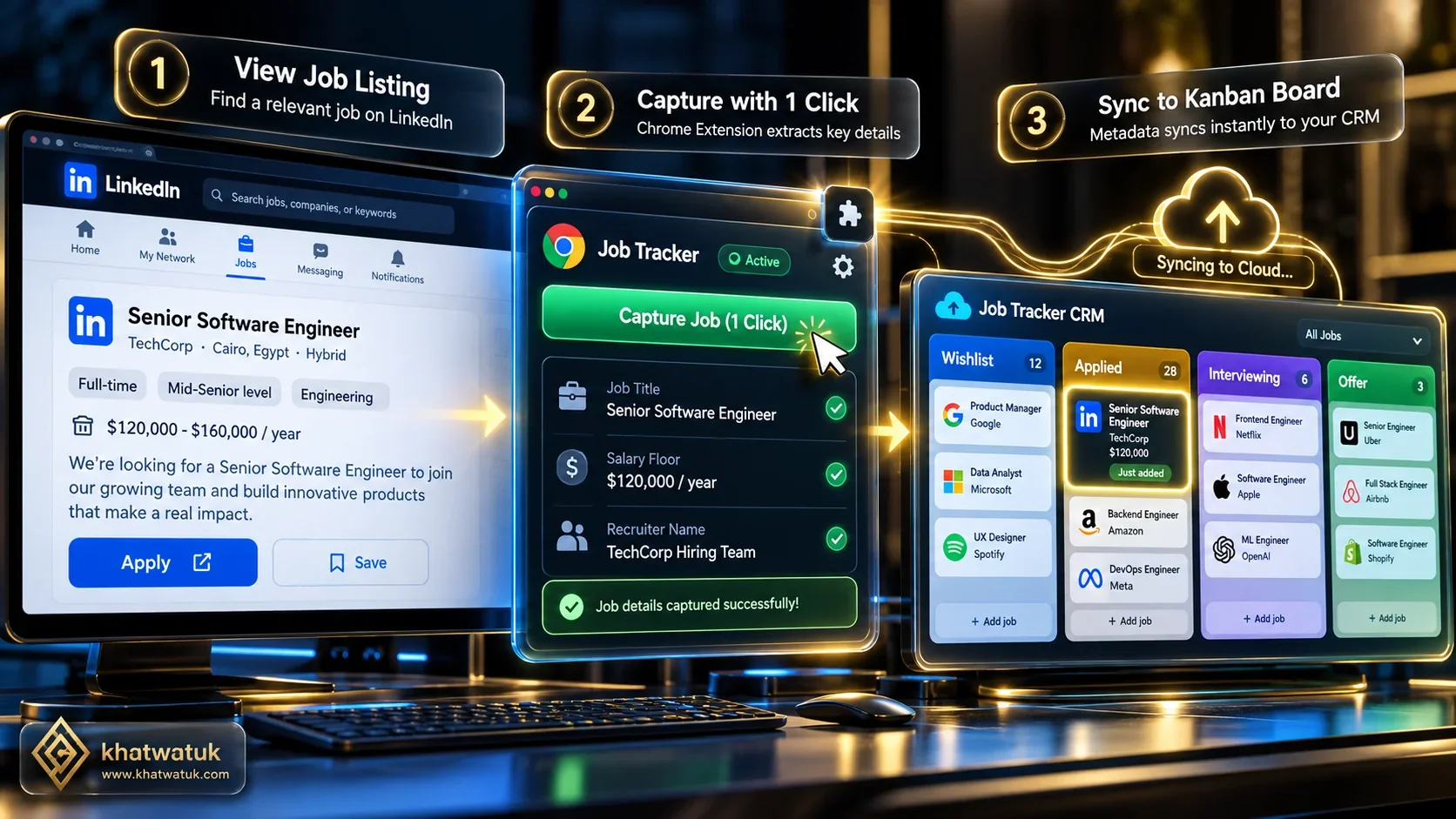 Browser extensions extract vacancy metadata directly from web pages and sync seamlessly with your career dashboard.
1-Click Web Scraping and Job Board Compatibility
A high-performing tracker must recognize vacancies across diverse platforms. The best tools function seamlessly on LinkedIn, Indeed, Glassdoor, ZipRecruiter, and enterprise portals like Workday, Greenhouse, and Lever. When you view a listing, the extension should automatically detect the job elements, extract required data, and present a preview overlay without requiring manual data entry.
Visual Kanban CRM and Pipeline Customization
The gold standard for application organization is the visual Kanban board. Standard stages typically include Bookmarked, Applied, Phone Screen, Technical Interview, and Offer. Leading extensions allow candidates to drag and drop job cards between stages, add custom tags, record salary negotiations, and attach specific resume PDF files.
Automated Follow-Up Reminders and Interview Scheduling
Following up with recruiters at the right time significantly increases interview rates. Advanced tracking extensions provide built-in reminder engines that prompt candidates to send follow-up notes five business days after applying, or prepare questions two days before a scheduled interview.
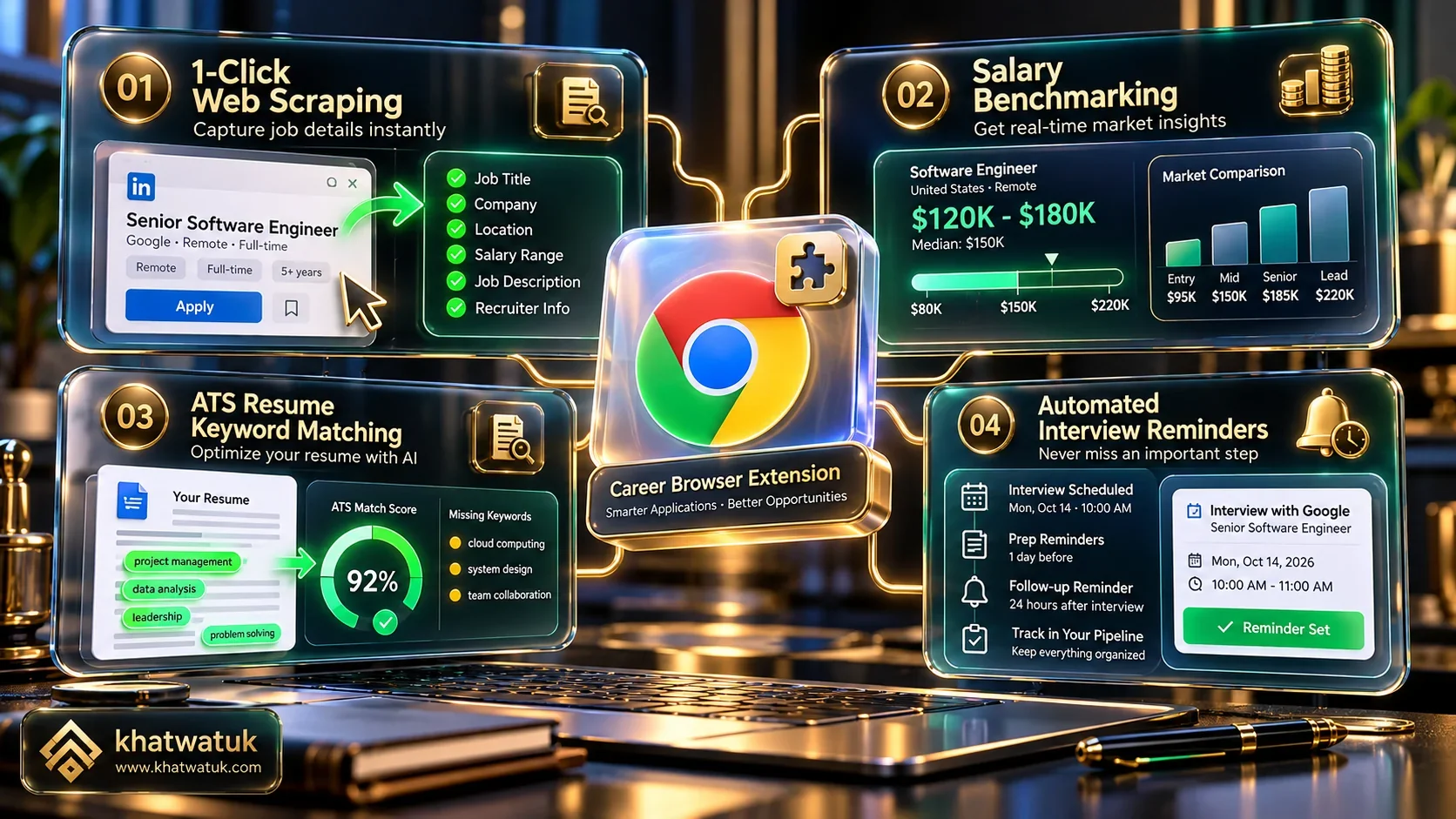 Modern extensions balance automated data extraction, form autofill, and resume tailoring capabilities.
Top 5 Job Application Tracker Chrome Extensions Compared
We conducted hands-on testing of the five leading Chrome extensions designed for tracking and managing job applications in 2026.
| Extension | Primary Architecture | Pricing Structure | Parsing Accuracy | Best For |
|---|---|---|---|---|
| Teal | Browser Copilot & Career CRM | Free / $9/wk ($29/mo) | 98% (40+ Platforms Supported) | All-around job saving, career CRM, and resume tailoring |
| Huntr | Dedicated Kanban Application Tracker | Free / $40/mo (Pro) | 95% (Broad Board Coverage) | Deep Kanban pipeline customization & notes |
| Simplify | Autofill Copilot & Job Tracker | 100% Free | 92% (ATS Focused) | Instant form autofill combined with job tracking |
| Careerflow | AI Career Copilot Extension | Free / $19.99/mo (Premium) | 90% (LinkedIn Focused) | LinkedIn profile optimization and networking tracking |
| Jobscan | ATS Keyword Matcher & Prep Tracker | Free / $49.95/mo ($89.95/qtr) | 100% Safe (Preparation Mode) | Matching resume keywords to saved jobs before applying |
Decision Framework: Selecting Your Ideal Platform
- Choose Teal if: You want an all-in-one browser copilot that links 1-click job bookmarking directly to an interactive CRM and resume builder. Learn more in our Teal review and career tool analysis.
- Choose Huntr if: You require flexible, multi-column Kanban board layouts and complex custom metrics.
- Choose Simplify if: Your priority is saving time through automated 1-click form autofill while keeping a basic application history.
- Choose Careerflow if: You spend most of your time on LinkedIn and want in-browser tips to boost profile visibility.
- Choose Jobscan if: You want to ensure your resume scores 80%+ against target ATS keywords for each saved role.
Privacy and Permissions: Securing Your Browser and Data
Installing browser extensions requires granting permissions to interact with webpage content. Job seekers must evaluate privacy standards to protect personal contact information, resumes, and browsing history.
Understanding Extension Manifest Permissions
When you install a job tracker, Chrome typically displays a permission request such as "Read and change your data on the websites you visit." Legitimate extensions like Teal and Huntr utilize this permission solely to read job listing DOM elements (such as job title, company name, and salary) when you click the save button. They do not log banking information, passwords, or unrelated browsing activity.
Safe Practices When Installing Career Extensions
To ensure complete safety when using browser tools, stick to extensions with established security records on the Chrome Web Store. Verify that the extension is verified by Google, review recent user feedback, and select platforms that enforce transparent data encryption protocols.
Advanced Workflow: Connecting Saved Jobs to ATS Resume Optimization
Saving job listings is only the first step. The true power of a Chrome extension tracker emerges when you link saved listings directly to resume customization.
Transforming Raw Job Postings into Keyword Blueprints
When you save a position via a Chrome extension, the full text of the job description is preserved. Instead of reading through lengthy paragraphs manually, career tools parse the posting to highlight required hard skills, preferred software proficiencies, and leadership competencies.
Closing Qualification Gaps Before Hitting Submit
By feeding the saved description into Jobscan, you can immediately identify critical keywords missing from your current resume. Adjusting your bullet points to reflect these terms before submitting ensures your application sails past ATS filters. For further insights on resume builders, explore our guide on the best AI resume builder tools in 2026.
Step-by-Step Setup Guide: Building Your Automated Pipeline in 15 Minutes
Follow this 15-minute implementation blueprint to establish a structured, automated application pipeline:
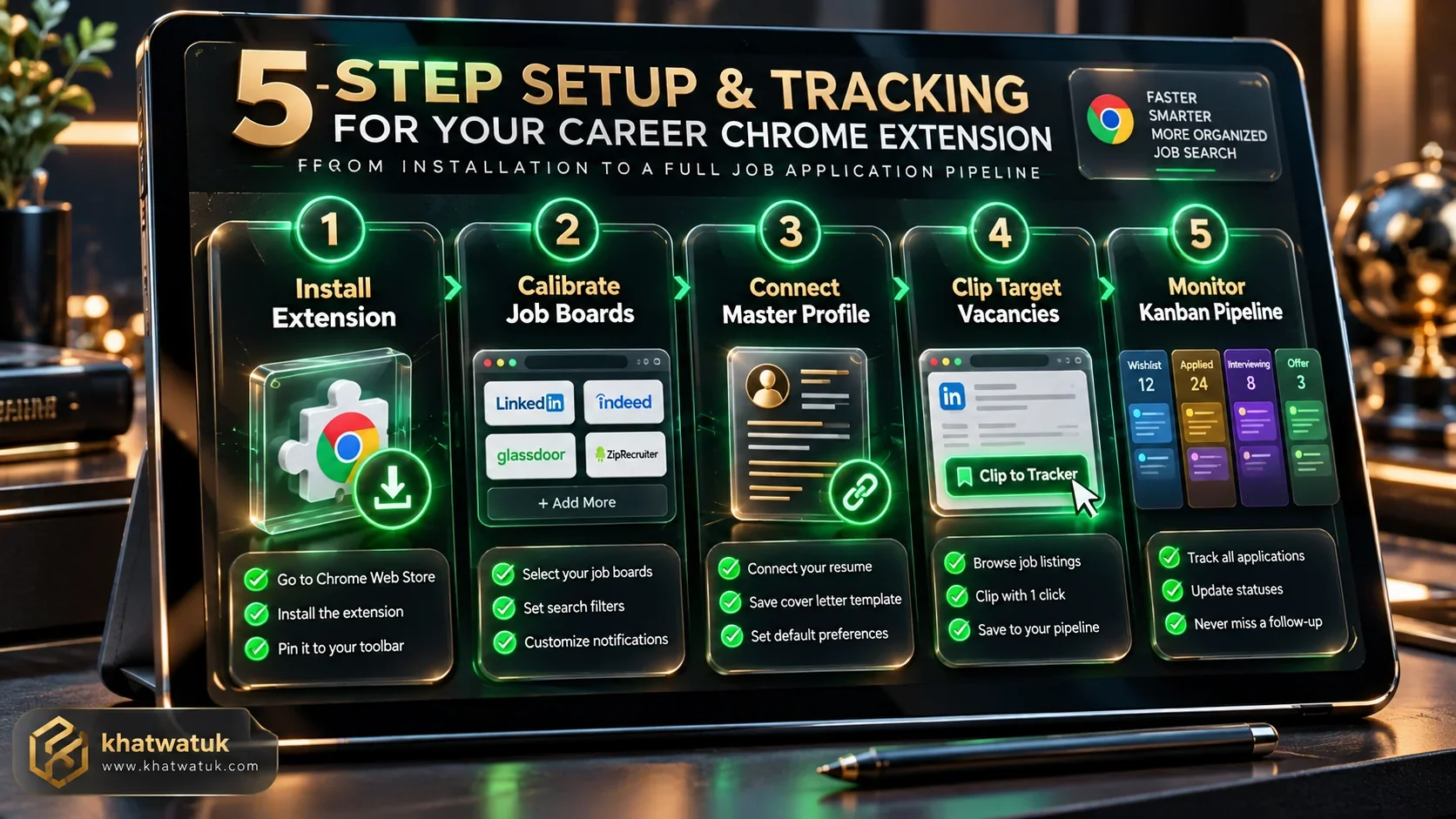 Setting up your browser extension pipeline takes under fifteen minutes and eliminates application disorganization.
1. Installing and Calibrating Your Selected Chrome Extension
Visit the Chrome Web Store, locate your chosen extension (such as Teal or Huntr), and click Add to Chrome. Pin the extension icon to your browser toolbar for instant 1-click access while navigating job boards.
2. Creating Custom Kanban Stages and Salary Targets
Open your web dashboard and configure your tracking pipeline stages. Set up columns for Wishlist, Applied, First Round, Technical Assessment, and Offer. Define your baseline salary expectations so the extension flags roles matching your target compensation.
3. Bookmarking Roles and Automating Follow-Up Checkpoints
Navigate to LinkedIn or Indeed, locate relevant roles, and click the extension icon to bookmark them. Set automated reminder prompts to follow up with recruiters five days after submission to keep applications moving forward.
Explore Related AI Career & Job Application Guides
Frequently Asked Questions (FAQ)
Find answers to common questions about job tracking Chrome extensions, privacy, and pipeline management:
What is the best job application tracker Chrome extension in 2026?
Teal is widely regarded as the best overall job application tracker Chrome extension. It combines 1-click job saving across 40+ job sites with an integrated visual Kanban CRM, resume tailoring tools, and recruiter contact management.
Are job tracker Chrome extensions free to use?
Yes. Most leading extensions (including Teal, Huntr, and Simplify) provide robust free plans that support unlimited job saving, basic Kanban organization, and browser clipping without requiring a credit card.
How does a job tracking extension extract data from LinkedIn?
When activated on a job listing page, the extension parses the Document Object Model (DOM) of the browser tab. It identifies designated elements for job title, company name, compensation ranges, and description text, copying them directly to your tracking dashboard.
Do job tracker extensions slow down your web browser?
No. Well-engineered extensions run lightweight background scripts that activate only when you interact with the extension icon or navigate to recognized career portals, maintaining normal browser performance.
What is the difference between Teal and Huntr?
Teal focuses on an all-in-one career ecosystem, linking job saving to resume building, ATS keyword tailoring, and job board tracking. Huntr focuses heavily on deep, customizable Kanban boards and flexible pipeline visualization.
Can a job tracker extension help you autofill job applications?
Some extensions, such as Simplify and Teal, provide form autofill capabilities alongside job tracking. They populate standard candidate details across corporate career sites to accelerate form submission.
Is my personal information safe when using career Chrome extensions?
Yes, provided you choose reputable extensions from verified developers. Verified extensions adhere to strict Chrome Web Store security standards and use data encryption to protect user credentials.
Why should I use a Chrome extension instead of an Excel spreadsheet?
A Chrome extension saves job postings in seconds without copy-pasting, preserves expired job descriptions permanently, and provides automated follow-up reminders that spreadsheets cannot match.
