

To master how to autofill job applications in 2026, candidates must deploy a dedicated browser extension copilot (such as Simplify or Teal) that maps a centralized candidate profile directly into enterprise ATS form fields (Workday, Greenhouse, Lever) with 1 click—compressing 45-minute questionnaires into under two minutes while preserving human review for custom questions.
Filling out repetitive enterprise hiring portals manually drains candidate momentum and leads to data entry fatigue. By automating form population through client-side browser extensions, you reclaim hours each day while eliminating typos in your work history and contact records.
Quick Verdict: The Optimal Autofill Copilot
For the vast majority of active job seekers, the most efficient workflow combines Simplify for lightning-fast 1-click form population across Greenhouse, Lever, and Workday portals, paired with Teal to organize bookmarks and manage pipeline CRM stages. Before submitting, run periodic scans on Jobscan to ensure your resume matches target keywords.

The 45-Minute Portal Trap: Why Manual Form Filling Fails
Corporate recruiting departments rely on comprehensive applicant tracking software to standardize incoming talent data. However, the candidate experience on platforms like Workday and Taleo is notoriously broken, forcing job seekers to re-enter data already present on their resumes.
This structural repetition causes over 60% of top-tier talent to abandon applications midway through multi-page wizards. Modern autofill copilots solve this dilemma by bridging candidate profiles directly to web forms.
The Multi-Step Nightmare of Enterprise Career Forms
A typical enterprise job application requires navigating through four to six separate screens: personal details, employment history, educational credentials, diversity declarations, and custom screening prompts.
Manual completion of these steps takes between 30 and 45 minutes per role. Intelligent browser extensions detect underlying input containers and populate them accurately in under three seconds.
Why Copilot Autofill Outperforms Unmonitored Bot Blasting
In reaction to form fatigue, some candidates turn to automated scraping bots that blast 500 unedited submissions overnight. This approach frequently backfires, triggering platform bot filters and burning candidate reputation.
Supervised browser copilots provide the perfect balance. They eliminate 95% of tedious typing while keeping human eyes on the final submission button to ensure context and accuracy.
How Autofill Technology Works: The DOM Mapping Framework
Modern browser autofill extensions do not simply paste text; they interact dynamically with the web page Document Object Model (DOM) to populate complex portal architectures.
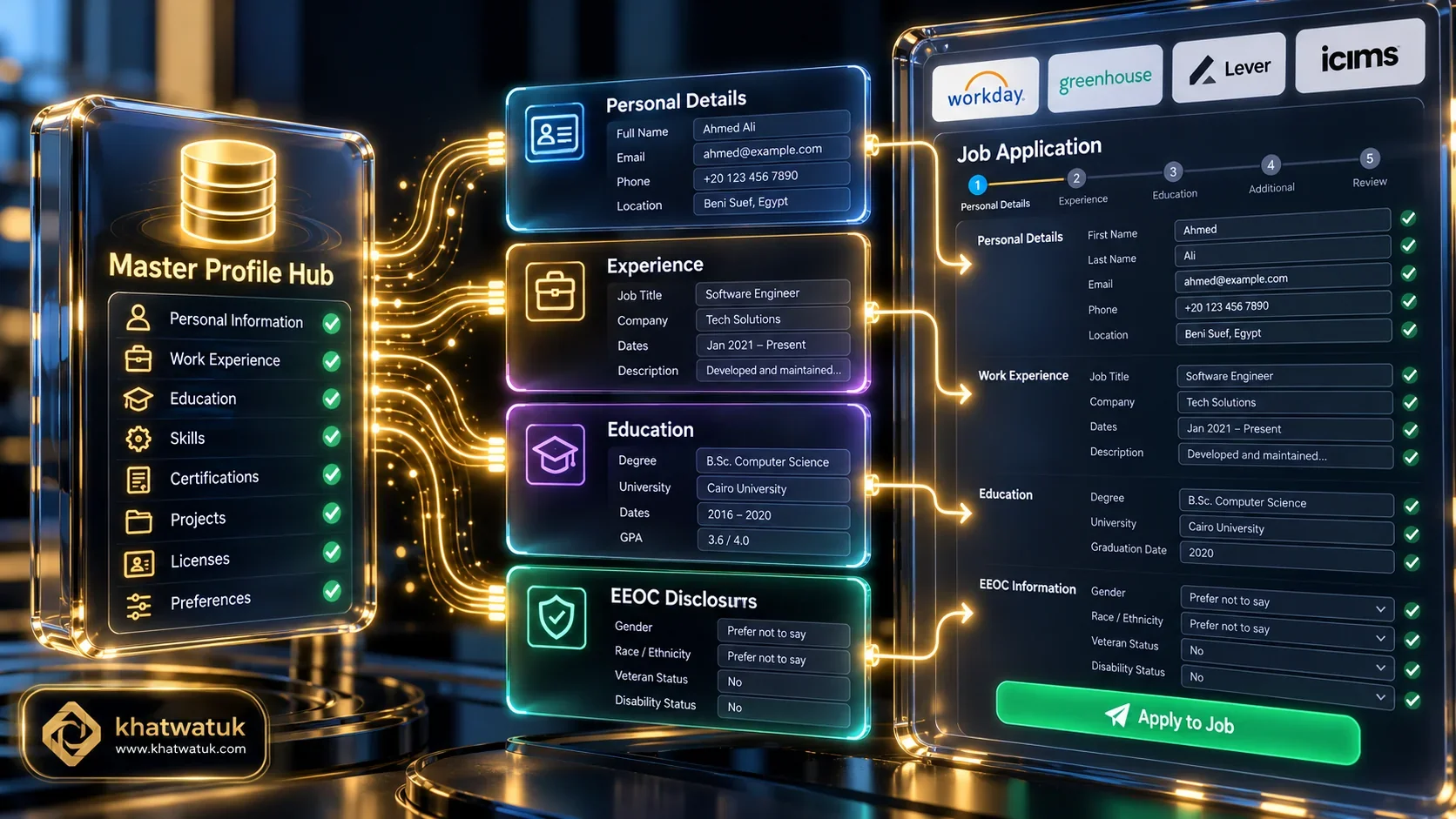
The Master Profile: Configuring Work History and Disclosures Once
The backbone of reliable autofill is a complete master profile stored in your extension. By saving verified dates, titles, bullet points, and degree names once, you guarantee 100% data consistency across every portal.
To ensure your underlying resume passes automated ranking algorithms, review our comprehensive guide on best AI resume builder in 2026 to format your credentials for seamless parsing.
How Browser Extensions Inject Data into Enterprise Forms
When you open an application on Greenhouse, Lever, or Workday, the extension inspects the HTML form elements, identifying input labels, dropdown menus, and date pickers.
By dispatching standard browser input and change events, the extension populates the fields exactly as a human user typing on a keyboard would, bypassing anti-bot challenge scripts.
Handling Custom Questionnaires and EEOC Disclosures
Nearly every corporate application includes legally mandated demographic questions, work authorization verifications, and compensation expectations.
Pre-configuring your EEOC preferences and salary ranges in your copilot allows the tool to select corresponding dropdown values instantly, saving minutes per application.
Top 5 Tools to Autofill Job Applications Compared
We tested leading application tools across live corporate portals to evaluate autofill speed, accuracy, and platform compatibility.
| Tool Name | Autofill Model | Supported Portals | Autofill Speed | Pricing Model |
|---|---|---|---|---|
| Teal | Supervised Copilot & CRM Tracker | 50+ portals (Workday, Lever, Greenhouse) | 3 - 5 seconds / form | Freemium / $9/wk - $29/mo |
| Simplify | 1-Click Community Extension | Greenhouse, Lever, Workday, Taleo | 2 - 3 seconds / form | 100% Free Forever |
| Jobscan | ATS Keyword Matcher & Form Prep | Corporate ATS Requisitions | Pre-application scan (30s) | Freemium / $49.95/quarter |
| LazyApply | Autonomous High-Volume Bot | LinkedIn Easy Apply, Indeed | Automated background runs | From $99 Lifetime |
| LoopCV | Algorithmic Matching Loop | Multi-board automated loops | Scheduled daily batches | From $49/month |
Streamlining your application workflow with verified tools eliminates repetitive typing while keeping your candidate profile completely compliant:
Review the profiles below to select the tool that best fits your job hunt style:
- Choose Teal if you want a comprehensive career copilot that connects 1-click form autofill with an active job search CRM tracker.
- Choose Simplify if you want a 100% free community extension focused purely on instant form completion across Greenhouse and Lever.
- Choose Jobscan if you need to reverse-engineer ATS keyword requirements before initiating form autofill.
- Choose LazyApply if you prioritize raw hands-free submission volume across LinkedIn and Indeed.
- Choose LoopCV if you need algorithmic matching paired with automated portal and email outreach loops.
Major ATS Portals Broken Down: Workday, Greenhouse & Lever
Different applicant tracking systems feature drastically different web architectures. Understanding how autofill extensions navigate each platform ensures zero friction during your search.
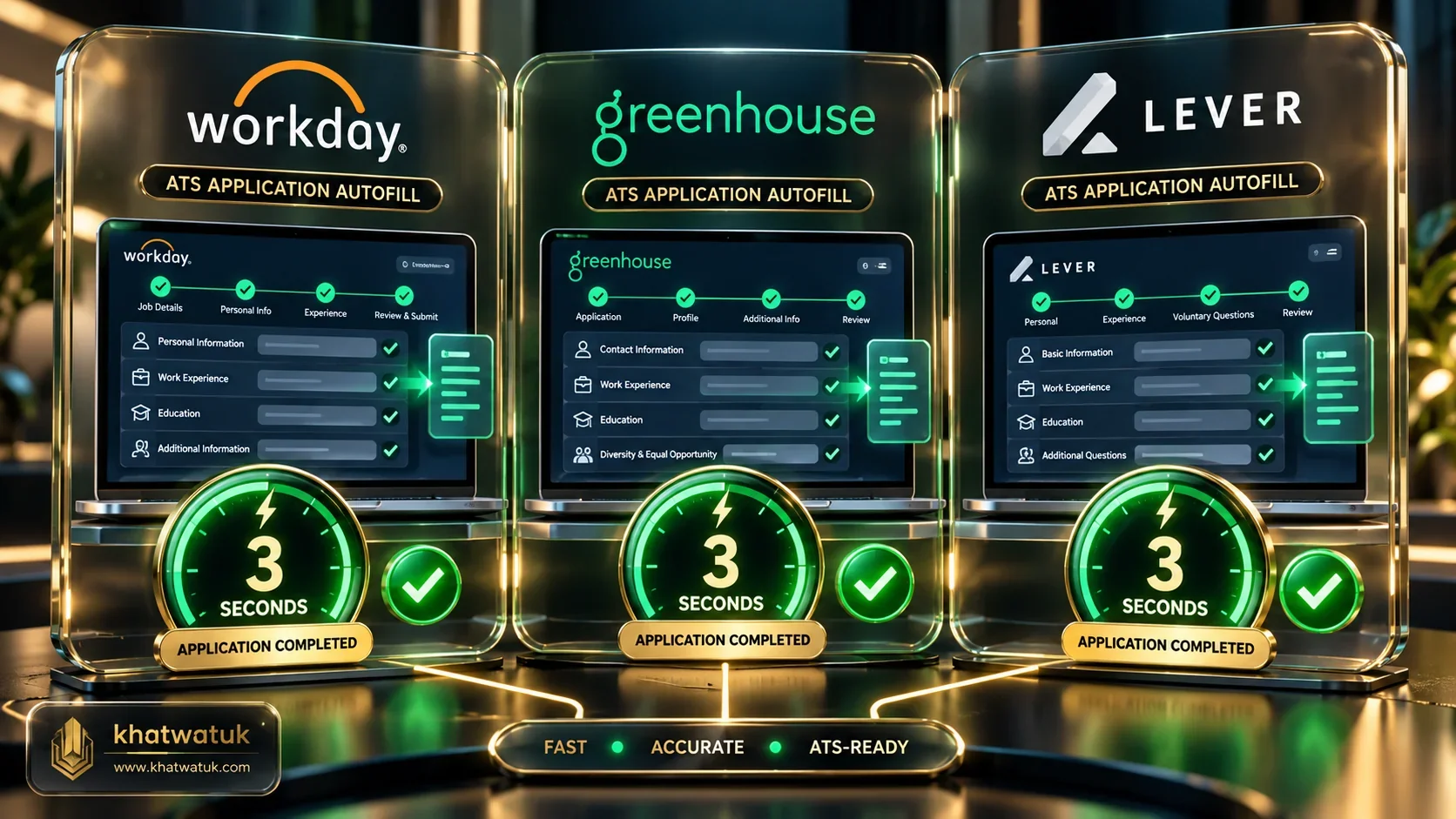
The table below summarizes autofill compatibility and completion benchmarks across major corporate hiring platforms:
| Applicant Tracking System | Form Architecture | Autofill Success Rate | Average Completion Time |
|---|---|---|---|
| Workday | Multi-step account wizard | 92% field match | Under 90 seconds |
| Greenhouse | Single-page responsive form | 99% field match | Under 30 seconds |
| Lever | Single-page clean layout | 99% field match | Under 25 seconds |
| Taleo / Legacy ATS | Multi-step legacy table | 85% field match | Under 2 minutes |
Conquering the Workday Multi-Page Wizard
Workday requires creating a separate candidate account for every company you apply to. When you log in, modern autofill extensions detect the progression bar and populate each section as you advance.
Instead of re-typing previous job titles, start dates, and supervisor names across multiple tabs, your extension completes each container in a single click.
1-Click Form Filling on Greenhouse and Lever
Greenhouse and Lever feature modern single-page architectures. Because all input fields reside on a single DOM hierarchy, copilot extensions populate the entire page instantly.
Your resume PDF, portfolio links, LinkedIn URL, and phone number are mapped directly into place in under 10 seconds.
Edge Case Scenarios and Mistakes to Avoid
While autofill saves enormous amounts of time, careless execution creates glaring submission errors that recruiters discard immediately:
- Leaving Unresolved Bracketed Placeholders: Submitting cover letters containing text like "[Company Name]" leads to instant disqualification.
- Transposed Salary Range Entries: Failing to verify whether an input expects an annual figure or hourly rate can accidentally report incorrect compensation requirements.
- Mismatched Work Authorization Answers: Rushing past visa sponsorship checkboxes without confirming accuracy can misclassify your candidacy.
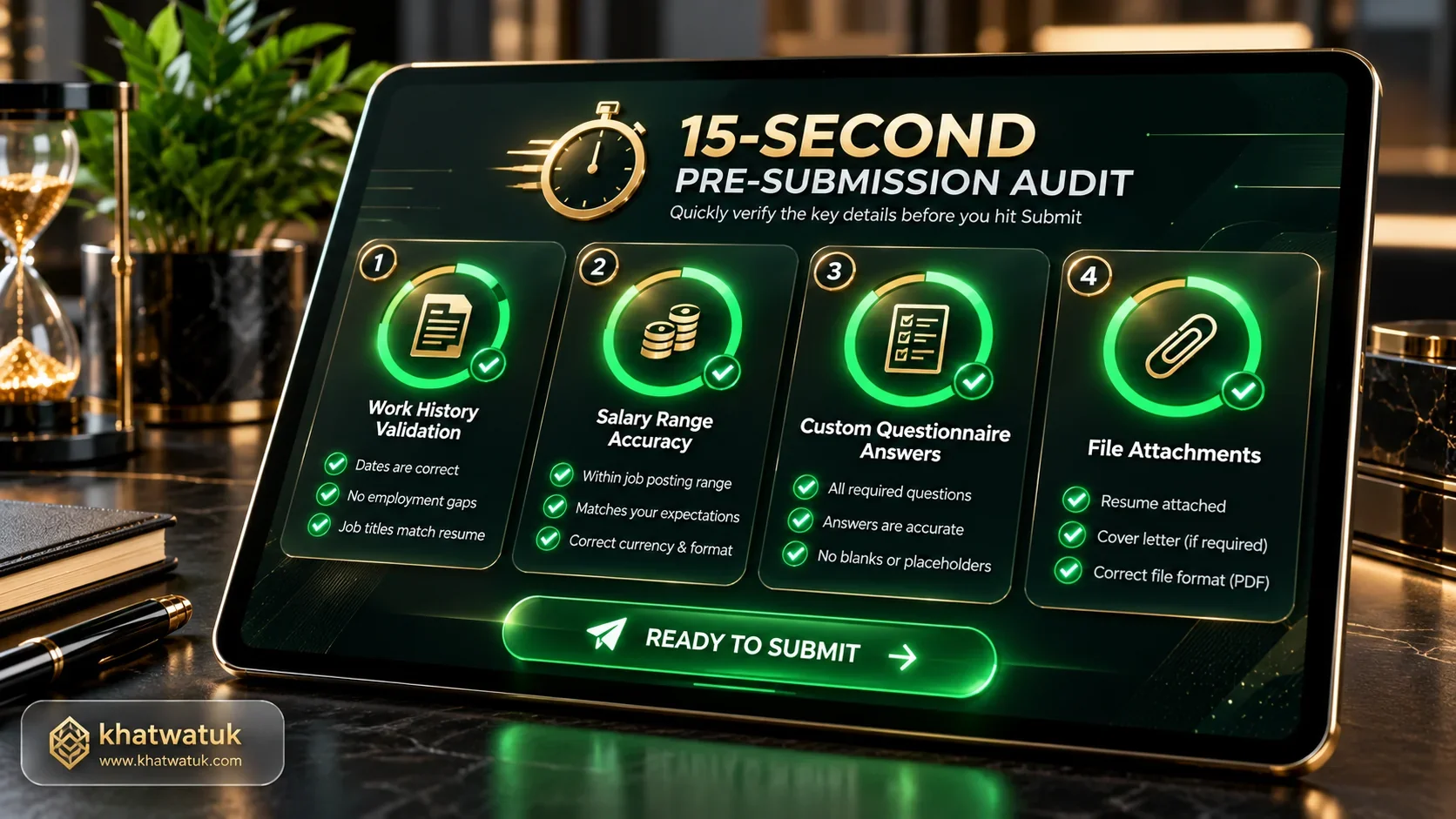
- Skipping the Final Form Audit: Failing to perform a 15-second visual scan before clicking submit risks submitting outdated phone numbers or mismatched addresses.
Step-by-Step Tutorial: Submitting Your First Autofilled Application
Follow this structured 15-minute tutorial to configure your extension and submit your first automated application with complete accuracy.
1. Building Your Master Profile Repository
Install your chosen autofill copilot from the Chrome Web Store and navigate to profile settings. Enter your complete contact info, work history dates, bullet points, and social links.
This master repository serves as the single source of truth, ensuring error-free data transmission into corporate portals.
2. Triggering the Extension on Career Portals
Before filling forms, optimize your resume keywords in Jobscan to ensure your match score clears 80% on corporate ranking filters.
Once your tailored PDF is ready, navigate to the employer application page and click the copilot icon. In seconds, all standard fields are filled.
3. Conducting the 15-Second Pre-Submission Audit
Take 15 seconds to glance through populated fields. Verify that salary numbers match your expectations, attach your tailored resume, and answer any unique employer-specific prompts.
Click submit with complete confidence in a tailored, professional application submitted in a fraction of manual time.
Frequently Asked Questions (FAQ)
Here are direct answers to the most common questions regarding how to autofill job applications safely and efficiently:
How do you autofill job applications?
You autofill job applications by installing a browser copilot extension (such as Simplify or Teal), building a centralized profile of your career details, and triggering 1-click population when landing on corporate career sites like Workday and Greenhouse.
What is the best browser extension to autofill job applications in 2026?
The top extensions are Simplify for 100% free form population across Greenhouse and Lever, and Teal for connecting browser autofill with an integrated career CRM and job search tracker.
How do I autofill Workday job applications without errors?
Ensure your master profile contains formatted start and end dates for every position, exact job titles, and standard salary ranges. Advance through the Workday wizard clicking autofill on each screen, and perform a quick visual review before final submission.
Can employers detect when you autofill job applications?
Employers cannot detect browser copilot autofill because extensions populate fields via standard client-side browser DOM events. However, unmonitored scraping bots can be detected through unnatural submission velocities and repetitive IP patterns.
Is it safe to autofill job applications using Chrome extensions?
Yes, verified extensions like Teal and Simplify are completely safe. They keep you in control of the final submission click and comply with user privacy regulations, encrypting candidate information.
Does autofill work on Greenhouse and Lever career sites?
Yes, Greenhouse and Lever have the highest autofill success rates (above 99%) because their single-page responsive layouts allow extensions to detect and populate all fields simultaneously in seconds.
How do autofill extensions handle custom screening questions?
Standard questions (salary requirements, work authorization, relocation) are answered from your saved preferences. Unique, company-specific prompts are highlighted for candidate review, ensuring custom answers remain tailored and accurate.
What is the biggest mistake candidates make when autofilling applications?
The biggest mistake is trusting automated input blindly without a 15-second visual review. Skipping this step can lead to transposed salary numbers, incorrect visa disclosures, or unresolved bracketed placeholders in cover letters.
