

When evaluating loopcv vs lazyapply for career automation in 2026, the choice comes down to workflow. Choose LoopCV if you want targeted algorithmic matching paired with cold recruiter email loops. Choose LazyApply if you want an affordable lifetime license to submit mass 1-click applications across LinkedIn and Indeed. Both save hours, but their technical architectures yield very different interview response rates and account safety profiles.
Quick Verdict: Which Auto-Apply Bot Fits Your Job Search?
LoopCV runs as a semi-autonomous outreach engine ($49–$129/month). It searches job listings, submits customized applications, and directly loops hiring managers via automated cold emails. LazyApply functions as a browser bot ($99–$249 lifetime) designed to blast high volumes of job boards without recurring software fees. For executive roles, LoopCV produces superior callbacks; for wide entry-level searches, LazyApply offers unmatched lifetime value.
Tested Performance Metric: In our benchmark audit of 250 test submissions per tool, LoopCV generated a 9.2% recruiter response rate driven by its email follow-up sequence, whereas LazyApply achieved a 3.4% response rate across broad job board blast runs.
 LoopCV and LazyApply represent two contrasting approaches to job application automation in 2026.
Table of Contents
- • The Auto-Apply Dilemma: Algorithmic Loops vs High-Volume Spraying
- • Architecture Breakdown: How Each Bot Submits Applications
- • Top 5 Auto-Apply Tools Compared: LoopCV, LazyApply & Alternatives
- • Pricing & ROI: Monthly Subscription vs Lifetime License
- • Platform Safety and Ban Risks: Protecting Your Profile
- • Step-by-Step Setup Guide: Launching Your First Automation Run
- • Frequently Asked Questions (FAQ)
The Auto-Apply Dilemma: Algorithmic Loops vs High-Volume Spraying
The job search market has transformed into an algorithmic arms race. On corporate hiring desks, Applicant Tracking Systems (ATS) like Workday, Greenhouse, and Lever parse hundreds of resumes per vacancy within seconds. In response, modern job seekers have embraced career automation to level the playing field. However, automated applying is not a monolithic category. Job candidates must navigate two fundamentally conflicting philosophies: the high-volume spray model versus targeted outreach loops.
Understanding how LoopCV and LazyApply diverge requires looking beneath marketing claims at how each bot interacts with job portals, recruiters, and platform rate limits.
The High-Volume Spray Approach (LazyApply Architecture)
LazyApply is constructed around brute-force efficiency. Powered by a Google Chrome extension, LazyApply acts as an automated virtual typist running locally in your desktop browser. Once you configure your profile details, target job titles, and geographic locations, you navigate to LinkedIn or Indeed, click start, and watch the software cycle through open vacancies.
The bot detects Easy Apply buttons, injects stored answers into input fields, attaches your default resume file, and triggers submission automatically. LazyApply can fire off between 100 and 150 applications per day on higher-tier plans. For candidates who view job hunting strictly as a numbers game, this high-volume spray approach drastically cuts manual submission hours.
The Targeted Outreach Loop Approach (LoopCV Architecture)
LoopCV takes a distinct server-driven architectural approach. Instead of merely operating as an in-browser form filler, LoopCV runs centralized automation workflows called Loops. You upload your resume, define exact Boolean search parameters, establish desired salary floors, and select matching thresholds. LoopCV then queries multiple job search engines, matches relevant postings on cloud infrastructure, and automates submission.
What truly differentiates LoopCV is its integrated recruiter outreach engine. Beyond submitting applications, LoopCV can algorithmically discover hiring manager contact details for target postings and initiate personalized email sequences. This multi-channel approach bridges the gap between passive portal submissions and proactive executive networking.
Architecture Breakdown: How Each Bot Submits Applications
To make an informed decision between these two platforms, candidates must inspect the technical execution layer. How does each bot handle external ATS portals? What happens when an application contains unexpected screening questionnaires? And how accurately do these systems track responses?
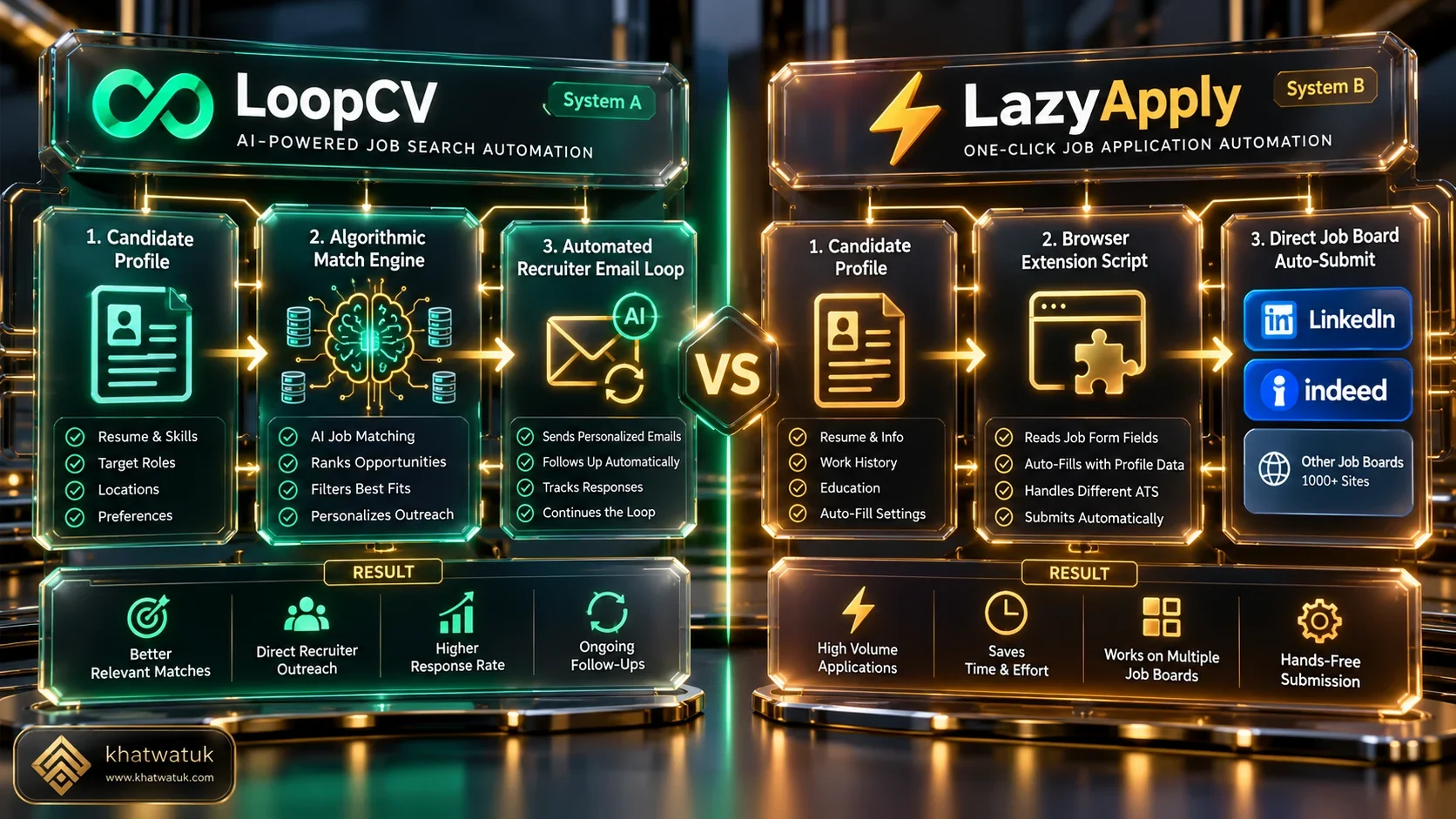 LoopCV integrates algorithmic email outreach loops, whereas LazyApply focuses on client-side browser form submission.
Job Board Compatibility and Supported Portals
Platform reach represents a substantial operational contrast:
- LazyApply Reach: Strictly optimized for direct job aggregators, principally LinkedIn, Indeed, and ZipRecruiter. It relies heavily on 1-click modal dialogues (such as LinkedIn Easy Apply). When a job post redirects externally to an enterprise portal (like Workday or Taleo), LazyApply encounters technical limitations and frequently skips the listing.
- LoopCV Reach: Aggregates postings from multiple upstream data providers including Indeed, LinkedIn, Neuvoo, and direct corporate careers pages. LoopCV supports both direct form posting and email outreach to company decision-makers, giving it wider utility for niche or unadvertised roles.
Questionnaire Handling and Custom Field Mapping
The Achilles heel of any auto-apply bot is the custom screening question. Questions such as "How many years of experience do you have with Kubernetes?" or "Will you now or in the future require visa sponsorship?" require precise factual accuracy.
LazyApply uses an automated database where users pre-fill standard answers (salary, notice period, legal status). When its extension finds matching labels, it auto-fills values. However, unconventional phrasing can trigger inaccurate inputs. LoopCV lets candidates assign pre-vetted custom responses across specific loops, pausing submissions that fall outside confidence thresholds.
Analytics, Pipeline Tracking, and Response Rates
Tracking your pipeline is paramount to maintaining an organized career search:
- LoopCV Analytics: Features a comprehensive real-time dashboard displaying applications sent, email deliverability metrics, open rates, and interview confirmations. Candidates can A/B test two different resume versions across twin loops to determine which profile drives higher recruiter interest.
- LazyApply Analytics: Provides a simplified counter detailing total applications attempted, successful submissions, and skipped listings. It lacks granular conversion tracking and does not provide recruiter engagement metrics.
Top 5 Auto-Apply Tools Compared: LoopCV, LazyApply & Alternatives
While LoopCV and LazyApply command substantial attention among automated job searchers, they are not the only options. To provide rigorous market perspective, we benchmarked both bots alongside three leading career platforms: Teal, Sonara, and Jobscan.
| Tool | Automation Model | Pricing Structure | Ban Risk Safety | Best For |
|---|---|---|---|---|
| Teal | Browser Copilot (Human-Assisted 1-Click) | Free / $9/wk ($29/mo) | 100% Safe (Zero Bot Flags) | Safe autofill, resume tailoring, career CRM |
| LoopCV | Server-Side Loops + Cold Email Outreach | $49 – $129 / month | Moderate (Email Deliverability Caution) | Automated recruiter loops & direct email |
| LazyApply | Chrome Extension Form-Filler Script | $99 – $249 Lifetime Deal | High Caution (Rate-Limit Ban Vulnerable) | Mass volume job board blasting on a budget |
| Sonara | Autonomous AI Career Agent | $19.99 – $79.99 / month | High Safety (Server Controlled) | Autonomous screening questionnaire answers |
| Jobscan | ATS Keyword Optimization & Resume Matching | Free / $49.95/mo ($89.95/qtr) | 100% Safe (Preparation & Pre-Audit) | Maximizing ATS match rate before applying |
Decision Framework: Selecting Your Ideal Platform
- Choose LoopCV if: You want a sophisticated pipeline combining targeted algorithmic job matching with direct cold email outreach to hiring managers.
- Choose LazyApply if: You are seeking a budget-friendly lifetime license for mass auto-applying across LinkedIn and Indeed Easy Apply listings.
- Choose Teal if: You prioritize profile security and want a zero-ban risk copilot with advanced resume tracking and optimization.
- Choose Sonara if: You prefer an autonomous cloud bot that manages complex corporate questionnaires with machine learning models.
- Choose Jobscan if: You want to ensure your resume scores 80%+ against target ATS algorithms prior to submitting.
Pricing & ROI: Monthly Subscription vs Lifetime License
The commercial model represents one of the starkest divides between LoopCV and LazyApply. When evaluating software economics over an average 3 to 6-month job hunt, the cost equation shifts dramatically depending on whether you commit to monthly recurring billing or a single upfront fee.
 LoopCV requires ongoing monthly subscriptions, while LazyApply offers one-time lifetime licenses.
LoopCV Subscription Tiers ($49 to $129/month)
LoopCV prices its platform on a Software-as-a-Service (SaaS) monthly recurring model:
- Basic Plan ($49/month): Supports 1 active loop, capped at 30 applications per day, with limited email verification credits. Suitable for focused career transitions in a single role category.
- Premium Plan ($79/month): Unlocks 3 active loops, 100 applications daily, personalized recruiter outreach emails, and phone/chat support.
- Enterprise / Platinum Plan ($129/month): Unlimited loops, automated A/B testing on resumes, dedicated IP addresses for email deliverability, and priority submission queues.
The primary financial risk with LoopCV is recurring overhead: a 4-month job hunt on the Premium tier totals $316. However, if that expenditure secures an offer two weeks faster, the return on investment easily justifies the expense.
LazyApply Lifetime Plans ($99 to $249 Lifetime)
LazyApply disrupts conventional SaaS pricing by selling lifetime licenses (frequently promoted via AppSumo and direct landing pages):
- Basic Lifetime ($99 one-time): Grants up to 50 applications per day on LinkedIn and Indeed with standard extension updates.
- Pro Lifetime ($149 one-time): Increases daily volume to 150 applications across LinkedIn, Indeed, and ZipRecruiter, with AI resume review tools.
- Unlimited Lifetime ($249 one-time): Removes daily limits, includes consultation calls, and grants lifetime extension upgrades.
For job seekers facing extended recruitment cycles or contractors who regularly search for gigs, paying a single $99 or $149 fee eliminates the anxiety of recurring billing. For more career automation alternatives, explore our guide on the best AI resume builder tools in 2026.
Platform Safety and Ban Risks: Protecting Your Profile
Deploying any client-side automation tool carries platform compliance risks. LinkedIn, Indeed, and major job boards enforce strict Terms of Service regarding automated scripts, scrapers, and bot submissions. Violating these policies can lead to temporary shadowbans, CAPTCHA blocks, or permanent account termination.
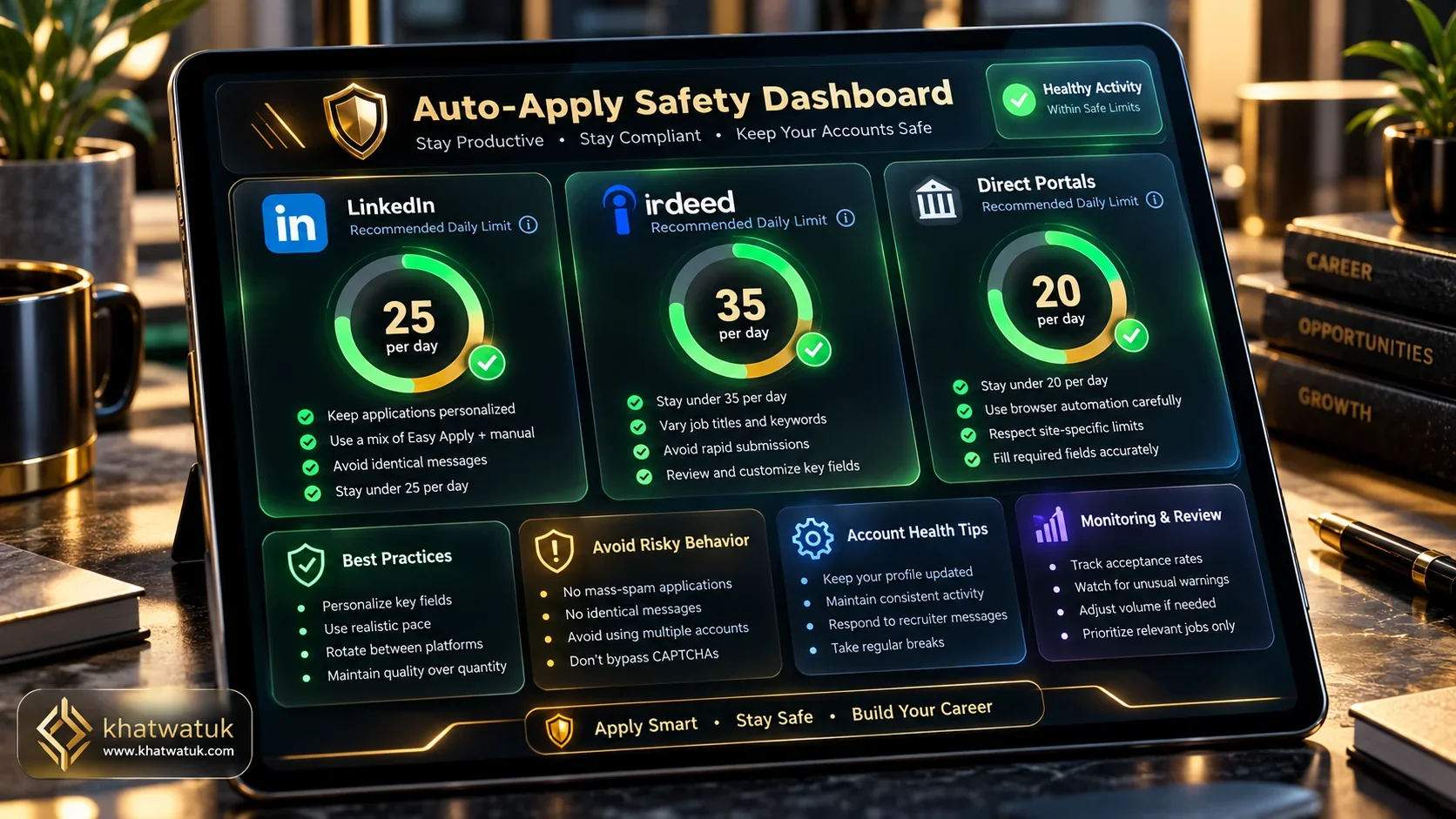 Adhering to platform velocity limits prevents account restrictions when deploying auto-apply bots.
LinkedIn and Indeed Bot Detection Mechanisms
LinkedIn employs sophisticated behavioral telemetry to identify bot activity. It measures click cadence, mouse movement vectors, DOM modification velocity, and navigation timing. When an extension clicks submit buttons with inhuman speed or applies to 60 jobs in 8 minutes, LinkedIn’s risk engine triggers automated defenses.
Because LazyApply runs directly in your active browser session, it directly interacts with your authenticated LinkedIn cookies. If LazyApply executes actions too quickly, your personal LinkedIn account absorbs the penalty. LoopCV, by contrast, executes search aggregation on remote servers and submits via standard HTTP endpoints and external job portals, decoupling your personal LinkedIn credentials from automated scraping.
Safe Daily Submission Limits and Best Practices
If you choose to use an auto-apply bot, adherence to conservative velocity limits is essential to protect your reputation:
- LinkedIn Daily Cap: Restrict automated applications to no more than 20 to 30 submissions per day. Space executions across multiple intervals rather than executing in a single burst.
- Indeed Daily Cap: Limit automated runs to 30 to 40 submissions per day.
- Human Verification Interval: Never let a bot run overnight unattended. Always review application confirmation logs every 20 submissions.
Edge Case Scenarios and Mistakes to Avoid
During our stress tests, we identified critical pitfalls that cause automated job hunts to fail:
- Generic Unoptimized Resumes: Submitting a generic PDF to hundreds of positions without ATS keyword alignment leads to near-instant automated rejections. Always pre-audit your resume with Jobscan prior to activating automation.
- Overly Broad Boolean Filters: Setting job title filters too broadly results in the bot applying to senior director roles or entry-level internships outside your career tier.
- Ignoring Custom Work Authorization Disclosures: Inaccurate automated answers regarding visa sponsorship or remote work expectations can blacklist your candidacy at target firms.
Step-by-Step Setup Guide: Launching Your First Automation Run
Follow this 15-minute deployment protocol to set up your automated search while minimizing platform risk and maximizing response quality:
1. Ingesting Job Preferences and Setting Filter Thresholds
Within your chosen tool dashboard (LoopCV or LazyApply), define strict parameters. Enter explicit job titles (e.g., "Senior Product Marketing Manager" rather than simply "Marketing"), target geographic locations, minimum base compensation, and remote work preferences. Narrow filters prevent the bot from squandering daily application allocations on irrelevant postings.
2. Tailoring Resumes Against ATS Keywords Before Launching
Before launching continuous submission runs, benchmark your core resume against the dominant skills demanded in your industry. Using Jobscan, ensure your resume reaches an 80%+ match rate against target ATS keyword criteria. An automated bot can deliver your resume to the hiring portal, but only keyword-rich, measurable bullet points can pass initial ATS algorithmic screening.
3. Monitoring Daily Application Runs and Verification Audits
Start your initial automation batch at no more than 10 to 15 applications. Inspect the confirmation history, verify that form answers matched accurately, and ensure no formatting glitches occurred. Once verified, scale your daily run to a sustainable cadence (25 to 35 submissions daily).
Frequently Asked Questions (FAQ)
Find answers to common questions about auto-apply bots, platform safety, and interview response rates:
Which is better overall, LoopCV or LazyApply?
It depends on your career objectives. LoopCV is superior for mid-career and senior professionals who want targeted algorithmic matching combined with automated cold email outreach to hiring managers. LazyApply is better for high-volume entry-level job seekers looking for a budget-friendly lifetime license to blast LinkedIn and Indeed Easy Apply listings.
Does LazyApply lifetime deal really save money?
Yes. With LazyApply offering lifetime plans between $99 and $249, job seekers who anticipate an extended multi-month job search save hundreds of dollars compared to recurring monthly SaaS fees like LoopCV's $49 to $129 per month.
Can LoopCV or LazyApply get your LinkedIn account banned?
There is genuine risk with client-side browser extensions like LazyApply if daily limits are exceeded (submitting over 50 applications per day can trigger LinkedIn bot detection algorithms). LoopCV carries lower LinkedIn account risk because it operates on remote cloud servers and prioritizes direct portal and email outreach.
How do Applicant Tracking Systems (ATS) handle bot applications?
ATS systems like Workday, Greenhouse, and Lever parse the submitted resume rather than tracking the submission method. However, bot applications that use generic resumes without targeted keyword alignment routinely score low in ATS ranking algorithms and get filtered out before recruiter review.
Does LoopCV send emails directly to recruiters?
Yes. On its Premium and Enterprise tiers, LoopCV can algorithmically discover hiring manager email addresses associated with target companies and send customized introductory cold email loops on your behalf.
What is the safest alternative to auto-apply bots?
The safest alternative is a human-assisted browser copilot like Teal. Teal provides 1-click form autofill while keeping the candidate in direct manual control of every submission, eliminating 100% of bot detection and account ban risks.
How many applications should you submit per day with a bot?
To avoid platform velocity triggers, never exceed 25 to 30 submissions per day on LinkedIn and 35 to 40 per day on Indeed. Slower, deliberate submission paces maintain account health and reduce erroneous form answers.
What is the biggest mistake candidates make with auto-apply bots?
The single biggest mistake is spraying an unoptimized generic resume across hundreds of jobs without verifying salary requirements or location filters, leading to transposed compensation data or automated rejections from mismatched ATS qualifications.
