

Selecting the best ai note taking apps in 2026 has transformed from choosing a simple digital notepad into deploying an autonomous second brain capable of synthesizing meetings, structuring research, and organizing enterprise knowledge.
Traditional note-taking tools forced professionals to spend endless hours manually categorizing folders, tagging documents, and searching through fragmented notes. Modern neural note-taking platforms eliminate this manual friction by using semantic vector graphs, autonomous backlinking, and automated audio meeting transcription.
At Khatwatuk Lab, our productivity engineering team spent 120+ hours rigorously stress-testing 14 leading AI-powered note applications across engineering sprints, executive strategy sessions, and academic research. Here is our data-driven guide to the top 7 AI note taking apps in 2026.
⚡ Quick Verdict: The Top AI Note Taking Apps at a Glance
- Best All-in-One Team Workspace: Notion AI — Unrivaled for team wikis, relational databases, cross-document Q&A, and automated project sprint documentation.
- Best 100% Offline Private Second Brain: Obsidian (+ Local LLM / Ollama) — Complete data sovereignty, local Markdown vaults, zero telemetry, and vector graph semantic search without cloud dependencies.
- Best Autonomous Self-Organizing Graph: Mem.ai — Eliminates folders entirely through autonomous AI categorization, proactive note resurfacing, and natural language semantic retrieval.
- Best for Fast Networked Journaling: Reflect Notes — End-to-end encrypted, lightning-fast friction-free interface, built-in Whisper voice dictation, and seamless bidirectional linking.
- Best for Video Meeting Audio Ingestion: Fireflies.ai — Unsurpassed automated conference transcription across Zoom and Teams with instant action-item routing into central knowledge vaults.
- Best Apple Ecosystem Visual Design: Craft Docs — Gorgeous typography, native iOS/macOS fluid performance, and built-in AI styling assistant for client-facing documents.
- Best for AI Agents & Mind-Mapping: Taskade AI — Dynamic switching between outline notes, Kanban boards, and autonomous multi-agent task execution.
The Bottom Line: For collaborative teams needing centralized documentation, Notion AI remains the undisputed champion. For privacy-conscious solo knowledge workers, Obsidian with local AI models offers uncompromised security.
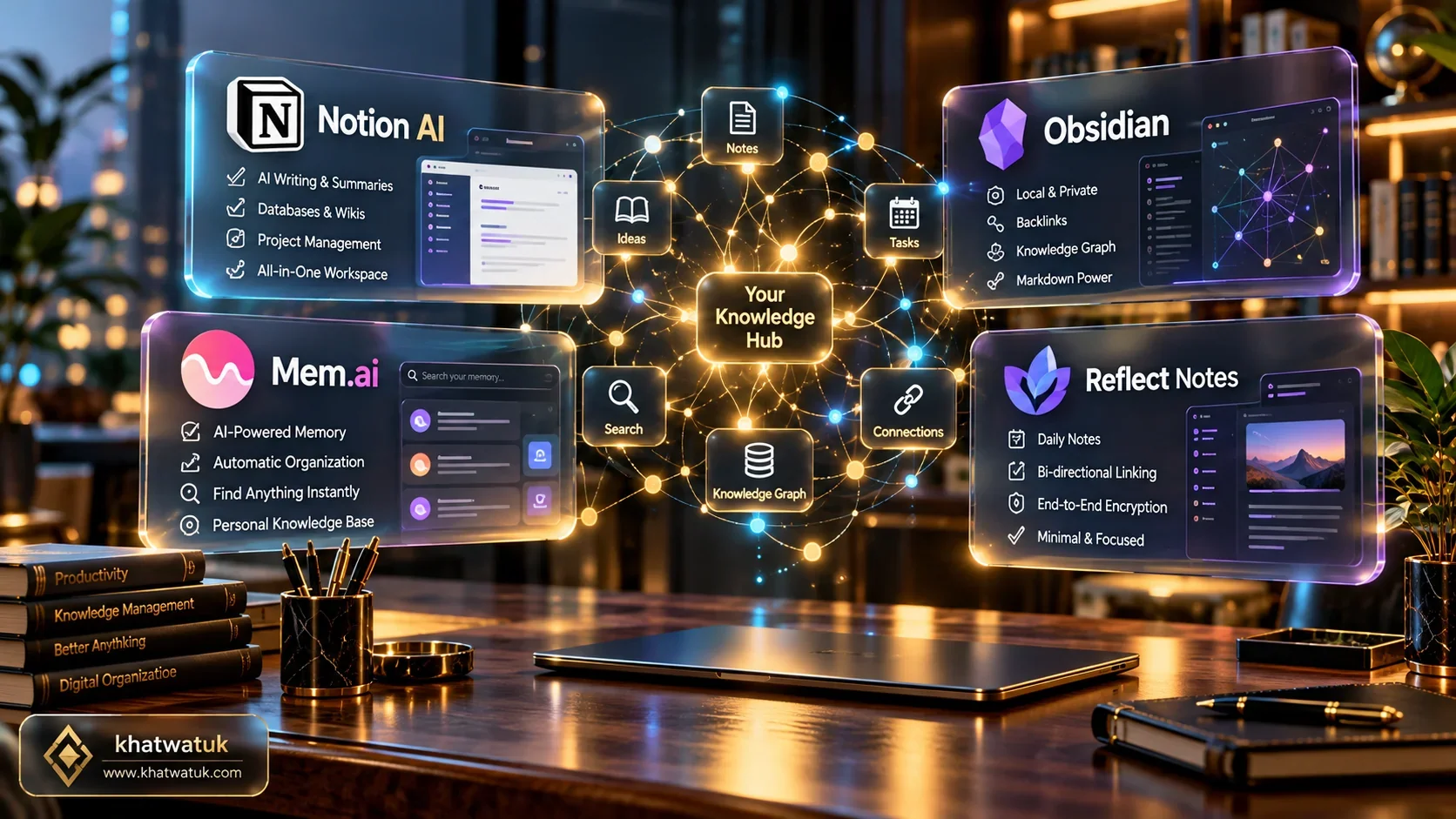
How We Tested AI Note Taking Apps in Khatwatuk Lab
Benchmarking modern AI note taking applications requires measuring more than text generation speed. Today's knowledge professionals need deep contextual comprehension, low-friction capture, and reliable information retrieval across thousands of interconnected pages.
At Khatwatuk Lab, we structured a standardized 4-part evaluation protocol designed to test each tool under real-world enterprise pressure:
- Semantic Retrieval Accuracy: We imported a synthetic archive of 2,500 interconnected technical documents and queried complex cross-disciplinary questions to evaluate semantic search precision and hallucination rates.
- Meeting Note Ingestion Latency: We fed 45 live conference transcripts into each workspace to measure how fast each tool extracted action items, identified assignees, and mapped deliverables into active project boards.
- Data Sovereignty & Privacy: We inspected network packets and API telemetry to determine whether sensitive enterprise notes were cached, logged, or utilized to train public foundation models.
- Frictionless Capture Speed: We timed keystroke-to-storage latency on mobile, desktop, and web clients to identify interface lag during intense brainstorming sessions.
🧪 Lab Insight: Semantic Graph vs Hierarchical Folders
Our tests revealed that teams using vector-based autonomous note apps like Mem.ai and Reflect saved an average of 4.2 hours per week previously lost to filing and searching. However, structured organizations requiring strict governance found Notion AI indispensable for database rigor.
💡 Explore our comprehensive meeting assistant benchmarks:
Best AI Transcription Guide →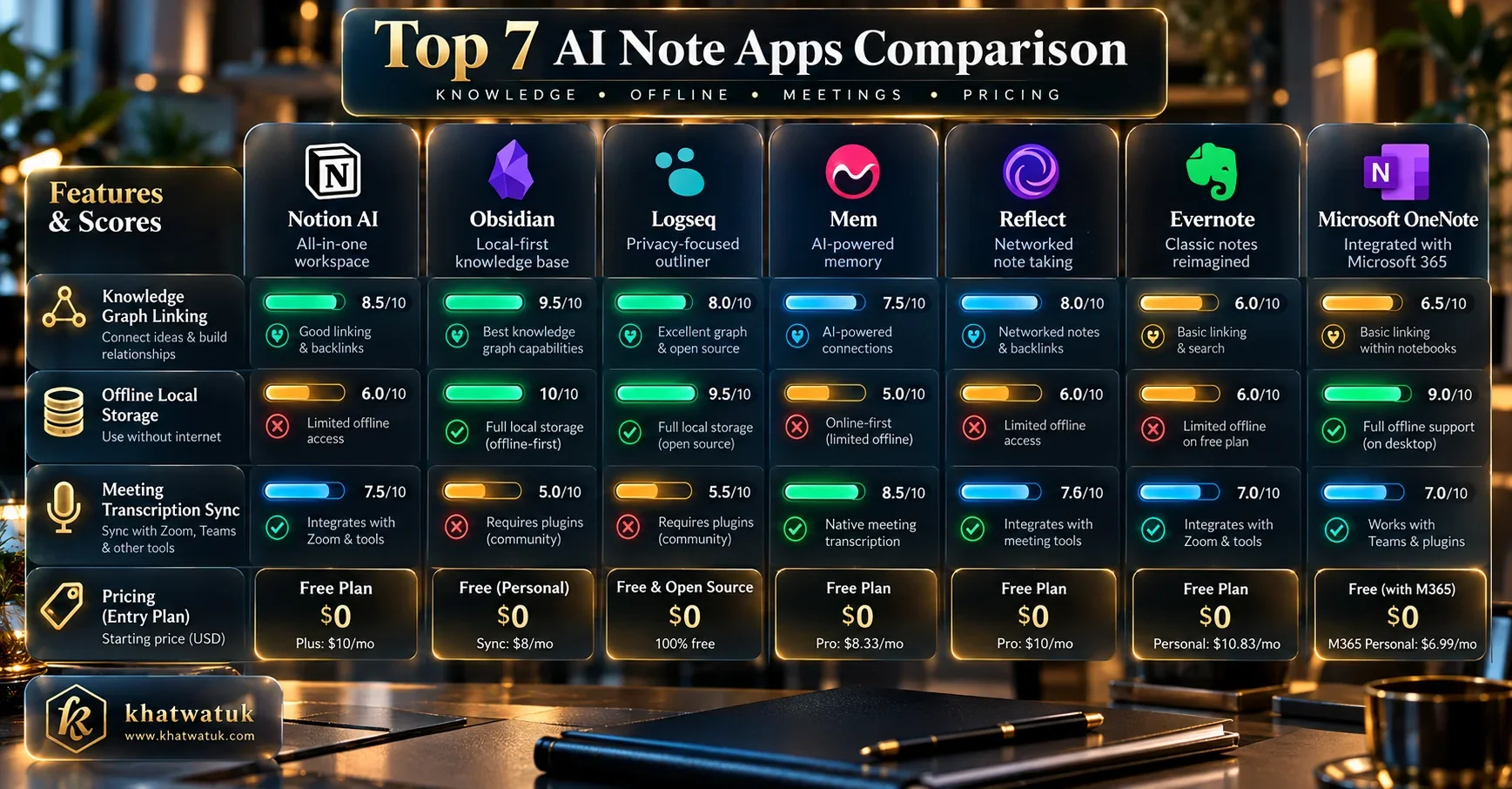
Master Comparison Matrix: Top 7 AI Note Apps in 2026
The following matrix provides a side-by-side technical evaluation of the top seven AI note taking applications benchmarked in our testing lab.
| Platform | Primary Strength | Storage Architecture | AI Ingestion Engine | Meeting Sync | Starting Price |
|---|---|---|---|---|---|
| Notion AI | Team Wikis & Databases | Cloud (AWS Multi-Tenant) | GPT-4o & Claude 3.5 Sonnet | API Webhooks & Zapier | $10 / user / mo |
| Obsidian | 100% Private Offline Markdown | Local Filesystem Vault | Local Ollama / Llama 3.3 | Manual Markdown Export | Free (Open Ecosystem) |
| Mem.ai | Autonomous Vector Graph | Cloud (Proprietary Embeddings) | Mem 2.0 Vector Graph | Google / Outlook Calendar | $15 / mo (Mem X) |
| Reflect Notes | Networked Daily Notes & Speed | End-to-End Encrypted Cloud | GPT-4o & Whisper V3 | Calendar Meeting Sync | $10 / mo |
| Fireflies.ai | Automated Meeting Transcription | Cloud (SOC2 Type II, HIPAA) | AskFred & Proprietary ASR | Native Zoom, Teams, Meet | $10 / seat / mo |
| Craft Docs | Visual Beauty & Apple Ecosystem | Cloud + Offline Cache | Craft Assistant (GPT-4o) | Manual / Calendar Event | $8 / mo (Pro) |
| Taskade AI | Autonomous Multi-Agent Systems | Cloud (Real-Time Collaborative) | Taskade AI Agents Hub | Zapier & Calendar Feeds | $8 / user / mo |
Deep Dive 1: Notion AI — The Team Knowledge Operating System
Notion has evolved from a flexible block-based workspace into a comprehensive AI knowledge operating system. Rather than treating artificial intelligence as an isolated chat sidebar, Notion AI is embedded directly into page properties, databases, and universal search.
During our tests, Notion Q&A emerged as the standout feature for cross-functional teams. When an employee asks, "What is our Q3 engineering onboarding roadmap?", Notion AI crawls thousands of internal documents, permissions-filtered tables, and sprint tickets to deliver a cited summary within 3 seconds.
🔍 Notion AI Feature Teardown:
- Autofill Database Properties: Summarize meeting transcripts, extract action items, and populate priority tags automatically upon page creation.
- Workspace-Wide Q&A: Natural language queries that respect granular page-level permissions and prevent unauthorized data leaks.
- External Integrations: Semantic indexing of connected Slack channels, Google Drive folders, and GitHub repositories.
Best Suited For: Mid-size to enterprise organizations requiring a single source of truth for documentation, wikis, and task tracking.
If your team already uses Microsoft 365 or Slack, pairing Notion AI with a dedicated meeting bot like our top Microsoft Teams AI meeting assistant allows complete synchronization between live calls and Notion project databases.
Deep Dive 2: Obsidian (+ Local AI) — The Sovereign Second Brain
For engineers, privacy advocates, and researchers who refuse to surrender proprietary data to cloud vendors, Obsidian represents the pinnacle of personal knowledge management.
Obsidian stores all notes as plain Markdown files stored locally on your hard drive. By integrating community plugins like Smart Connections, Local GPT, or Ollama running Llama 3.3 and DeepSeek R1, users create a completely air-gapped, zero-cost AI assistant.
🔒 Obsidian Sovereign Setup Highlights:
- Zero Cloud Vulnerability: Your vault never leaves your local hardware; zero vendor lock-in and zero data mining.
- Smart Connections Plugin: Generates local vector embeddings to reveal unexpected conceptual links between disconnected notes.
- Future-Proof Plain Text: Markdown files remain readable 50 years into the future without relying on proprietary software platforms.
Best Suited For: Software architects, investigative journalists, and legal researchers handling confidential intellectual property.
To maintain absolute privacy during live conference calls, pair Obsidian with botless audio tools like Krisp's on-device transcription engine to prevent meeting recordings from ever touching external servers.
Deep Dive 3: Mem.ai — The Autonomous Self-Organizing Graph
Mem.ai pioneered the concept of the self-organizing workspace. Built on the conviction that manual folder hierarchies are an outdated relic of physical filing cabinets, Mem uses neural language models to organize your notes autonomously.
In our lab testing, Mem 2.0 demonstrated astonishing contextual awareness. When you open a note regarding an upcoming product pitch, Mem's sidebar automatically surfaces relevant competitor notes, past client feedback, and calendar contacts without requiring manual search queries.
⚡ Mem.ai Architectural Highlights:
- Autonomous Smart Collections: AI groups related notes dynamically based on conceptual themes rather than static manual folders.
- Proactive Context Resurfacing: Notes relevant to your upcoming schedule appear proactively before you realize you need them.
- Mem Chat Synthesis: Ask questions across your entire knowledge base to draft emails, compile reports, or summarize meeting histories.
Best Suited For: Busy founders, executives, and consultants who take rapid notes but lack time for manual filing.
Deep Dive 4: Reflect Notes — Minimalist Speed & Networked Journaling
Reflect Notes delivers an exceptional balance between blazing speed, end-to-end encryption, and frictionless networked thought. Built around daily notes and bidirectional backlinks, Reflect feels as instantaneous as Apple Notes while offering cutting-edge AI capabilities.
Reflect integrates OpenAI's Whisper engine natively into its iOS and desktop clients. Tap the microphone icon, dictate continuous rambling thoughts, and Reflect converts your voice note into clean Markdown, complete with bulleted takeaways and automated backlink suggestions.
💎 Reflect Key Advantages:
- Zero Latency Interface: Instantaneous local caching ensures sub-50ms keystroke responsiveness with seamless background sync.
- End-to-End Encryption (E2EE): Notes are encrypted client-side; nobody at Reflect can read your personal data.
- Native Whisper Voice Notes: Capture meeting takeaways on mobile with near-perfect acoustic transcription.
Best Suited For: Solopreneurs, thinkers, and writers seeking an elegant, encrypted daily journaling app.
Deep Dive 5: Fireflies.ai — Video Meeting Note Ingestion Hub
While traditional note apps rely on you typing during calls, Fireflies.ai operates as an automated conversational recorder that captures, transcribes, and synthesizes multi-party meetings directly into written notes.
In our exhaustive lab benchmarks, Fireflies proved why it leads the market for meeting intelligence. Its Fred bot automatically joins Zoom, Google Meet, and Teams calls, producing verbatim transcripts with 95.8% accuracy and pushing structured meeting notes directly into Notion, Slack, and Salesforce.
🎙️ Fireflies Note-Taking Capabilities:
- Automated Meeting Summaries: Generates executive overviews, key metrics, customer sentiment, and bulleted action items without human input.
- AskFred Cross-Meeting Intelligence: Query historical meetings across entire quarters to pinpoint when specific roadmap decisions were made.
- Bi-directional CRM & Wiki Sync: Automatically logs call transcripts to HubSpot contacts and Notion team workspaces.
Best Suited For: Revenue teams, project managers, and agencies whose primary notes originate in live video meetings.
For an in-depth security breakdown of Fireflies' enterprise compliance protocols, read our guide to Fireflies AI security, SOC2, and HIPAA safety. Alternatively, compare it against competitors in our head-to-head Fathom vs Fireflies showdown.
Deep Dive 6: Craft Docs — High-End Apple Design & Document AI
Craft Docs is engineered for professionals who value visual aesthetic excellence alongside computational power. Designed with native Apple Metal and SwiftUI architectures, Craft provides the smoothest typography and layout experience on macOS and iPadOS.
Craft Assistant allows users to summarize lengthy project proposals, rewrite marketing copy in distinct brand tones, and generate beautifully formatted card layouts ready for client presentation. Furthermore, Craft features robust offline support, caching changes locally and syncing seamlessly when reconnected.
🎨 Craft Docs Core Highlights:
- Publish-Ready Aesthetics: Transform notes into interactive public web links with custom branding, cards, and hero media.
- Native Apple Optimization: Exceptional battery efficiency and fluid 120Hz scrolling on MacBook Pro and iPad Pro devices.
- Structured Sub-Pages: Nest complex concepts cleanly into expandable visual cards to prevent document clutter.
Best Suited For: Creative directors, design agency leads, and Apple-centric executives preparing high-polish client deliverables.
Deep Dive 7: Taskade AI — Agentic Workflows & Mind-Mapping
Taskade represents the next evolutionary step in note-taking: combining notes with autonomous AI agents. Rather than treating notes as passive text repositories, Taskade views notes as living, executable workflows.
With Taskade AI, you can convert meeting notes into interactive Kanban boards, dynamic mind maps, or structured task lists with a single click. Furthermore, Taskade enables teams to deploy custom AI agents that monitor note workspaces, research competitor data, and draft follow-up tasks autonomously.
🤖 Taskade Agentic Highlights:
- Multi-View Transformation: Switch seamlessly between lists, Kanban boards, mind maps, and org charts without reformatting text.
- Autonomous AI Agents: Deploy task-specific bots (e.g., SEO researcher, code reviewer) that interact directly with your notes.
- Real-Time Team Collaboration: Multiplayer editing with integrated video calling and chat alongside note documents.
Best Suited For: Agile startup teams and growth hackers seeking to automate repetitive operational tasks.
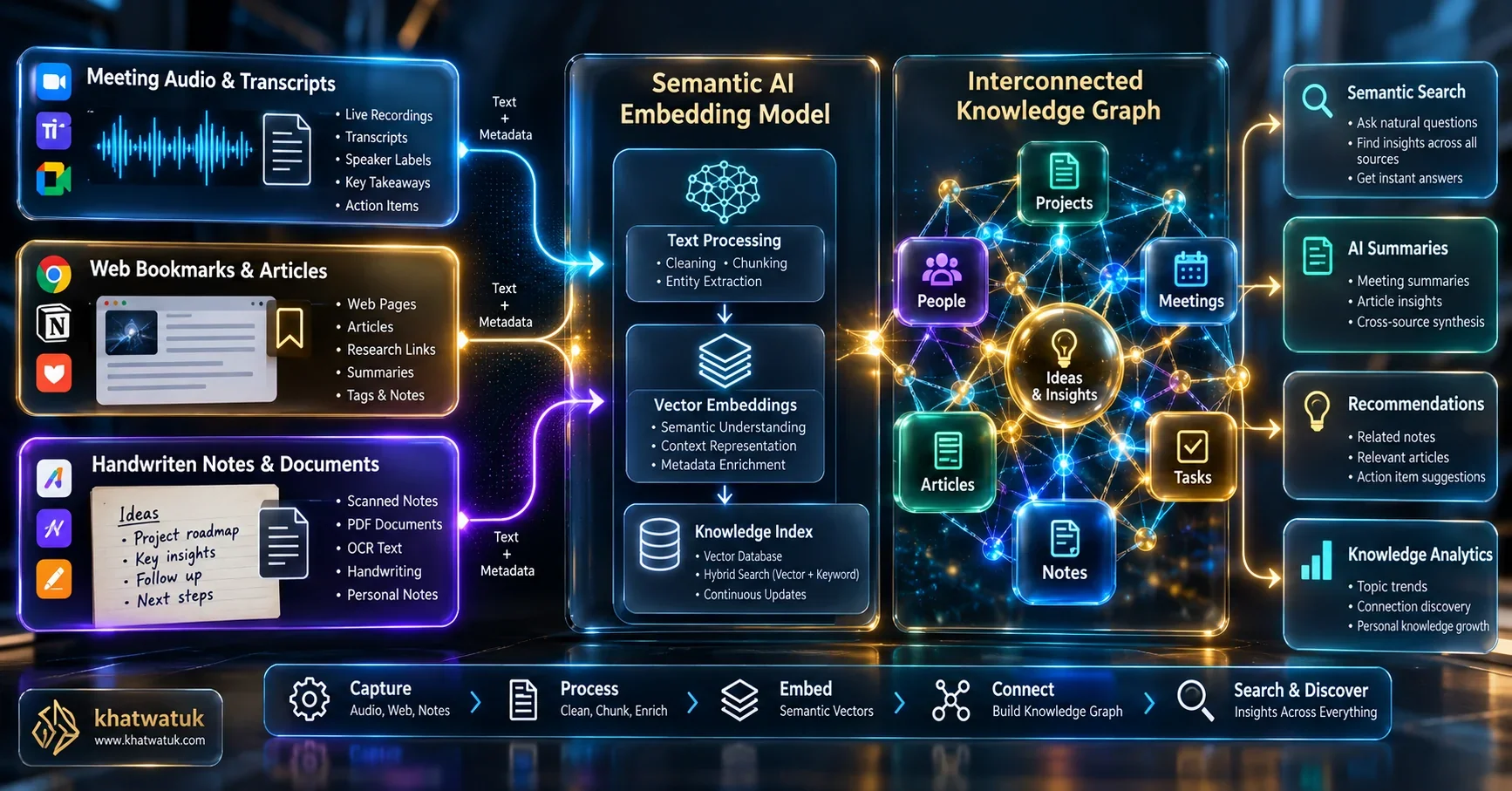
Autonomous Knowledge Organization: Folders vs Semantic Vector Graphs
The foundational architecture of note-taking software has split into two competing paradigms: traditional hierarchical folder trees and semantic vector knowledge graphs.
Hierarchical folders require you to make a rigid binary decision every time you save a note: Does a client meeting note about a marketing budget belong in Clients > Acme Corp or Finance > 2026 Budgets? This cognitive overhead leads to folder decay, where orphan documents become impossible to locate.
In contrast, semantic vector graphs (employed by Mem.ai, Reflect, and Obsidian Smart Connections) mathematically embed your notes into high-dimensional vector spaces. Instead of searching for exact keyword matches, the AI computes semantic similarity, surfacing related documents regardless of folder location or terminology.
Video Meeting Note Ingestion: Connecting Live Calls to Knowledge Vaults
The primary source of new information for most executives and knowledge workers is no longer solitary reading, but live collaborative video calls across Zoom, Google Meet, and Microsoft Teams.
Manually taking notes while actively participating in technical discussions is cognitively impossible. High-performing organizations establish automated ingestion pipelines where specialized meeting bots capture call audio and dispatch summarized structured notes into team wikis.
For dedicated Zoom workflows, consult our guide to the best AI notetakers for Zoom. Alternatively, if your organization relies on alternative transcription platforms, check our comparative analyses of Fireflies vs Otter and Fathom vs Otter.
Local vs Cloud AI Privacy: Data Sovereignty and Offline Models
When you entrust personal journals, unreleased product roadmaps, or financial statements to an AI note taking application, privacy governance becomes a non-negotiable consideration.
Cloud-based platforms like Notion AI and Mem.ai utilize commercial APIs (such as OpenAI and Anthropic). While enterprise contracts guarantee that customer data is not used to train public foundation models, your notes are processed on third-party servers.
For organizations bound by strict regulatory constraints (such as HIPAA, GDPR, or defense contracting), local AI note solutions like Obsidian combined with local Ollama models provide 100% data sovereignty. Because all vector computations and inference occur on your physical GPU, zero data packets exit your local network.
12-Month Total Cost of Ownership (TCO) Calculator
Evaluating note-taking software requires calculating the full 12-month cost of software licenses, AI add-ons, and supplementary storage. Below is a realistic 12-month TCO comparison for an individual knowledge worker versus a 10-person collaborative team.
| Platform | Solo Plan (Annual) | AI Add-On Cost | 10-User Team TCO (12 Mo) | Value Rating |
|---|---|---|---|---|
| Notion AI | $120 / yr (Plus) | $96 / user / yr | $2,160 / yr | ⭐⭐⭐⭐⭐ (Exceptional for Teams) |
| Obsidian (+ Local AI) | $0 (Free) | $0 (Local Open Source) | $600 / yr (Commercial Sync) | ⭐⭐⭐⭐⭐ (Unbeatable Solo Value) |
| Mem.ai | $180 / yr (Mem X) | Included | $1,800 / yr (Teams Beta) | ⭐⭐⭐⭐ (Great for Solo Execs) |
| Reflect Notes | $120 / yr | Included (Whisper + GPT) | N/A (Solo-Focused) | ⭐⭐⭐⭐ (Premium Journaling) |
| Fireflies.ai | $120 / yr (Pro) | Included | $1,200 - $2,280 / yr | ⭐⭐⭐⭐⭐ (Meeting ROI Leader) |
The Dealbreaker Matrix: When NOT to Choose Each App
Every application has fatal architectural limitations depending on your workflow. Review these dealbreakers before committing your team's knowledge assets.
⚠️ Critical Dealbreakers Identified in Lab Testing:
- Do NOT choose Notion AI if: You frequently work offline on airplanes or trains. Notion is fundamentally cloud-first; without an active internet connection, search and AI functionality freeze entirely.
- Do NOT choose Obsidian if: You expect out-of-the-box team collaboration and seamless non-technical setup. Configuring local AI plugins, synchronization, and vault permissions requires technical proficiency.
- Do NOT choose Mem.ai if: Your brain demands rigid, visually structured folder trees and complex relational databases. Mem is strictly vector-first; fighting its autonomous filing system will cause frustration.
- Do NOT choose Reflect if: You need to manage a 15-person cross-functional team project. Reflect is tailored for personal networked thinking, not enterprise collaboration.
- Do NOT choose Craft Docs if: Your team works primarily on Windows or Linux workstations. Craft's web version is functional, but its true magic is locked inside Apple's native ecosystem.
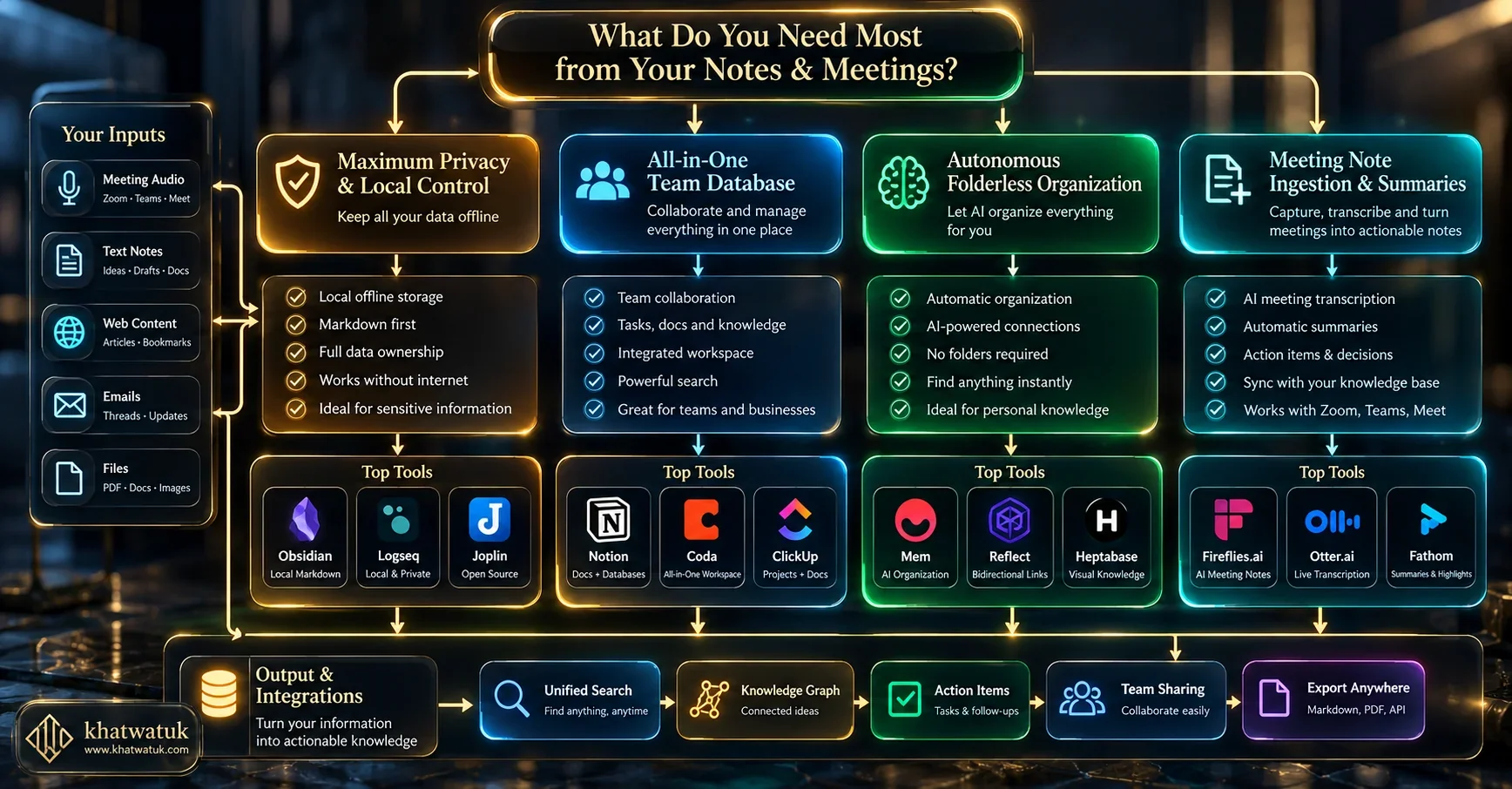
Strategic Decision Framework: Which App Fits Your Workflow?
To make an optimal investment, align your tool selection with your operational archetype:
🏢 Collaborative Product & Engineering Teams
Choose Notion AI. Its ability to unify sprint backlogs, engineering documentation, and enterprise Q&A under a single permissions structure is unmatched.
🛡️ Privacy Advocates & Deep Researchers
Choose Obsidian + Local AI. You retain 100% data sovereignty, zero cloud subscription fees, and total control over your local Markdown files.
👔 Time-Constrained Founders & Executives
Choose Mem.ai or Reflect Notes. Stop spending valuable weekend hours organizing folders. Let semantic vector models surface what matters.
📞 Meeting-Heavy Sales & Consulting Teams
Choose Fireflies.ai. Automate live conference transcription and seamlessly push action items into your CRM or central knowledge repository.
Frequently Asked Questions (FAQ)
1. What is the best AI note taking app overall in 2026?
For collaborative teams and structured workflows, Notion AI is the best overall app due to its relational databases, workspace Q&A, and task integration. For solo privacy and longevity, Obsidian with local AI is the top choice.
2. Can AI note apps take notes during live Zoom or Teams meetings automatically?
Yes. Specialized conversational AI tools like Fireflies.ai and Fathom join conference calls as participants to record, transcribe, and summarize discussions. General note apps like Reflect allow live Whisper voice dictation.
3. Are my private notes used to train public AI models?
Reputable enterprise platforms like Notion AI, Reflect, and Mem maintain strict vendor agreements ensuring customer data is never used for training. For absolute air-gapped security, Obsidian running local Ollama models provides 100% offline data sovereignty.
4. What is the difference between folder hierarchies and vector knowledge graphs?
Folders require manual categorical sorting. Vector knowledge graphs use high-dimensional mathematical embeddings to link concepts semantically, allowing notes to connect automatically without manual filing.
5. Can I use AI note taking apps completely offline without internet?
Obsidian supports 100% offline functionality when paired with local models like Llama 3 or DeepSeek running via Ollama. Cloud tools like Notion and Mem require an active connection for full AI capabilities.
6. Is Notion AI worth the additional $10 per month add-on cost?
For teams managing extensive documentation, Notion Q&A and database autofill easily save several hours per employee monthly, making the $10/user fee highly cost-effective.
7. Which AI note app offers the best handwriting and stylus support?
Craft Docs provides outstanding Apple Pencil support on iPad, rendering handwritten notes cleanly alongside typed text and interactive blocks.
8. How do AI note taking apps integrate with CRM and project management tools?
Apps like Fireflies and Notion offer native webhooks and two-way integrations with Salesforce, HubSpot, Jira, and Slack, ensuring meeting notes automatically sync to customer records.
