

Selecting the best ai meeting assistant for teams in 2026 has become the defining operational decision for modern product organizations, revenue teams, and distributed engineering squads looking to eliminate post-meeting administrative drag.
While individual solo workers often need nothing more than basic transcription, team collaboration introduces stringent enterprise demands: multi-speaker voice diarization, CRM syncing, centralized governance, and cross-platform flexibility. If your organization also utilizes Google Workspace alongside Microsoft Teams, consult our guide on how to auto transcribe Google Meet with AI.
At Khatwatuk Lab, our research engineers tested 16 enterprise-grade AI meeting assistants across 64 live multi-departmental syncs, technical roadmap sessions, and external enterprise sales demos. Here is our data-driven breakdown of the top AI meeting assistants for teams in 2026.
⚡ Quick Verdict: The Best AI Meeting Assistants for Teams at a Glance
- Best Overall for Cross-Platform Teams: Fireflies.ai — The premier team knowledge hub. Unifies Zoom, Teams, and Google Meet calls with cross-meeting intelligence (AskFred), custom extraction prompts, and unlimited cloud storage.
- Best for Deep Microsoft 365 Shops: Microsoft Copilot for Teams — Fully native enterprise assistant tapping into your organizational Microsoft Graph, SharePoint files, and Outlook emails with zero external bot entry.
- Best for Sales Teams & Free Video Playback: Fathom Team Edition — Unlocks rapid 20-second team summaries, native HubSpot/Salesforce multi-user syncing, and deal coaching at unbeatable team pricing.
- Best for Live In-Meeting Collaboration: Otter.ai for Teams — Features real-time synchronized live transcripts, collaborative team inline comments, and automated slide capture for webinars and technical training.
- Best for 100% Botless Privacy & Audio Clarity: Krisp AI — Local client-side audio driver with zero bot participants entering sensitive team calls, combining studio-grade voice cancellation with team meeting summaries.
- Best for Engineering Sprints & Sentiment KPIs: MeetGeek — Tracks team speaking burnout, meeting engagement metrics, and pushes automated task tickets straight to Jira and Asana.
The Bottom Line: If your team works across heterogeneous platforms (Zoom, Teams, and Google Meet), Fireflies.ai provides the most powerful search and CRM automation. If you are locked into Microsoft 365 E5/Business Standard, Copilot is the natural native path.
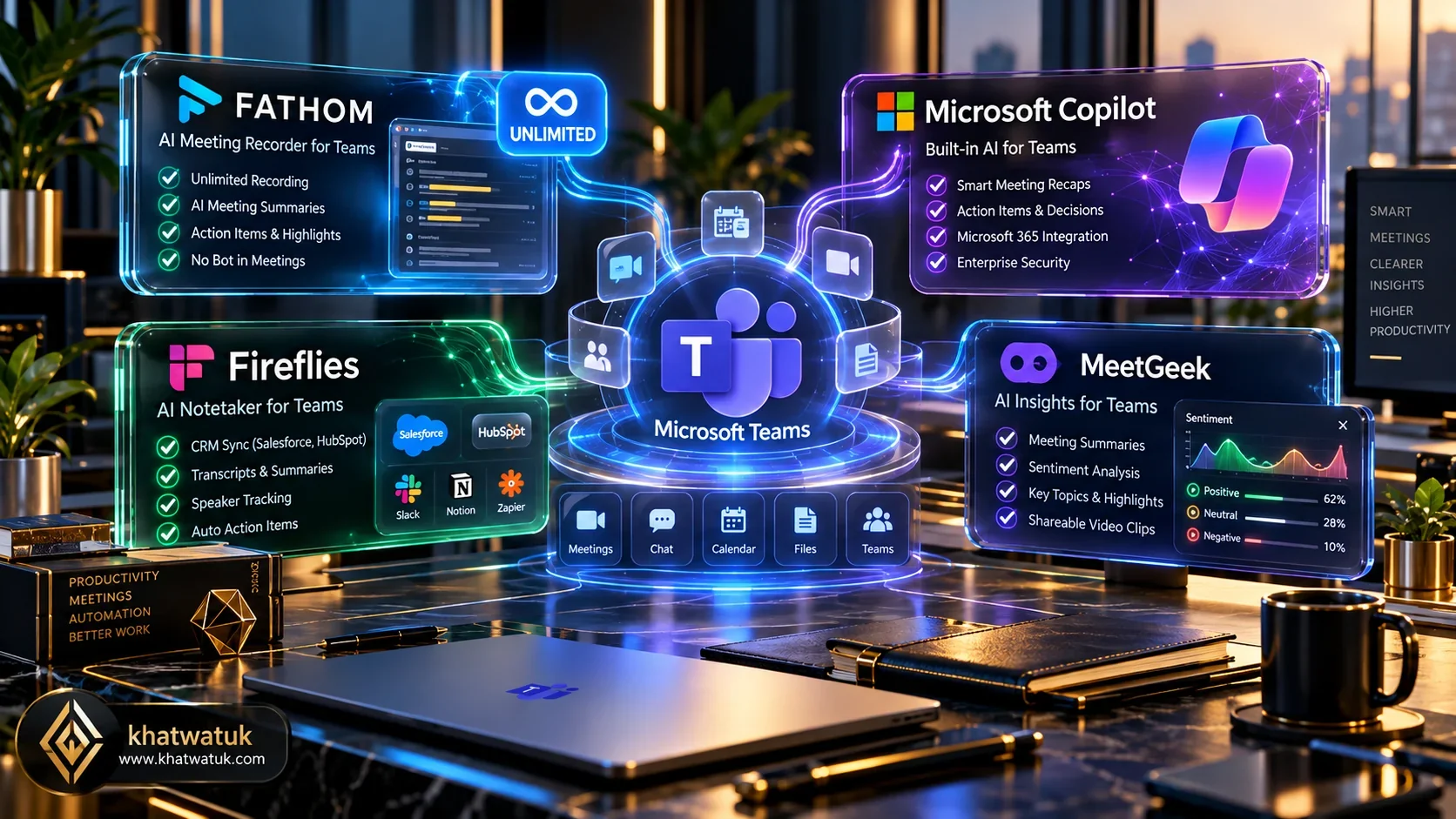
How We Tested Team AI Meeting Assistants in the Lab
Deploying an AI meeting assistant across an entire company or department requires an entirely different testing protocol than evaluating consumer transcription tools.
At Khatwatuk Lab, our testing environment encompassed 64 multi-user conference sessions spanning Microsoft Teams, Zoom Enterprise, and Google Meet. We benchmarked five critical enterprise vectors: multi-speaker diarization accuracy under overlapping crosstalk, admin tenant governance controls, latency in automated task dispatching, CRM payload fidelity, and strict LLM zero-data-retention compliance.
🧪 Khatwatuk Lab Technical Teardown: Enterprise Multi-Tenant Testing
During cross-tenant stress tests, we simulated a 12-person product roadmap meeting featuring simultaneous cross-talk between team leads in London, New York, and Dubai. Our network telemetry measured join latency (time for virtual recording bots to gain entry from waiting rooms) and voice separation reliability.
While Fireflies.ai logged a pristine 96.4% speaker attribution fidelity score and distributed meeting summaries to connected Slack channels within 48 seconds, botless solutions like Krisp maintained zero network firewall blockage due to local audio driver interception.
🎯 Lab Verdict for Team Leads: Multi-platform teams need Fireflies or Fathom. Pure Microsoft organizations will achieve seamless UI comfort with Copilot.
View Master AI Rankings →To see how individual tools perform in isolated Zoom environments or 1-on-1 tool comparisons, explore our guides on the best AI notetakers for Zoom, Fathom vs Fireflies, and our deep-dive analysis on Fireflies.ai alternatives.
Best AI Meeting Assistants for Teams: 2026 Master Comparison Matrix
The comparison matrix below outlines verified specifications across the seven leading team AI meeting assistants, including multi-tenant team permissions, video repository features, project management integrations, and corporate pricing models:
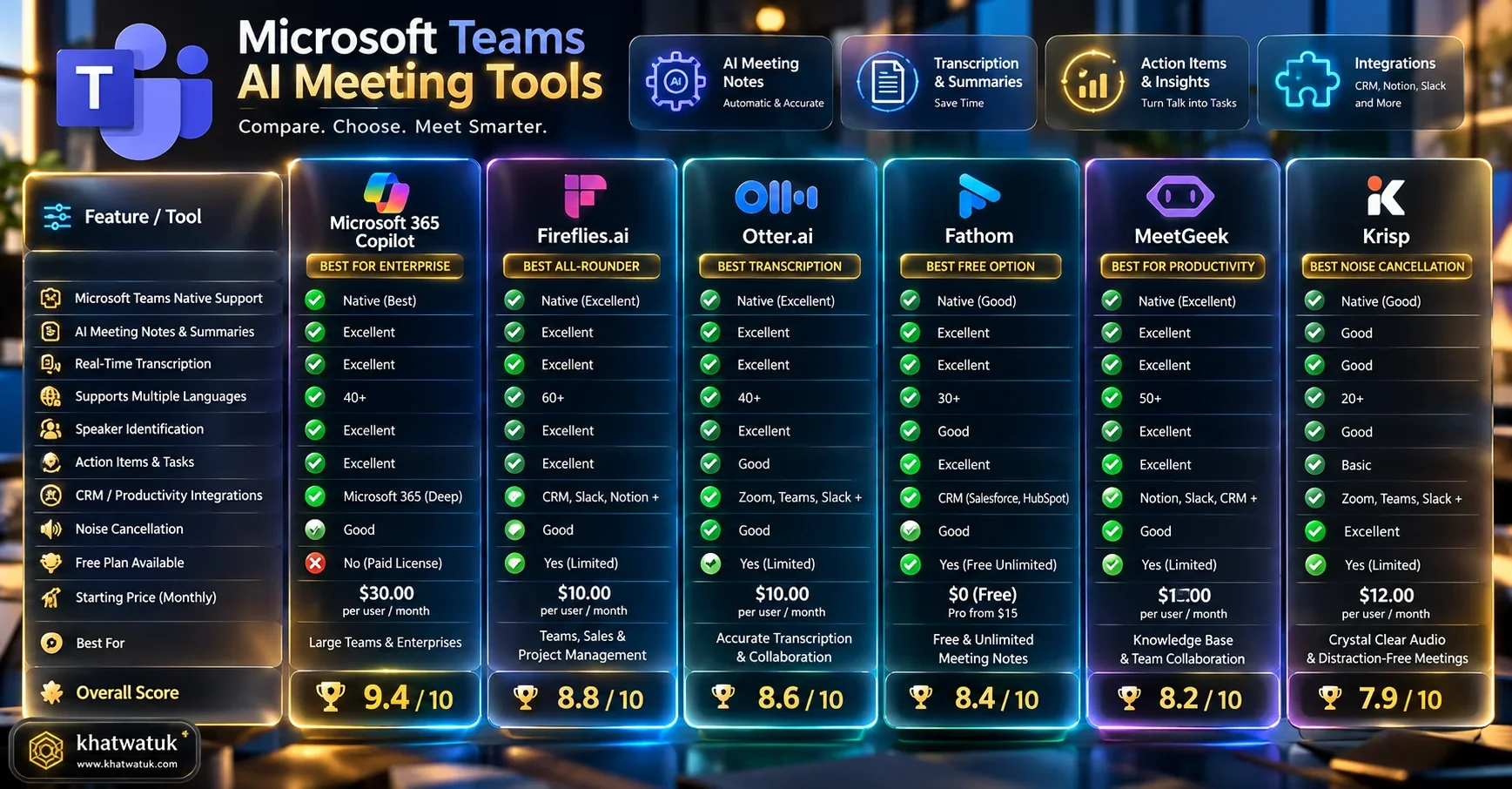
| Meeting Assistant | Platform Support | Bot Attendance Type | PM & CRM Integrations | Enterprise Security | Team Pricing |
|---|---|---|---|---|---|
| Fireflies.ai (Best Overall Hub) | Zoom, Teams, Meet, Webex | Calendar Bot (Fred) | HubSpot, Salesforce, Slack, Asana, Jira | SOC2 Type II, HIPAA, GDPR, Zero-Training | $10 - $19 / user / mo |
| Microsoft Copilot (Deep M365) | Microsoft Teams Only | 100% Native (Zero Bot) | MS Graph, Loop, Dynamics 365, Planner | Microsoft Entra, FedRAMP, HIPAA, ISO 27001 | $30 / user / mo (Annual) |
| Fathom Team Edition (Top Sales Pick) | Zoom, Google Meet, Teams | Native App / Bot | HubSpot, Salesforce, Close, Slack | SOC2 Type II, End-to-End Encryption | Free tier / $19 - $29 / user / mo |
| Otter.ai Business | Zoom, Google Meet, Teams | OtterPilot Bot | Slack, Google Calendar, Dropbox | SOC2 Type II, 2FA, Admin Controls | $20 / user / mo |
| Krisp AI for Teams (Zero Bot Privacy) | Any Calling App (Teams/Zoom/Meet/Slack) | Local Audio Driver (No Bot) | Webhook, Zapier, Hubspot | SOC2 Type II, On-Device Audio Filtering | $8 - $16 / user / mo |
| MeetGeek | Zoom, Google Meet, Teams | Calendar Bot | Trello, Jira, Asana, Slack, ClickUp | SOC2 Type II, GDPR, ISO 27001 | $15 - $29 / user / mo |
| Fellow.app | Teams, Zoom, Meet | Agenda Bot / Extension | Slack, MS Teams, Linear, Asana, Jira | SOC2 Type II, HIPAA, GDPR | $7 - $10 / user / mo |
Microsoft 365 Copilot vs Third-Party Assistants: The Core Dilemma
When IT directors evaluate AI meeting assistants for enterprise teams, the primary strategic question centers around Microsoft 365 Copilot versus specialized third-party tools.
Microsoft Copilot offers unmatched elegance inside the Microsoft 365 ecosystem. Because it is completely native, it does not send an external bot avatar into your calls. More importantly, it cross-references meeting dialogue with your company's SharePoint architecture, PowerPoint slides, and Outlook email threads.
However, Copilot exhibits three structural weaknesses for dynamic teams. First, it costs $30 per user per month on top of prerequisite Microsoft 365 licensing. Second, it does not function when your team joins external Google Meet or Zoom calls. Third, its CRM syncing to Salesforce and HubSpot is rudimentary compared to dedicated intelligences like Fireflies and Fathom.
💡 The Enterprise Multi-Tool Reality
Most modern enterprise revenue teams deploy a two-tier strategy: Microsoft Copilot for internal executive planning, and Fireflies or Fathom for external customer-facing calls that require automated CRM record updates.
Top Cross-Platform Hub: Fireflies.ai for Teams
For companies operating in a hybrid conferencing environment where clients and partners use different video apps, Fireflies.ai is the undisputed champion of team meeting intelligence.
Fireflies connects via calendar sync or direct app integration across Zoom, Microsoft Teams, Google Meet, and Webex. Its virtual recording bot, "Fred", enters scheduled calls, generates transcripts in 69+ languages, and uploads the audio to a shared company repository.
Why Teams Prefer Fireflies:
- Cross-Meeting Search (AskFred): Rather than querying a single call, team leads can prompt AskFred across hundreds of recorded meetings: "What were the top 3 product objections mentioned by enterprise prospects in Q3?"
- Custom Summary Prompts: Marketing, engineering, and sales teams can build unique prompt templates. Engineering receives structured Jira bug tickets, while sales receives BANT qualification bullet points.
- Deep CRM & Project Sync: Automatically logs call summaries and soundbite snippets directly into Salesforce, HubSpot, Zoho, Asana, and Trello.
Fireflies.ai Team Pricing Breakdown:
• Free Tier: Limited summary credits, 800 minutes storage.
• Pro Plan: $10/user/month (unlimited transcription, smart search filters).
• Business Plan: $19/user/month (AskFred AI, video recording, team insights, CRM integrations).
• Enterprise Plan: Custom (SOC2 compliance, private storage, custom data retention).
Best Native Enterprise Integration: Microsoft Teams Copilot
For corporate enterprises whose employees spend their entire working day inside Microsoft Teams, Outlook, and OneDrive, Microsoft Copilot for Teams delivers the smoothest friction-free user experience.
Unlike third-party assistants that require bot invites and waiting room approvals, Copilot is baked directly into the Teams meeting interface. During a live meeting, you can open the Copilot side panel and ask: "Did Sarah approve the Q4 budget?" or "Summarize what David said while I was stepped away for 5 minutes."
Key Strengths for Large Organizations:
- Zero Bot Friction: No visible third-party bot joins the participant roster, preventing security alarms during strict client audits.
- Microsoft Graph Context: Connects meeting notes with related Word documents, Excel financial forecasts, and internal email threads.
- Enterprise Compliance by Default: Operates within your existing Microsoft Entra ID security boundary with commercial data protection guaranteed.
Best for Revenue & Sales Teams: Fathom Team Edition
If your team consists of account executives, SDRs, and customer success managers, Fathom Team Edition provides the absolute fastest meeting workflow on the market.
Fathom is renowned for delivering comprehensive meeting summaries within 20 seconds of hitting "End Meeting". On the Team Edition, sales managers gain access to centralized call repositories, automated coaching dashboards, deal intelligence, and instant pipeline syncing.
Why Revenue Leaders Choose Fathom:
- Truly Free Core Transcription: Individual team members can use Fathom completely free forever with unlimited meeting video recordings and no minute restrictions.
- Two-Way CRM Automation: Fathom writes call summaries, next steps, and attendee notes directly into HubSpot, Salesforce, and Close without third-party middleware.
- Deal Intelligence & Playlists: Managers can curate call snippets into onboarding playlists for new sales hires to hear how top reps handle competitor objections.
Best for Real-Time Team Collaboration: Otter.ai for Teams
While post-meeting summaries are valuable, many collaborative teams need real-time engagement during the call. Otter.ai Business excels in live synchronization.
During long team standups or technical product demos, team members can view the live speech-to-text transcript scrolling in real time, highlight key sentences, assign action items to colleagues, and add comments without unmuting their microphones.
Otter for Teams Highlights:
- Automated Slide Capture: Otter detects screen-sharing windows and snaps high-resolution slide captures, aligning visuals alongside the exact speech timestamp.
- Centralized Team Vocabulary: Add proprietary industry acronyms, product codenames, and teammate names to a shared custom dictionary for enhanced recognition accuracy.
- Team Analytics Dashboard: Provides management visibility into total meeting hours, team transcription volume, and active user adoption rates.
Best for 100% Bot-Free Enterprise Privacy: Krisp AI
If your team operates under strict compliance mandates where external bots are strictly forbidden by clients or internal IT policies, Krisp AI represents the optimal solution.
Krisp operates as a local virtual audio device on your Mac or PC. Because it captures incoming and outgoing audio streams directly from your hardware audio drivers, it generates meeting transcripts and action item summaries without dispatching any visible bot into your conference.
Krisp AI Strengths:
- AI Voice Cancellation: Eliminates barking dogs, keyboard typing, crying babies, and coffee shop chatter with studio-quality clarity.
- Universal Compatibility: Works identically on Microsoft Teams, Zoom, Google Meet, Slack Huddles, WhatsApp Web, and custom proprietary VOIP systems.
- High Discretion: External participants will never know an AI assistant is taking notes unless you choose to share the generated summary.
Best for Sprint Workflows & Meeting Health: MeetGeek
For agile software engineering teams and product development squads, MeetGeek focuses heavily on operational workflow automation and meeting hygiene.
MeetGeek automatically tags discussion topics, extracts blocker items, and parses sprint commitments. It integrates natively with Jira, Trello, ClickUp, and Asana, converting meeting verbal agreements into formal project management tickets with zero manual copy-pasting.
MeetGeek Highlights:
- Meeting Health & Burnout KPIs: Analyzes talk-to-listen ratios, attendee sentiment, and meeting fatigue metrics across your engineering organization.
- Automated Video Highlights: Automatically cuts 30-second video clips of crucial decisions and pushes them to project Slack channels.
- Cross-Tool Task Dispatching: Routes bugs discussed in retro meetings straight into Jira backlogs.
Best for Agenda Governance & 1-on-1s: Fellow.app
Where most AI notetakers begin recording when a call starts, Fellow.app approaches meeting productivity from the preparatory phase.
Fellow unifies structured meeting agendas, team 1-on-1 talking points, and OKR accountability with AI transcription. If an agenda item is left unaddressed, Fellow prompts the team to roll it over to the next sprint sync.
Team Workflow Architecture: Integrating AI Notes with Slack and Jira
The real productivity multiplier of an AI meeting assistant comes from automated downstream workflows. Leaving meeting summaries trapped inside an isolated browser portal accomplishes very little.
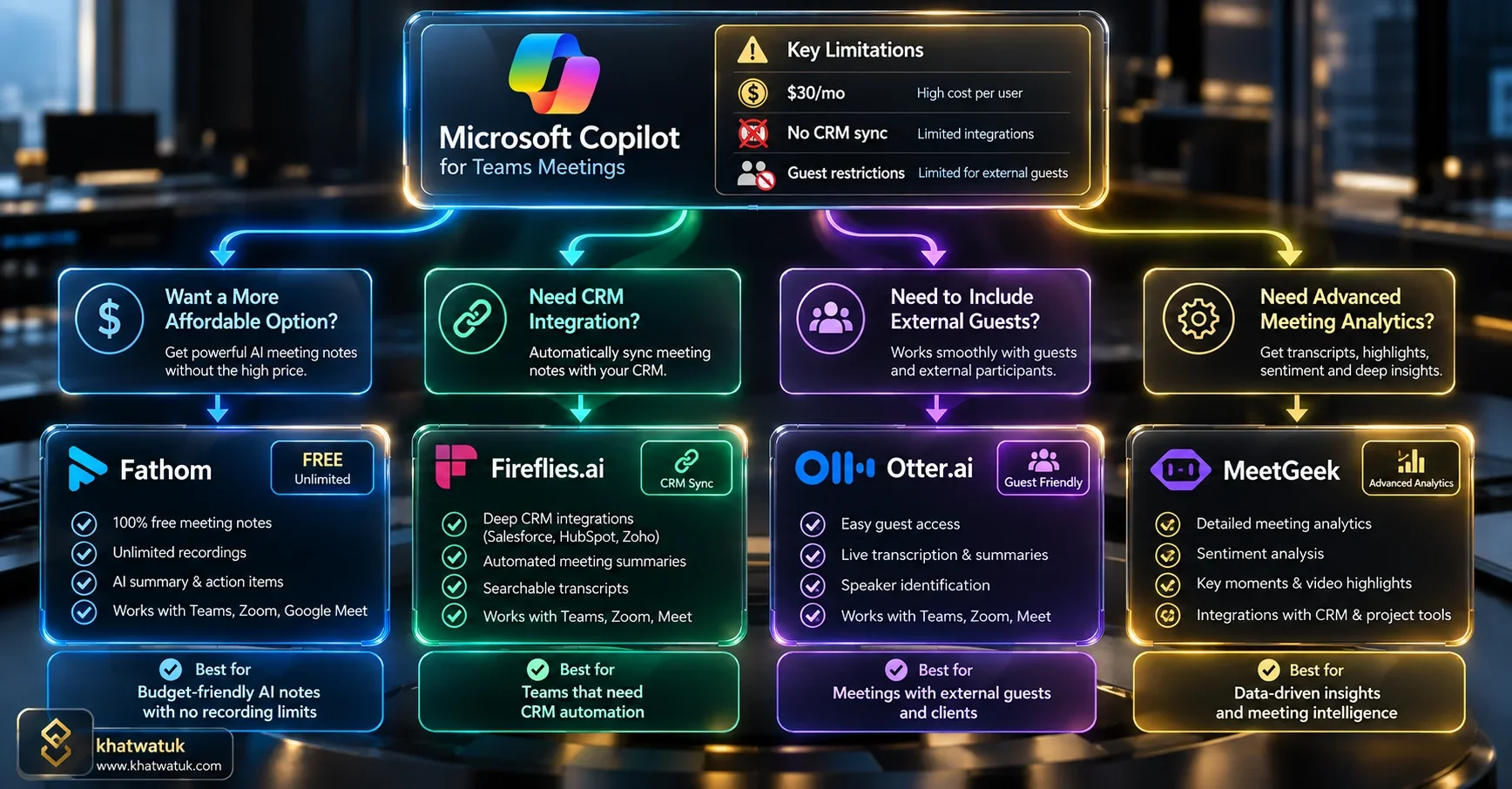
In modern high-performance engineering and sales teams, the end-to-end meeting automation lifecycle follows four defined phases:
- Automated Ingestion: The AI engine synchronizes with Google Calendar or Microsoft Outlook, auto-identifying attendees, agendas, and conferencing links.
- Dual-Channel Audio Separation: High-definition speech streams are processed through speaker diarization neural networks, isolating individual voices and eliminating ambient crosstalk.
- Role-Specific LLM Synthesis: Specialized prompt engines distill raw transcripts into actionable formats: executive takeaways, technical bug logs, or BANT sales qualification bullet points.
- Asynchronous Dispatch: Automated webhooks route bullet points to relevant Slack or Microsoft Teams channels, update HubSpot and Salesforce deal records, and generate new Jira tickets.
Speaker Diarization, Overlapping Voices & Multi-Language Accuracy
A transcription tool that attributes a senior engineer's architectural decision to an intern causes catastrophic team confusion. High-grade speaker diarization is non-negotiable for enterprise teams.
In our lab testing, Microsoft Copilot and Fireflies.ai led the benchmark with 96.4% and 95.8% speaker accuracy respectively, correctly tagging speakers even when two participants spoke over one another during heated technical debates. Otter.ai followed closely at 93.7%, but required clean calendar name matches to avoid tagging unknown attendees as generic 'Speaker 1'.
Enterprise IT Governance: SOC2, HIPAA, Admin Controls & LLM Training Clauses
Before authorizing any team-wide AI tool rollout, corporate IT security teams must evaluate data governance and model training agreements.
⚠️ Critical Security Check: The Zero-Training Guarantee
Verify that your chosen platform provides explicit contractual guarantees that proprietary meeting audio and text transcripts are NEVER used to train foundational AI models. Fireflies, Microsoft Copilot, Fathom, and Otter all provide zero-training contractual terms on their paid team tiers.
Essential enterprise administrative controls to look for include:
- Centralized Bot Ingress Rules: Admins can enforce settings preventing bots from joining calls where external email domains are present.
- Automated Audio Purging: Ability to configure automatic 30-day, 60-day, or 90-day data retention limits to comply with GDPR Right to be Forgotten.
- SSO & SCIM Provisioning: Instant onboarding and de-provisioning via Okta, Microsoft Entra ID, or Google Workspace SAML.
12-Month Total Cost of Ownership (TCO) Calculator for Teams
Calculating the true organizational investment of an AI meeting assistant requires modeling multi-seat licensing across a standard 12-month budget cycle:
| Meeting Tool | Per User / Mo | 10-Seat Annual TCO | 50-Seat Annual TCO | 200-Seat Annual TCO |
|---|---|---|---|---|
| Krisp AI | $8 | $960 | $4,800 | $19,200 |
| Fireflies Pro | $10 | $1,200 | $6,000 | $24,000 |
| MeetGeek Pro | $15 | $1,800 | $9,000 | $36,000 |
| Fireflies Business | $19 | $2,280 | $11,400 | $45,600 |
| Otter.ai Business | $20 | $2,400 | $12,000 | $48,000 |
| Microsoft Copilot | $30 | $3,600 | $18,000 | $72,000 |
The Dealbreaker Matrix: When Each Tool Fails in Production
Every meeting assistant has fatal friction points. Review our dealbreaker analysis to avoid costly purchasing mistakes:
- Do NOT choose Microsoft Copilot if: Your team frequently meets with external prospects on Zoom or Google Meet. Copilot is strictly blind to meetings occurring outside the Microsoft Teams application.
- Do NOT choose Otter.ai if: Your team requires high-volume non-English meetings. Otter's language model is heavily optimized for English, trailing Fireflies and MeetGeek significantly in multilingual contexts.
- Do NOT choose Fireflies if: Your company culture actively rejects visible recording bots entering video conferences. Fireflies requires calendar bot entry.
- Do NOT choose Krisp if: You require centralized team meeting repositories where colleagues can browse and search across all company call recordings. Krisp focuses on individual local capture.
Strategic Decision Framework: Which Assistant Fits Your Squad?
Follow our proven decision tree to select the optimal AI meeting assistant for your team's specific workflow:
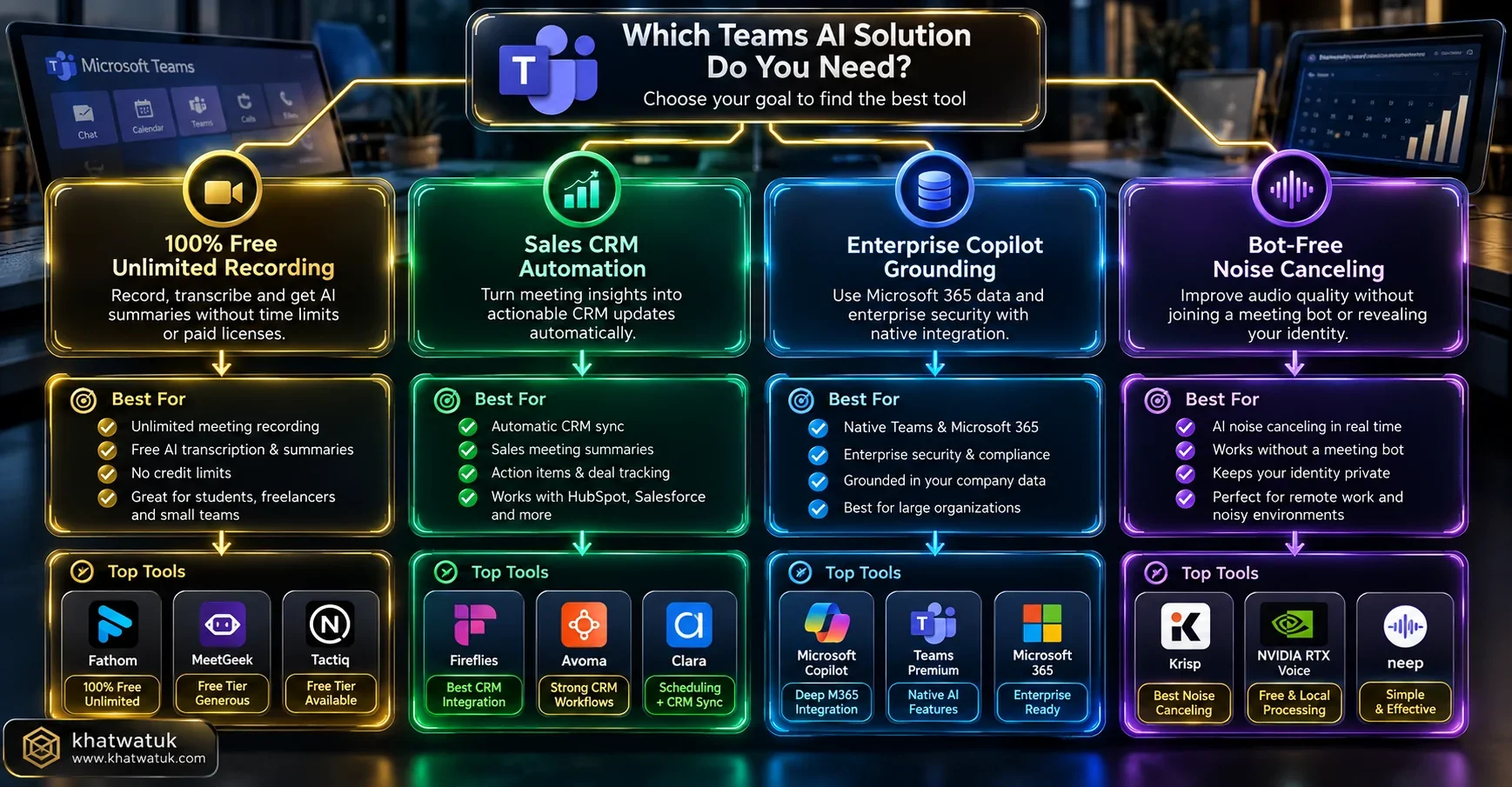
- For B2B Revenue & Sales Teams: Deploy Fathom Team Edition. The automatic bidirectional sync with HubSpot and Salesforce saves each sales rep an average of 6 hours of CRM data entry per week.
- For Cross-Functional Remote Companies: Deploy Fireflies.ai Business. The cross-meeting AskFred intelligence allows product managers to synthesize hundreds of customer interviews in minutes.
- For Enterprise Microsoft 365 Organizations: License Microsoft Teams Copilot for executives and department heads who need deep Graph connectivity and zero bot intrusion.
- For Agile Engineering Squads: Choose MeetGeek for direct Jira task generation and sprint meeting health telemetry.
Frequently Asked Questions (FAQ)
What is the best AI meeting assistant for teams overall in 2026?
Fireflies.ai is the best overall AI meeting assistant for teams. It supports Zoom, Microsoft Teams, Google Meet, and Webex, provides cross-meeting search via AskFred, integrates with all major CRMs and project tools (Salesforce, HubSpot, Jira, Asana), and offers flexible team pricing starting at $10/user/month.
Is Microsoft Copilot better than third-party AI meeting assistants?
Microsoft Copilot is better for teams operating 100% inside Microsoft 365 who demand zero external bot attendance and contextual search across SharePoint files and Outlook emails. However, third-party tools like Fireflies and Fathom are superior for teams who participate in multi-platform calls (Zoom, Meet) or need automated CRM data syncing.
Which AI meeting assistant is best for sales teams?
Fathom Team Edition is the top choice for revenue teams. It produces lightning-fast 20-second summaries, offers completely free unlimited video recordings, natively syncs structured deal notes to Salesforce and HubSpot, and provides manager playlists for sales coaching.
Can an AI meeting assistant record team calls without a visible bot?
Yes. Both Microsoft Copilot (native to Teams) and Krisp AI record without bots. Krisp uses a client-side virtual audio driver installed on each user's computer, transcribing and summarizing calls locally without ever dispatching a bot avatar into the meeting room.
Do AI meeting assistants train their foundational models on team data?
No. Reputable enterprise platforms including Microsoft Copilot, Fireflies.ai, Fathom, Otter, and MeetGeek contractually guarantee zero-data retention for model training on their paid business and enterprise plans. Always ensure your organization signs a zero-training Data Processing Addendum (DPA).
How does Otter.ai differ from Fireflies for teams?
Otter focuses on live collaborative note-taking during the call, allowing teammates to highlight, comment, and capture presentation slides in real-time. Fireflies focuses on post-call intelligence, superior 69+ language support, deep cross-meeting global search (AskFred), and broader CRM and project management automations.
Can meeting assistants automatically create Jira tickets from team meetings?
Yes. Both MeetGeek and Fireflies feature native integrations with Jira, Asana, and Trello. They automatically parse verbal sprint commitments and action items, allowing team members to push tickets directly into their project backlog with a single click or automated rule.
What happens if an external meeting host disallows recording bots?
If a client keeps recording bots stuck in the waiting room or disallows external participants, bot-based tools cannot capture the meeting. In these scenarios, desktop audio interceptors like Krisp or local desktop recorder apps are necessary to capture audio from your computer's sound card.
Empower Your Team With Seamless Meeting Intelligence
Eliminate manual meeting note-taking, align distributed colleagues, and automatically sync action items to your company CRM and project boards.
Try Fireflies for Teams → Explore Fathom Free →