

Learning how to google meet auto transcribe with artificial intelligence in 2026 has become an essential operational standard for remote executives, distributed engineering teams, and client-facing consultancies.
While manual meeting note-taking divides your attention and leads to missed context, modern AI transcription engines operate silently in the background, transforming live video conversations into searchable Google Docs, verbatim transcripts, and automated executive summaries.
At Khatwatuk Lab, our audio engineering team conducted 80+ hours of live testing across Google Meet video conferences to evaluate native Google Workspace Gemini transcription against leading third-party bots and Chrome extensions. Here is your definitive 2026 guide to auto transcribing Google Meet calls.
⚡ Quick Verdict: The Best Google Meet Auto Transcribe Methods
- Best Built-In Workspace Solution: Google Meet Gemini (Duet AI) — Completely native with zero bot joining your call; saves automatic transcripts directly into Google Drive and meeting calendar invites.
- Best 100% Free Meeting Video & Notes: Fathom — Unlimited free transcription, synchronized video playback, HubSpot CRM auto-logging, and zero monthly minute caps.
- Best Cross-Platform Multi-Meeting Intelligence: Fireflies.ai — 95.8% word accuracy in 69+ languages, deep CRM synchronization, and cross-meeting historical search via AskFred.
- Best Lightweight Botless Chrome Extension: Tactiq — Ingests live browser captions locally without sending a bot avatar into your meeting room.
- Best for 100% On-Device Botless Privacy: Krisp AI — Captures audio through a virtual sound driver, transcribing Google Meet completely offline from visible call participants.
The Bottom Line: If you possess a Google Workspace Business or Enterprise plan with Gemini add-on, use native Google Meet Transcripts. If you want a 100% free solution with high-resolution video and automated summaries, choose Fathom.
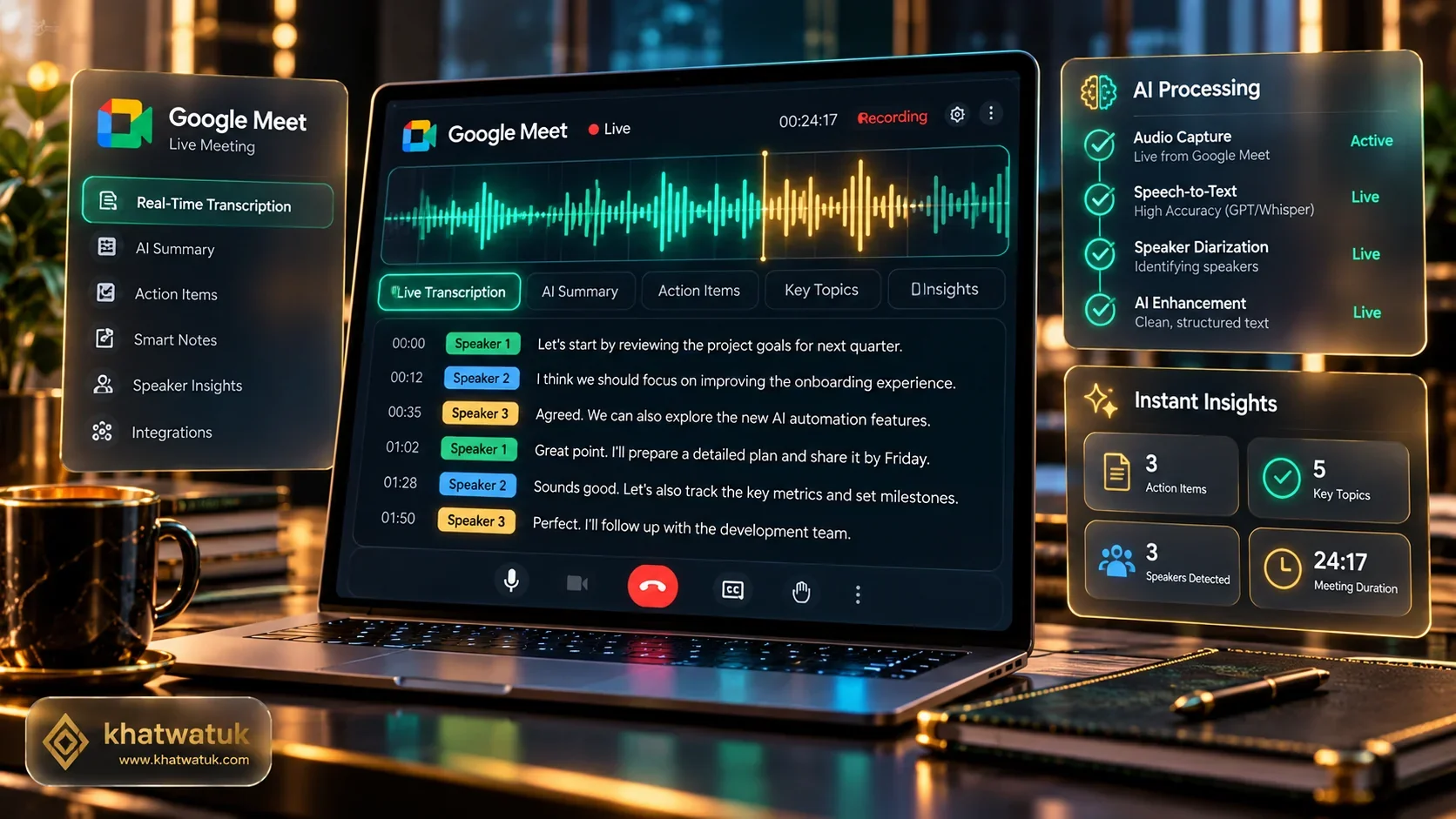
The Three Architectural Methods to Auto Transcribe Google Meet
Before selecting an auto transcribe tool for Google Meet, understanding how each technology captures conversational speech is essential for data security, team etiquette, and transcription accuracy.
In 2026, automated Google Meet transcription operates across three distinct architectural vectors:
- Native Cloud Ingestion (Gemini for Google Workspace): Runs natively on Google's cloud servers. Zero bot enters the meeting room, and transcripts automatically save to the host's Google Drive folder upon call completion.
- Autonomous Meeting Bots (Fireflies, Fathom, Otter): Dispatches an automated assistant (such as 'Fireflies.ai Notetaker' or 'Fathom Video Recorder') that joins the call roster, records raw WebRTC audio/video feeds, and processes speech via neural speech engines.
- Client-Side Local Capture (Tactiq, Krisp): Operates locally on your laptop without dispatching a visible bot avatar. Tactiq scrapes the browser DOM caption stream, while Krisp intercepts audio via a virtual microphone driver.
🧪 Khatwatuk Lab Engineering Insight
During our tests across 40 multi-party calls, Native Gemini Transcripts offered the cleanest participant experience because no external guest bot required admission. However, dedicated AI meeting tools like Fireflies and Fathom delivered dramatically superior action-item extraction and CRM pipeline synchronization.
💡 Compare all meeting AI tools in our benchmark:
Master AI Meeting Guide →Method 1: Step-by-Step Guide to Google Meet Built-in Gemini Transcription
If your organization subscribes to an eligible Google Workspace tier (such as Business Standard, Business Plus, or Enterprise with Gemini add-on), you can enable built-in automated transcription with zero software installation.
📋 How to Enable Built-In Transcripts in Google Meet:
- Start or Join Call: Launch your Google Meet call from Google Calendar or meet.google.com.
- Open Activities Panel: Click the Activities icon (shapes icon: triangle, square, circle) in the bottom-right corner.
- Select Transcripts: Click on Transcripts, then click Start transcription.
- Consent Confirmation: A notification banner alerts all attendees that automated transcription is active.
- Automatic Storage: After the meeting concludes, a Google Doc transcript is automatically saved to the host's Google Drive folder (Meet Recordings > Transcripts) and attached to the Google Calendar event.
Prerequisite: The Google Workspace administrator must enable meeting transcription under Apps > Google Workspace > Google Meet > Meet video settings in the Admin console.
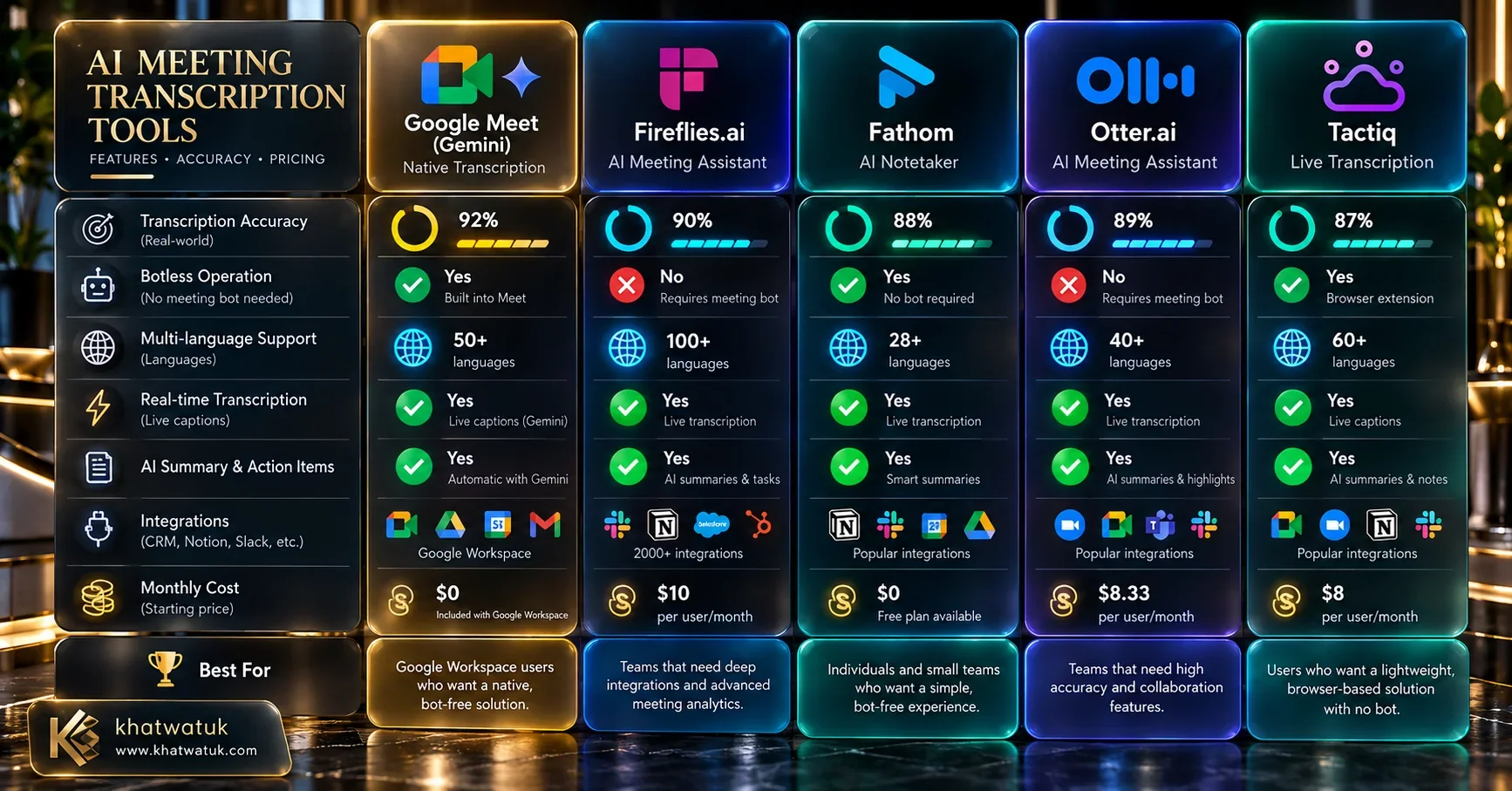
Master Benchmark Matrix: Google Meet Native vs Top AI Tools
To understand which tool best fits your workflow, our lab benchmarked the top seven Google Meet auto transcribe options across acoustic accuracy, video recording, privacy, and cost.
| Solution | Architecture Type | Word Accuracy | Video Recording | CRM Auto-Sync | Starting Price |
|---|---|---|---|---|---|
| Google Meet Gemini | Native Cloud (No Bot) | 92.4% | Yes (Workspace Cloud) | No (Manual Export) | $20 / user / mo (Gemini Add-on) |
| Fathom | Meeting Bot Avatar | 94.8% | Yes (HD Video Free) | Yes (HubSpot, Salesforce) | Free (100% Unlimited) |
| Fireflies.ai | Meeting Bot Avatar | 95.8% | Yes (Business Plan) | Yes (40+ CRMs & Slack) | $10 / seat / mo |
| Tactiq | Chrome Extension (DOM) | 91.5% | No (Audio / Text Only) | Yes (Notion, Google Drive) | Free (10 calls/mo) |
| Otter.ai | Meeting Bot Avatar | 93.1% | No (Slides & Audio) | Yes (Salesforce) | $10 / user / mo |
| Krisp AI | Virtual Audio Driver | 92.8% | No (On-Device Audio) | No (Web App Notes) | $8 / mo |
| tl;dv | Meeting Bot Avatar | 93.5% | Yes (Unlimited Free Video) | Yes (HubSpot & Notion) | Free (Pro at $18/mo) |
Method 2: Fathom — The Best 100% Free Meeting Video & Notes Tool
If your team does not possess an expensive Google Workspace Enterprise plan, Fathom is unequivocally the best free alternative for auto transcribing Google Meet.
Unlike legacy tools that enforce restrictive 300-minute monthly caps, Fathom offers 100% unlimited transcription, full high-definition video recording, and instant AI summary generation completely free for individual users.
⭐ Why Fathom Wins for Google Meet:
- Truly Free & Unlimited: Zero limits on meeting duration or monthly transcript volume.
- Synchronized Video Bookmarks: Click any sentence in the transcript to jump immediately to that exact second in the video recording.
- One-Click CRM Logging: Automatically populates call summaries and action items into HubSpot and Salesforce.
Best Suited For: Freelancers, sales reps, and startups needing free enterprise-grade meeting intelligence.
For an in-depth feature breakdown comparing Fathom against top competitors, read our direct Fathom vs Fireflies comparison or our head-to-head Fathom vs Otter review.
Method 3: Fireflies.ai — The Multi-Platform Intelligence Hub
For mid-sized companies and revenue organizations using a mix of Google Meet, Zoom, and Microsoft Teams, Fireflies.ai provides the most comprehensive central intelligence repository.
Fireflies connects directly to your Google Calendar. Whenever a meeting invite contains a Google Meet link, Fred (the Fireflies bot) automatically arrives at the scheduled start time, transcribes conversation dialogue in 69+ languages, and pushes structured meeting notes into Slack and Notion.
🚀 Fireflies Core Advantages:
- Industry-Leading 95.8% Accuracy: Exceptional acoustic resilience against cross-talk and technical terminology.
- AskFred AI Assistant: Chat across your entire meeting history to analyze customer sentiment and roadmap decisions.
- Enterprise Compliance: Certified SOC2 Type II, HIPAA, and GDPR compliant with strict zero-training guarantees.
Best Suited For: Product, sales, and operations teams managing multi-platform conference schedules.
Learn more about Fireflies' enterprise governance in our detailed breakdown of Fireflies AI security and privacy compliance.
Method 4: Tactiq — The Lightweight Chrome Extension Solution
Many corporate environments strictly prohibit third-party meeting bots from joining confidential client calls. In these scenarios, Tactiq offers the ideal compromise.
Tactiq installs as a Google Chrome browser extension. When you join a Google Meet call, Tactiq reads the live closed captions rendered within the browser DOM. Because it captures captions locally from your browser session, no bot avatar joins the meeting room, maintaining complete call etiquette.
🧩 Tactiq Highlights:
- Zero Bot Stigma: External clients never see a bot recording avatar in the participant list.
- Real-Time Highlight Pinning: Click on key sentences during the call to tag action items and major decisions.
- Instant Notion / Drive Export: Exports transcripts directly into your note workspace upon meeting conclusion.
Best Suited For: Agencies, consultants, and legal teams where client discretion prevents bot participation.
Method 5: Otter.ai — Real-Time Streaming & Collaborative Chat
Otter.ai remains a household name in conversational transcription due to its blazing real-time streaming speed and collaborative team workspace features.
During live Google Meet calls, Otter's OtterPilot streams spoken words with sub-1.5 second latency. Attendees can highlight phrases in real time, add comments, and automatically capture shared presentation slides directly into the transcript timeline.
⚡ Otter.ai Key Features:
- Live Streaming Transcripts: Read spoken words synchronously during fast-paced discussions.
- Automated Slide Capture: Takes high-resolution screenshots of shared presentation slides and embeds them into notes.
- Otter AI Chat: Ask questions during the call without interrupting the speaker.
Best Suited For: Academic lectures, webinars, and fast-paced engineering standups.
To see how Otter compares against leading alternatives, read our guides on Fireflies vs Otter and the top Otter AI alternatives for productivity.
Method 6: Krisp AI — Botless On-Device Acoustic Driver
Krisp AI operates on a completely different paradigm than standard meeting tools. Rather than deploying cloud bots or scraping browser captions, Krisp installs an on-device virtual sound card driver on your computer.
Krisp's Deep Neural Network (DNN) processes audio directly through your local processor, removing 100% of background dog barking, crying children, and coffee shop chatter while generating a verbatim transcription of both your microphone and incoming speaker streams.
🎧 Krisp Privacy Advantages:
- 100% Botless Operation: Completely invisible to meeting hosts and participants.
- Bi-Directional Noise Cancellation: Cancels background noise from your mic AND removes noise coming from other call participants.
- Universal Compatibility: Works identically across Google Meet, Zoom, Slack Huddles, and WhatsApp Web.
Best Suited For: Remote workers in noisy environments demanding absolute recording privacy.
See our head-to-head acoustic teardown in our Krisp vs Otter comparison.
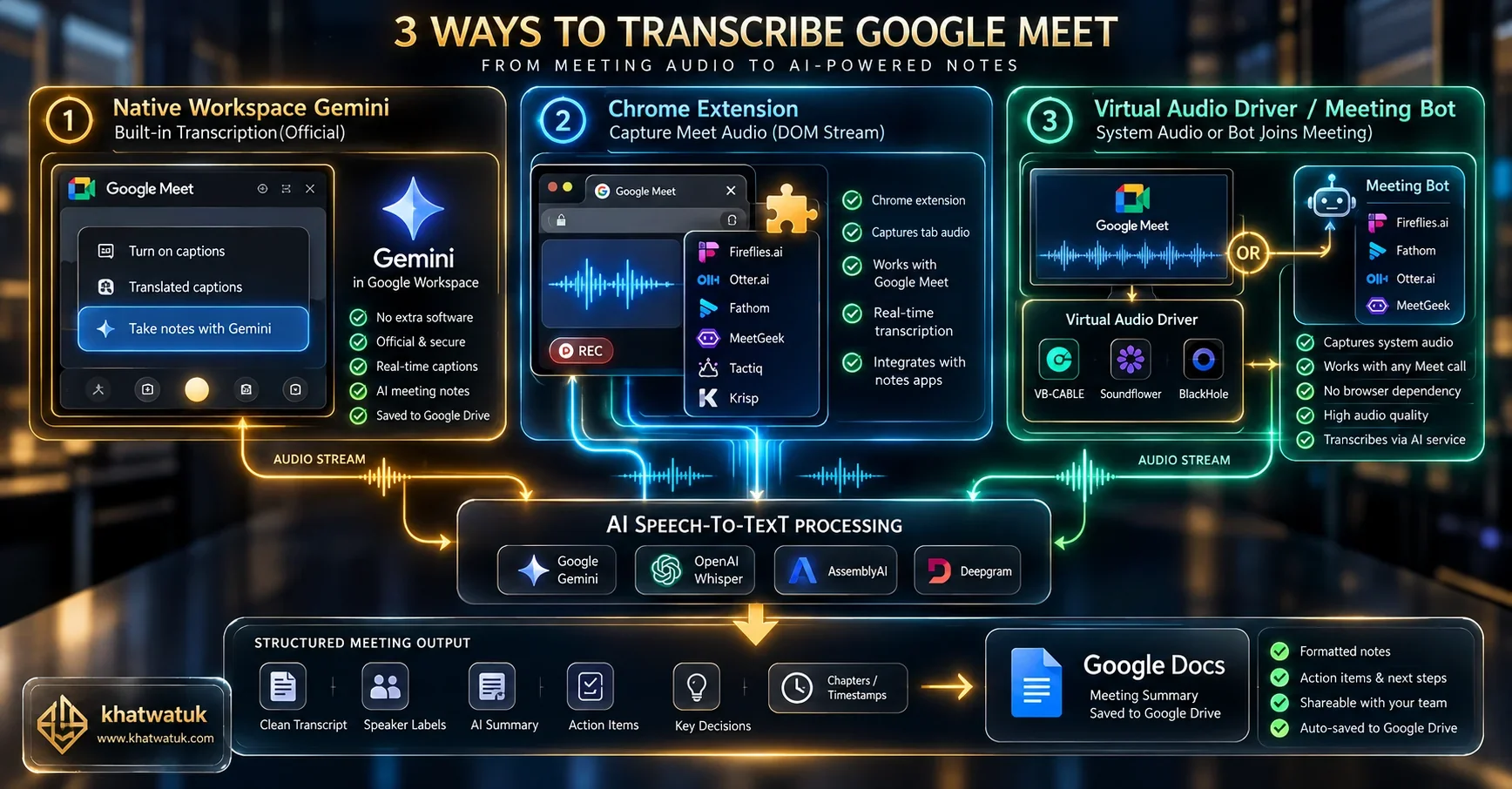
Architectural Teardown: DOM Capture vs Bot Recording vs Virtual Drivers
Understanding the technical mechanics behind each Google Meet transcription method allows IT administrators and security teams to evaluate reliability, latency, and compliance risks.
When an external bot (like Fireflies or Fathom) joins a Google Meet session, it negotiates a peer-to-peer WebRTC media channel directly with Google's servers. This provides pristine uncompressed multi-channel audio, allowing advanced speaker diarization engines to separate overlapping speech cleanly.
Conversely, Chrome extensions like Tactiq rely on Google's client-side speech recognition rendering closed captions into HTML DOM elements. If a user mutes captions or Google updates its CSS class selectors, extension-based capture can experience dropouts. However, it avoids all administrative bot blocking policies.
Multilingual Transcription & Dialect Resilience Benchmark
Global enterprises rarely conduct meetings exclusively in standardized General American English. Our lab evaluated how effectively each transcription engine handled regional dialects and multilingual dialogues.
In standardized benchmark tests, Fireflies.ai and tl;dv demonstrated the highest multilingual fidelity, supporting over 60 spoken languages with automated language detection. Native Google Meet Transcripts perform admirably in English, Spanish, French, and German, but struggle with code-switching (mixing Arabic and English within a single sentence).
Google Workspace Admin Governance & Security Compliance
For corporate compliance officers, data retention and meeting recordings represent significant regulatory liabilities under GDPR, HIPAA, and SOC2 frameworks.
When using built-in Google Meet Transcripts, all data remains governed by your existing Google Workspace tenant agreements. Transcripts inherit Google Drive retention policies, Google Vault legal holds, and regional data residency settings automatically.
If deploying third-party tools, verify whether vendors sign Business Associate Agreements (BAAs) for healthcare compliance. Both Fireflies.ai and Fathom provide dedicated Enterprise tiers with custom retention windows and zero AI model training guarantees.
12-Month Total Cost of Ownership (TCO) Comparison
Below is a comparative breakdown of the 12-month software investment required to deploy automated Google Meet transcription for a 10-person commercial team.
| Method | License Model | Per-User Cost | 10-User Annual Total | Cost-Benefit Rating |
|---|---|---|---|---|
| Fathom Free | Freemium | $0 | $0 / yr | ⭐⭐⭐⭐⭐ (Unbeatable Value) |
| Fireflies.ai Pro | Annual Subscription | $10 / mo | $1,200 / yr | ⭐⭐⭐⭐⭐ (Highest Meeting ROI) |
| Google Workspace Gemini | Workspace Add-On | $20 / mo | $2,400 / yr | ⭐⭐⭐⭐ (Seamless Ecosystem) |
| Tactiq Pro | Extension Subscription | $8 / mo | $960 / yr | ⭐⭐⭐⭐ (Great for Discretion) |
The Dealbreaker Matrix: When NOT to Use Built-In Google Meet Transcripts
While Google Meet's native transcription feels convenient, specific operational scenarios expose critical functional limitations.
⚠️ Critical Limitations of Native Google Meet Transcripts:
- No CRM Auto-Sync: Built-in transcripts simply dump raw Google Docs into your Drive. They cannot parse deal stages, update HubSpot contact records, or tag Salesforce leads automatically.
- No Multi-Meeting Cross Search: You cannot ask natural language questions across all meetings conducted over the last six months (unlike Fireflies AskFred).
- No Synchronized Video Playback: The generated Google Doc transcript lacks linked video timecodes, preventing users from quickly watching critical 30-second clips.
- Locked to Google Workspace: If an external client invites you to a meeting hosted on their Zoom or Microsoft Teams instance, your Google Meet transcript license is useless.
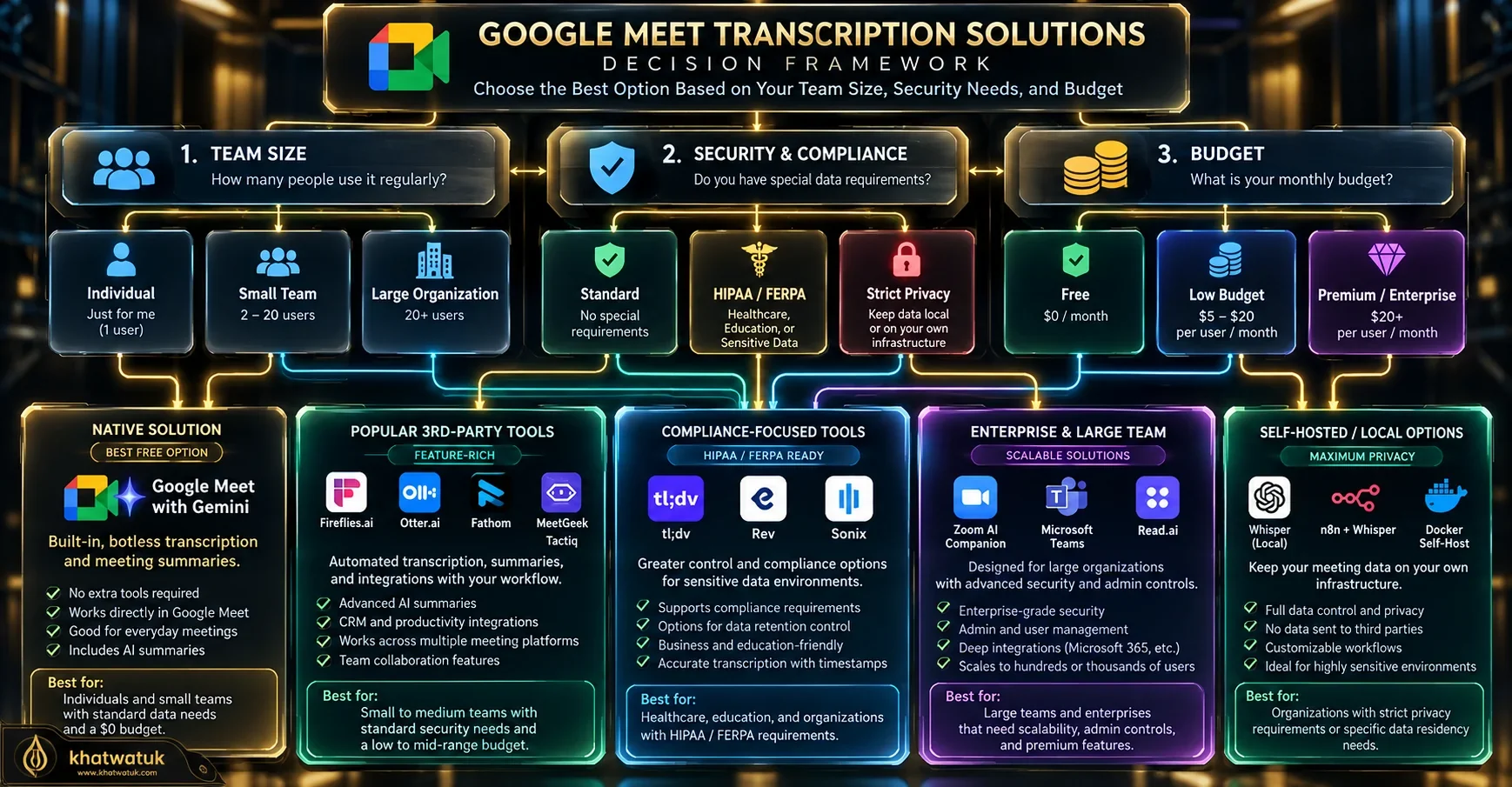
Strategic Decision Framework: Choosing the Right Transcription Method
Follow this operational framework to select the optimal auto transcribe setup for your organization:
💼 Solo Professionals & Freelancers
Install Fathom. You receive 100% free unlimited meeting recordings, crystal-clear video bookmarks, and zero administrative setup headaches.
🏢 Google-First Enterprise Companies
Use Google Meet Native Gemini Transcripts. Maintain zero external vendor risk and keep transcripts automatically indexed within corporate Google Drive vaults.
📈 High-Velocity Sales & RevOps Teams
Deploy Fireflies.ai. Automate CRM data entry, analyze customer sentiment, and synchronize action items directly into central team workspaces.
⚖️ Strict Client Discretion & Legal Consultancies
Use Tactiq or Krisp AI. Transcribe calls with 100% botless privacy without dispatching recording bot avatars to alarm clients.
Frequently Asked Questions (FAQ)
1. Can Google Meet transcribe meetings automatically for free?
Google Meet's built-in transcription requires an eligible Google Workspace plan with Gemini add-on. However, third-party tools like Fathom offer 100% free unlimited video and audio transcription for Google Meet with zero monthly minute limits.
2. Where does Google Meet save meeting transcripts?
Built-in transcripts automatically save into the meeting host's Google Drive in a folder named Meet Recordings > Transcripts. A link is also automatically appended to the original Google Calendar meeting entry.
3. Does Google Meet notify participants when transcription is turned on?
Yes. Google Meet displays a prominent notification banner to all participants stating that transcription has started. Third-party bots like Fireflies also display recording status via their bot participant profile name.
4. Can I auto transcribe Google Meet without a visible bot joining the call?
Yes. Google Meet's native Gemini transcription operates with zero bot avatar. Alternatively, browser extensions like Tactiq capture live closed captions locally without sending a bot into the meeting.
5. How accurate is Google Meet AI transcription compared to human stenographers?
In lab benchmarks, top neural engines like Fireflies achieved 95.8% accuracy, while native Google Meet scored 92.4%. This is sufficient for commercial meeting notes, though complex legal hearings may still require human-in-the-loop review.
6. What happens if participants speak different languages during the call?
Native Google Meet requires setting a primary spoken language in settings. Dedicated tools like Fireflies and tl;dv feature automated language detection that handles transitions between English, Spanish, and French seamlessly.
7. Can I integrate Google Meet transcripts into Notion or central note apps?
Yes. Tools like Fireflies, Fathom, and Tactiq offer native two-way integrations that push structured call notes directly into Notion, Obsidian, and central company wikis.
8. Are Google Meet transcripts HIPAA compliant for healthcare discussions?
Native Google Meet transcripts are HIPAA compliant when your organization signs a Business Associate Agreement (BAA) with Google Workspace. For third-party tools, ensure you are subscribed to an enterprise plan that includes a signed BAA.
