

Corporate executives and professional designers love Beautiful.ai for its browser-based Smart Slides, but enterprise reality demands deliverable files. Whether presenting to a Fortune 500 board, sharing decks with investment committees, or handing off files to external event organizers, understanding how beautiful ai export to powerpoint functions under desktop inspection is crucial.
Technical Testing Verdict: In our laboratory stress-test across Microsoft Office 365, PowerPoint 2021 desktop, and Google Slides, Beautiful.ai's Editable PPTX export maintained 95% vector shape fidelity and live text editability. However, dynamic Smart Slide automatic layout recalculation is lost once imported into PowerPoint, and uninstalled cloud fonts trigger default typography reflow.

Modern cloud presentation builders frequently advertise seamless export, but deliver flat bitmap images pasted onto blank slides. When clients need to tweak financial projections or swap a logo thirty minutes before a conference keynote, uneditable slides cause operational friction. To understand how Beautiful.ai fits into the broader generative slide landscape, explore our comprehensive guide to the Best AI Presentation Maker.
Technical Benchmark: Beautiful.ai vs Competing PPTX Export Methods
We created identical 15-slide enterprise corporate decks featuring multi-column text, data charts, vector icons, and custom hex color palettes, exporting them across six standard configurations to measure vector shape preservation and typography integrity.
| Export Configuration | Vector Path Editability | Live Text Boxes | Font Preservation | Smart Layout In PPTX |
|---|---|---|---|---|
| Beautiful.ai Editable PPTX | Full Vector Shapes (Scalable) | 100% Editable Text | Requires Local Font Install | Frozen (Standard PPTX Grid) |
| Beautiful.ai Flattened / View-Only | None (Rasterized Background) | Uneditable Text Image | 100% Visual Exact Match | Static Presentation Slide |
| Gamma App PPTX Export | Partial Vector / Nested Shapes | Editable Body Copy | Standard Fallback System Fonts | Frozen Card Formatting |
| Canva PPTX Export | Individual Graphics & SVGs | Editable Text Lines | Common System Fonts | Standard Unlocked Canvas |
| Plus AI Native Generation | Native Office Vector Elements | Native Slides Text Boxes | Native Google & Office Fonts | Standard PowerPoint Shapes |
| Microsoft Copilot PPTX | 100% Native Office 365 Vectors | Native Microsoft Text Boxes | Fully Integrated Enterprise Fonts | Native PowerPoint Rules |
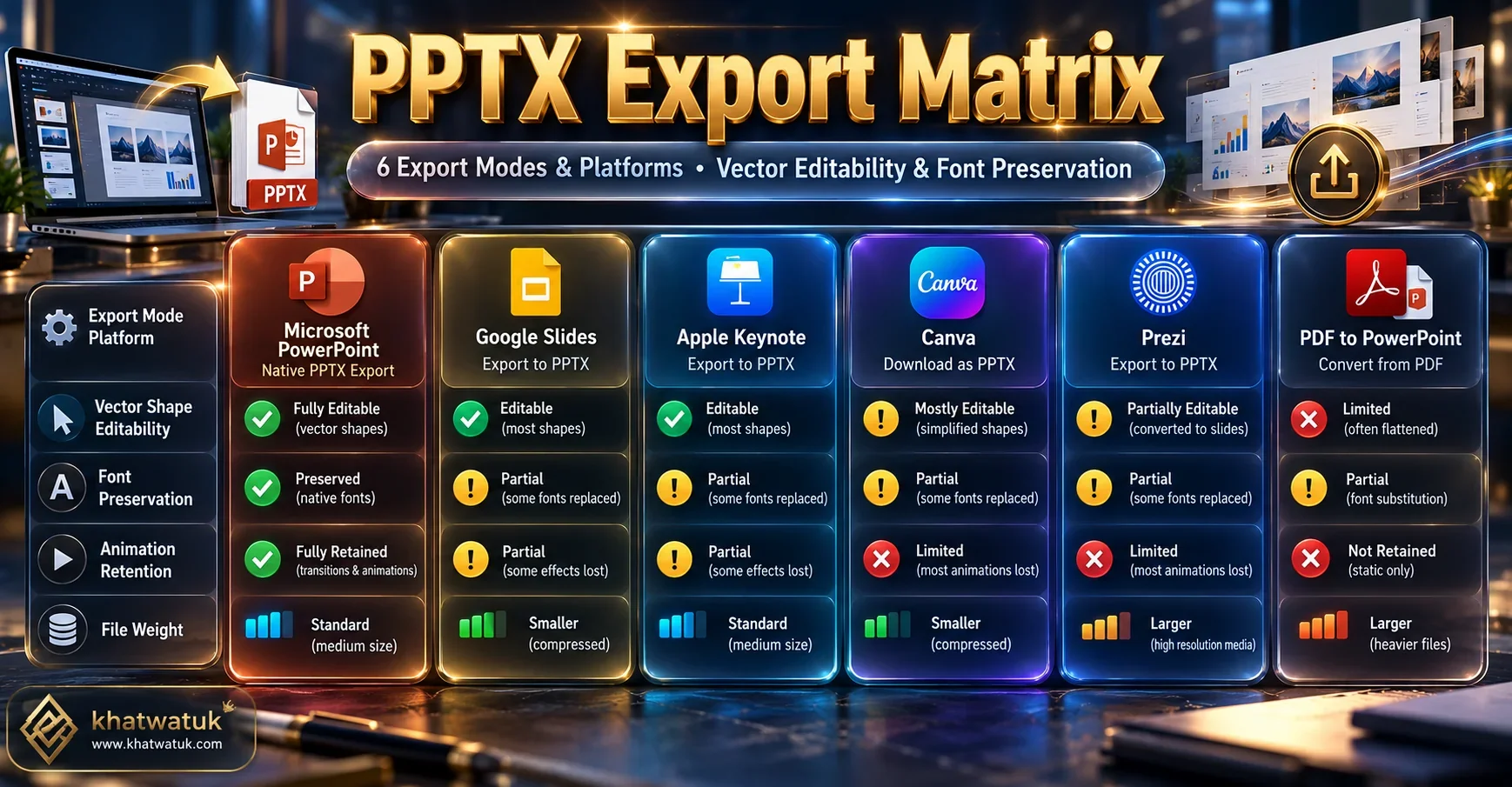
Deep-Dive Analysis: The 6 Presentation Export Modes Examined
To evaluate whether Beautiful.ai's PowerPoint export meets your team's operational requirements, we scrutinized each format's technical behavior inside desktop PowerPoint.
1. Beautiful.ai Editable PowerPoint Export (.pptx)
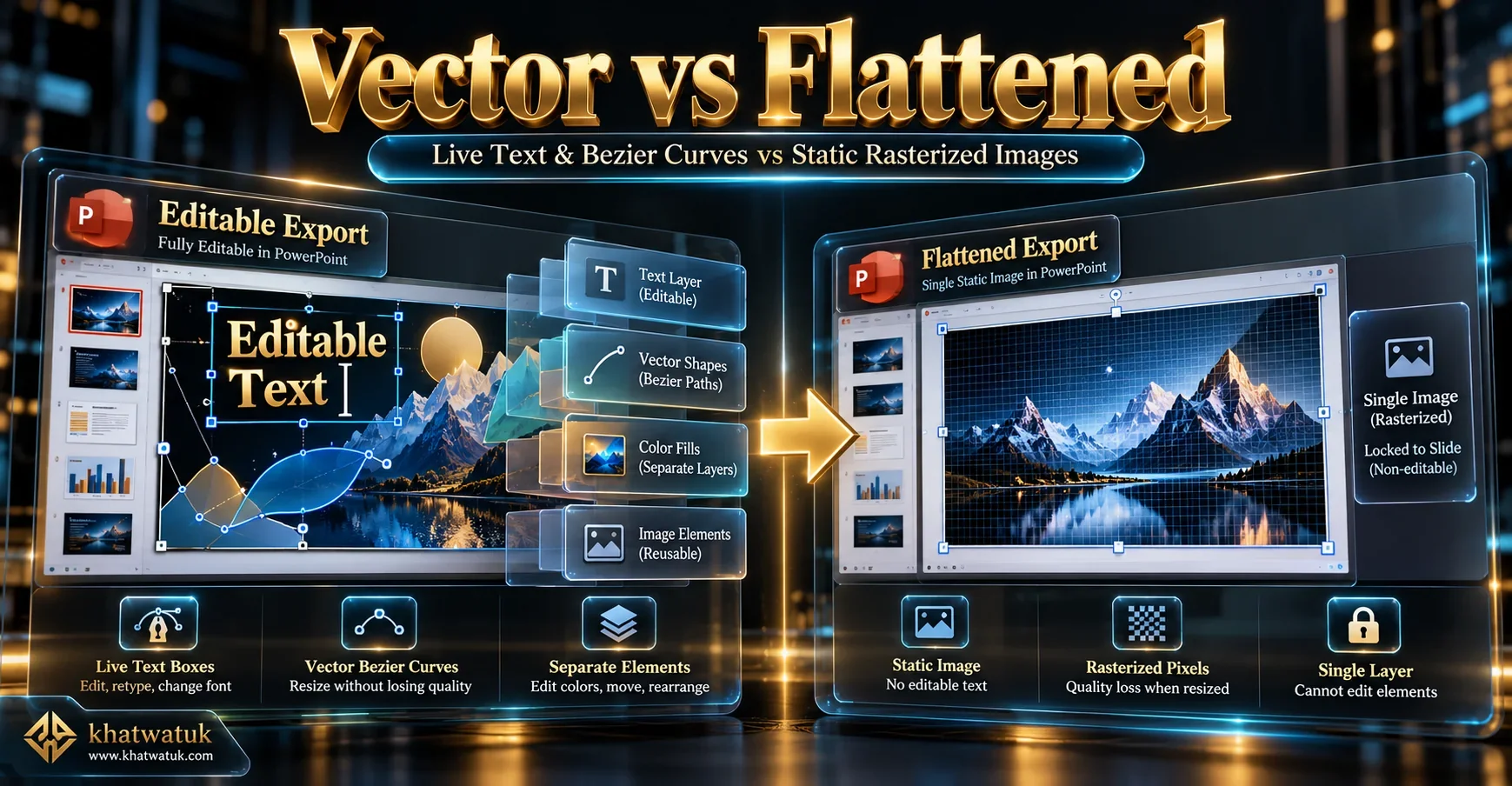
The 'Editable' option is Beautiful.ai's flagship export capability. When downloaded as an editable (.pptx) file, the engine dissects web-based Smart Slides and compiles them into genuine Microsoft PowerPoint Open XML objects. Text paragraphs remain live, editable string boxes, and graphic elements (bar graphs, timeline milestones, metric badges) convert into native vector shapes.
In our testing, resizing vector elements in PowerPoint retained crisp edge resolution without pixelation. However, the automated Smart Slide layout logic stays behind in the Beautiful.ai cloud editor. If you delete a metric card inside PowerPoint, the remaining two cards will not automatically slide to re-center themselves; you must reposition them manually. To see how Beautiful.ai's layout engine performs against web-first tools, check out Beautiful.ai vs Gamma.
Technical Verdict: High vector fidelity and live text make this the best choice when collaborating with PowerPoint-bound colleagues.
2. Beautiful.ai Flattened / View-Only Export
The 'Flattened' export setting rasterizes each slide into a high-resolution, pixel-perfect image locked to the background of a PowerPoint slide canvas. There are zero live text strings or selectable vector paths.
While this eliminates editability, it guarantees that custom corporate fonts, brand color gradients, and complex mathematical alignment will render identically on any computer or operating system, regardless of whether the recipient has your fonts installed. When pitching high-stakes venture capital presentations, this bulletproof visual lock is critical, as discussed in our review of Beautiful.ai Pitch Deck Review.
Technical Verdict: Ideal for final external client presentations and conference podium laptops where formatting breakage cannot be tolerated.
3. Gamma App PowerPoint Export (.pptx)
Gamma operates on fluid web-first cards rather than rigid 16:9 PowerPoint slides. When exporting to PPTX, Gamma attempts to condense vertical cards into traditional horizontal presentation slides.
While basic text boxes remain editable, multi-column layouts frequently export as nested groupings or static background cards. Complex web embeds (interactive forms, live web links) flatten entirely. For teams converting unstructured text directly into Microsoft files, see our analysis of the Best AI PowerPoint Generator from Text.
Technical Verdict: Serviceable for basic text handoffs, but less structurally refined than Beautiful.ai's vector exports.
4. Canva PowerPoint (.pptx) Export
Canva allows users to download presentation decks directly into Microsoft PowerPoint (.pptx) format. Graphic elements and vector SVGs transfer into PowerPoint shapes cleanly.
The primary vulnerability in Canva's PPTX export is typography kerning. Because Canva relies heavily on custom web typography, opening an exported file on a computer without those fonts leads to abrupt line wraps and disjointed text placement.
Technical Verdict: Good for creative multimedia slides, but requires rigorous font verification before presenting.
5. Plus AI Native In-Workspace Generation
Unlike third-party web apps that require a conversion pipeline to create PPTX files, Plus AI builds slides directly inside Google Slides or Microsoft PowerPoint via official workspace add-ons.
Because every slide element is constructed natively within your office software's DOM, there is zero translation error or vector degradation upon saving. For an in-depth assessment of in-workspace generative add-ons, read our head-to-head comparison of SlidesAI vs Beautiful.ai.
Technical Verdict: Eliminates export conversion errors entirely by generating native office objects from the start.
6. Microsoft Copilot for PowerPoint
Microsoft Copilot operates natively within the desktop PowerPoint application. It does not 'export' slides; it generates them directly onto your company's official corporate master template (.potx).
Every text box, animation trigger, and shape uses native PowerPoint engine properties, ensuring 100% interoperability across enterprise environments without conversion anomalies.
Technical Verdict: The definitive gold standard for Microsoft 365 enterprise environments seeking zero export friction.
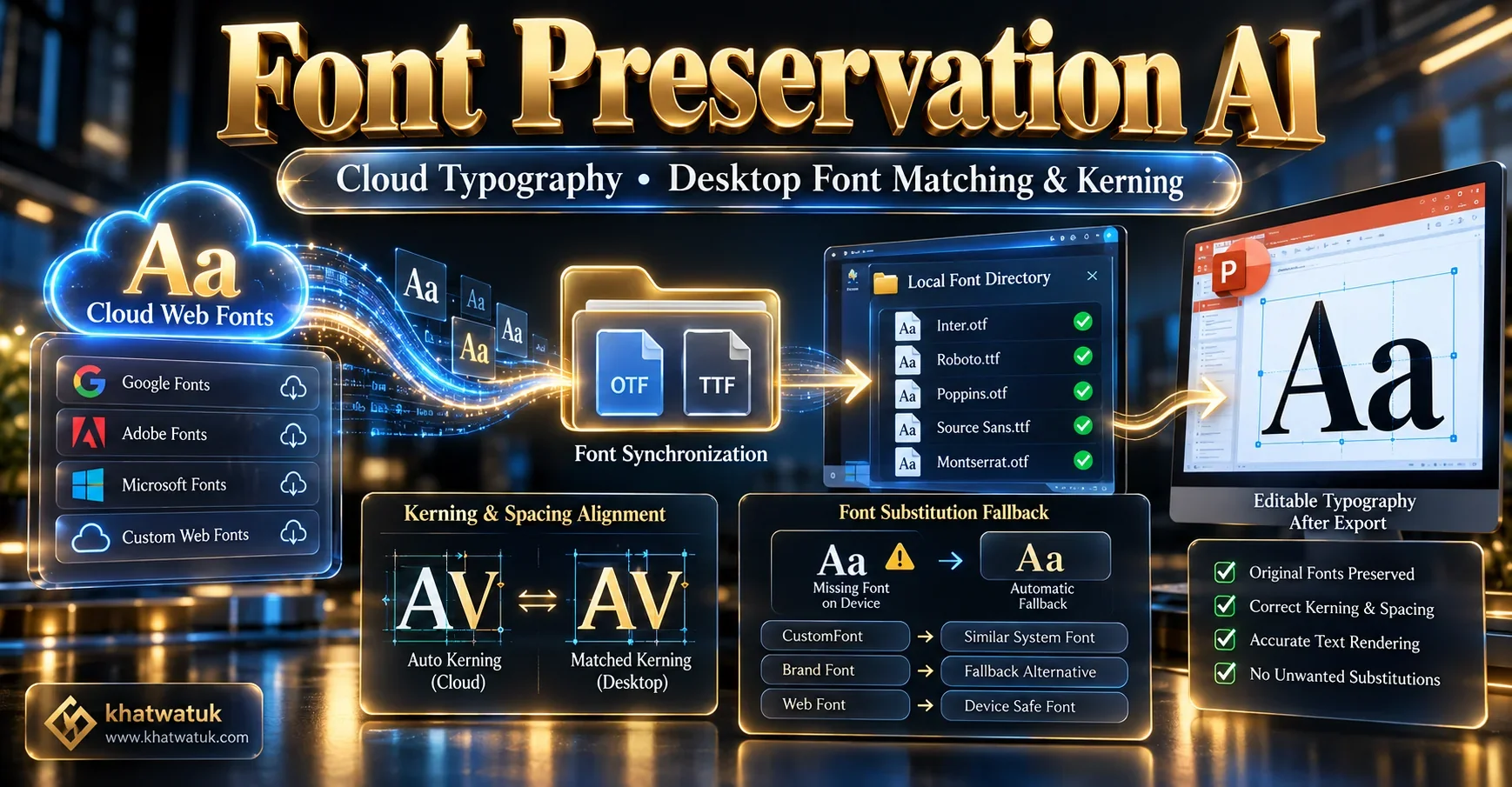
What Breaks When You Export Beautiful.ai to PowerPoint?
While Beautiful.ai provides the most accurate vector export among third-party slide generators, three technical compromises occur during conversion:
- Smart Slide Dynamics Cease Functioning: In the Beautiful.ai web interface, slides adapt dynamically: adding a bullet item shrinks font size proportionally across all items. Inside PowerPoint, this computational layout code is stripped away. The slide freezes as a standard, static set of PowerPoint text frames.
- Cloud Typography Substitution: If your Beautiful.ai presentation uses a Google Font or custom brand typeface that the recipient does not have installed locally on their machine, PowerPoint defaults to Calibri or Arial. This often causes text reflow, pushing bullet points below their container borders.
- Web Animations Are Flattened: Animated data progressions, progressive milestone reveals, and smooth page fades built in Beautiful.ai do not convert into PowerPoint animation triggers. The exported slide displays all elements in their final completed state.
Frequently Asked Questions (FAQ)
Here are direct answers to common questions about exporting presentations from Beautiful.ai into Microsoft PowerPoint.
Can you edit text and shapes in PowerPoint after exporting from Beautiful.ai?
Yes, if you select the 'Editable' export setting. Beautiful.ai converts slides into native PowerPoint text boxes and vector shapes, allowing you to edit copy and resize graphics. However, dynamic Smart Slide automatic layout recalculation is disabled once in desktop PowerPoint.
Why do fonts change or look misaligned after exporting from Beautiful.ai to PowerPoint?
Beautiful.ai uses cloud web fonts. If the recipient does not have that exact font installed locally on their computer, Microsoft PowerPoint substitutes a default system font like Calibri or Arial, which can cause text reflow and overlapping boxes.
Does Beautiful.ai keep animations and slide transitions when exported to PPTX?
No. Beautiful.ai web animations, animated data charts, and dynamic transitions are stripped down to static slides upon PowerPoint export. If you require smooth animated transitions, present directly from the Beautiful.ai web player.
Which Beautiful.ai subscription tier is required to export editable PowerPoint files?
Exporting editable PowerPoint (.pptx) files requires an active paid subscription (Pro plan at $12/month or Team plan) or an active 14-day free trial. Free viewer accounts can only view slides online.
Is Beautiful.ai's PowerPoint export better than Gamma or Canva?
Yes, for corporate PowerPoint workflows. Beautiful.ai generates genuine vector shapes and standard slide dimensions, whereas Gamma converts web-first fluid cards that often export as rasterized image backgrounds in desktop PowerPoint.
Final Technical Recommendation
For organizations seeking AI presentation speed with reliable Microsoft PowerPoint compatibility, Beautiful.ai offers the best third-party vector export in the market. Select Editable PPTX for internal collaboration, or Flattened PPTX for high-stakes external keynotes.
Export Beautiful.ai Decks to PowerPoint