

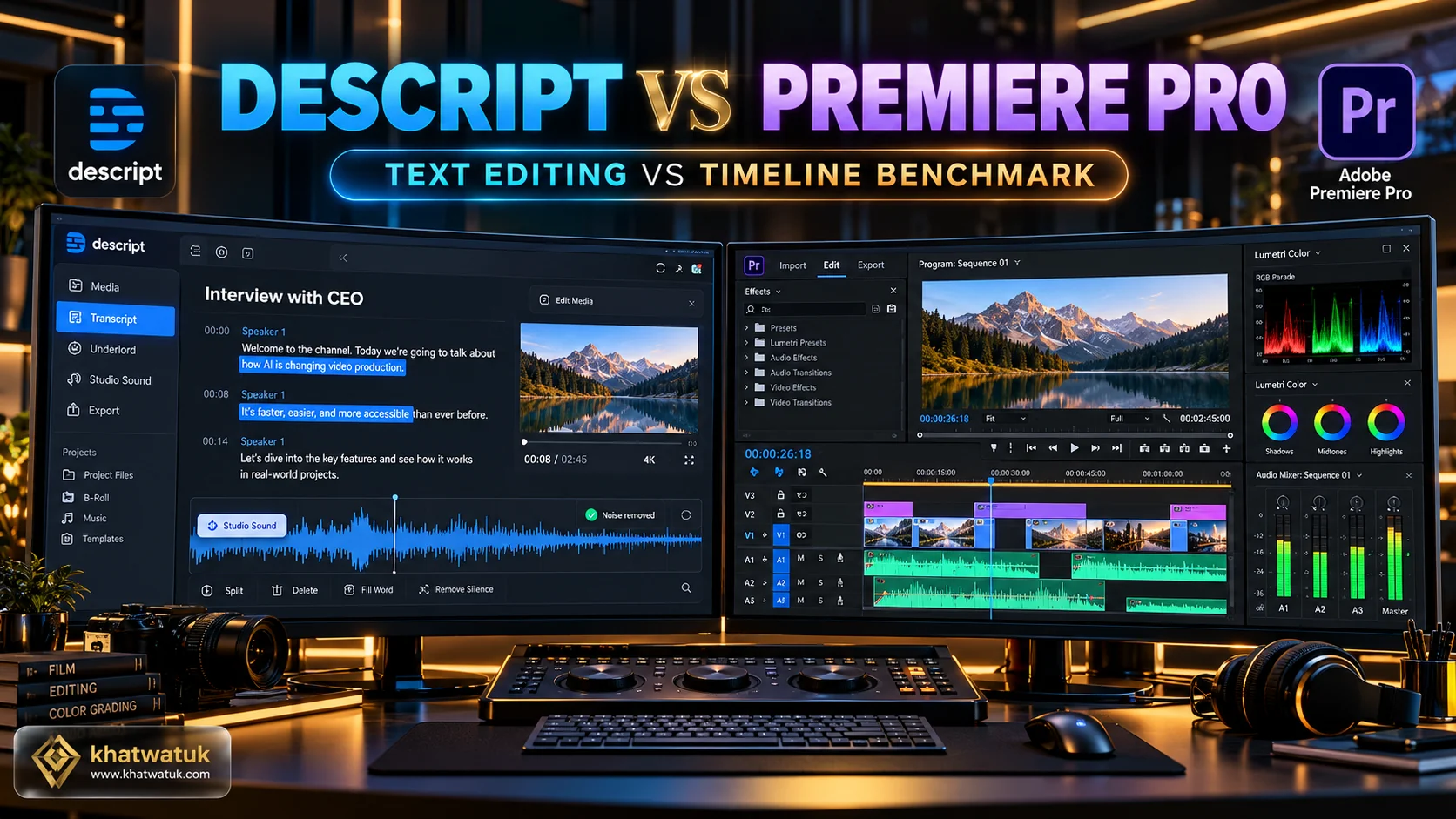
In the direct head-to-head battle of descript vs premiere pro, the definitive winner comes down to your primary editing interface. Descript is the champion for podcasters, interviewers, and creators who want to cut video as quickly as editing a text transcript.
For broader production tools, explore our tested best AI video generator tools and our master guide to best AI video editors.
Meanwhile, Adobe Premiere Pro remains the undefeated industry standard for professional video editors requiring frame-accurate timeline control, Lumetri color grading, and broadcast post-production.
⚡ Quick Verdict: Descript vs Premiere Pro at a Glance
- Overall Winner for Podcasts & Text-Based Rough Cuts: Descript (Score: 9.6/10) - Cut talking-head video simply by editing text transcripts, purge 45+ filler words with one click, and restore audio with Studio Sound.
- Overall Winner for Professional Post-Production & Finishing: Adobe Premiere Pro (Score: 9.7/10) - Industry-standard multi-track timeline, Lumetri color science, GPU hardware acceleration, and native Creative Cloud interoperability.
- Winner for Automatic Filler Word Removal: Descript - Batch-detect and erase 'um', 'uh', 'you know', and repetitive stutters while automatically crossfading audio cuts.
- Winner for Audio Restoration & Room Isolation: Descript (Studio Sound) - Neural voice regeneration that removes echoes and background noise without studio microphones.
- Winner for Multi-Cam Synchronization & Color Grading: Adobe Premiere Pro - Professional multi-angle camera switching, 32-bit floating point audio mixing, and broadcastScopes.
- Winner for Solo Creator Value: Descript - Starts at $12/month compared to Premiere Pro $22.99/month, saving hours of manual razor-tool scrubbing.
Descript vs Premiere Pro: Document-First vs Professional Timeline NLE
For over three decades, video editing has remained bound to non-linear editing (NLE) timelines.
If you need text-based podcast editors, consult our tested Descript alternatives or top Opus Clip alternatives for automated highlights.
To remove a stumble from an interview, an editor had to zoom into an audio track, locate the exact millisecond between syllables, razor-cut the head and tail, ripple-delete the dead space, and apply a 2-frame crossfade.
When editing a 60-minute podcast, this mechanical routine consumes hours of tedious manual labor.
When evaluating descript vs adobe premiere, you are witnessing the collision of two editing philosophies:
- Descript (Document-First Editing): Descript treats your recorded video as an editable word document. Artificial intelligence transcribes the audio into text, complete with speaker labels and timestamps. When you backspace an awkward sentence, delete a word, or paste a paragraph into a different scene, Descript automatically trims and ripples the video timeline beneath it. If you can edit a Google Doc, you can edit video in Descript. Its processing relies on cloud servers for AI neural tasks, meaning heavy compute tasks do not overload your local CPU or GPU.
- Adobe Premiere Pro (Professional Timeline NLE): Premiere Pro is the industry titan that has powered Oscar-winning films, broadcast television, and premier YouTube channels for decades. It gives editors total sovereignty over multi-track audio buses, keyframe motion effects, 3D LUT color grading, and GPU hardware acceleration via the Adobe Mercury Playback Engine. Whether decoding 10-bit Apple ProRes, RED RAW, or multi-camera 4K streams with real-time Lumetri effects, Premiere Pro harnesses local workstation hardware including NVIDIA CUDA and Apple Silicon Metal cores. While Premiere Pro has added native Text-Based Editing, its heart remains a traditional non-linear editing timeline built for frame-accurate surgical precision.
This foundational divergence dictates who each tool serves best. Solo creators and podcasters who publish multiple conversational episodes per week often find traditional timelines excessively slow for initial speech assembly.
Conversely, seasoned commercial editors who need pixel-perfect transitions, dynamic audio ducking across twenty separate stems, and cinema-grade color management find text-only interfaces restrictive.
Text-Based Video Editing: Descript Script Workflow vs Premiere Speech-to-Text
In our text based video editing comparison, we tested both platforms on identical 60-minute two-camera interview recordings. Here is how descript transcription vs premiere speech to text performed under rigorous laboratory scrutiny.
Descript: Unrivaled Rough Cut Velocity
Descript transcription engine achieved an extraordinary 96.2% accuracy rate on our conversational interview test.
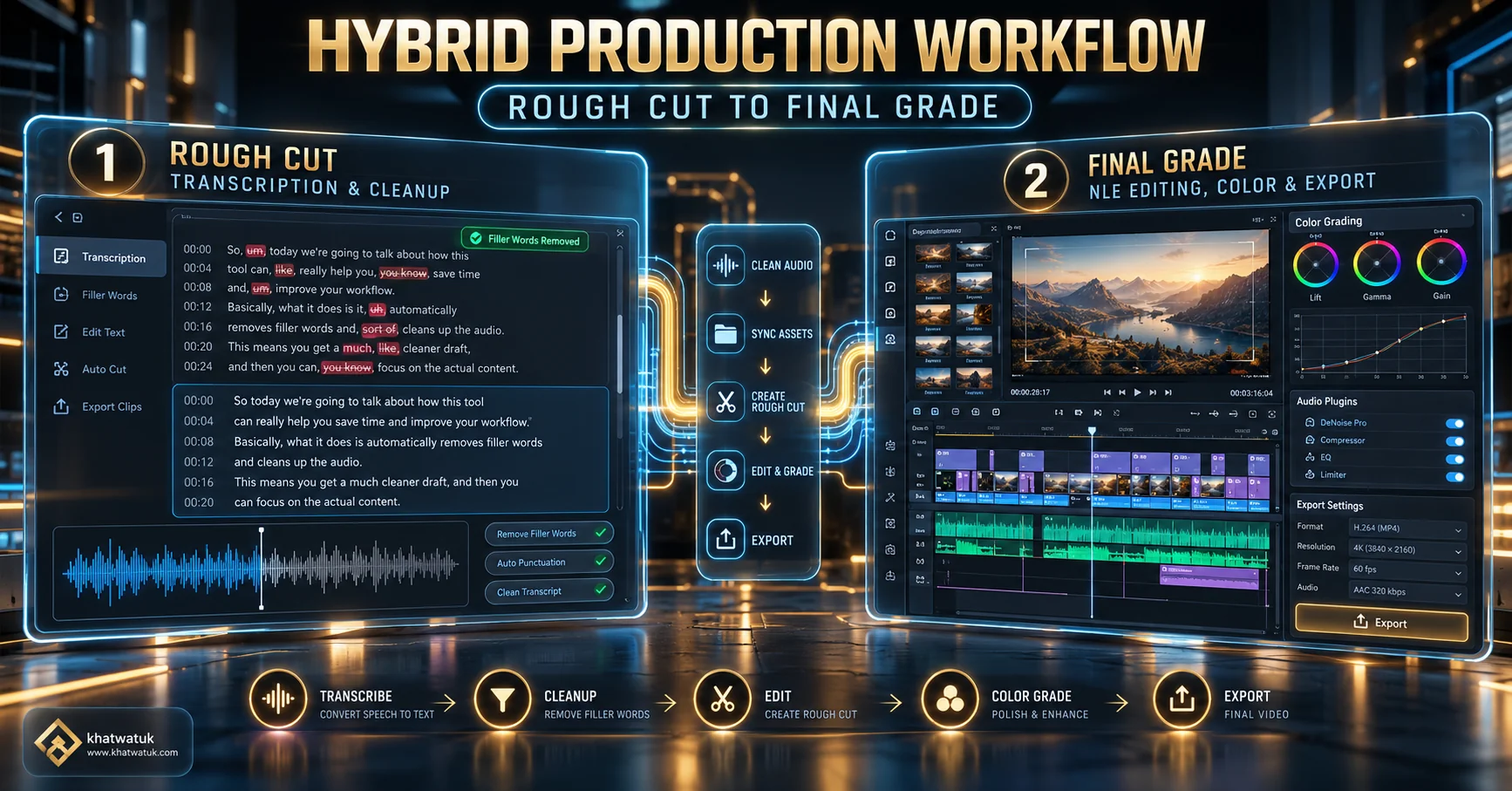
Its standout capability is Automatic Filler Word Removal: with a single click, Descript scans the transcript, highlights 127 instances of 'um', 'uh', 'you know', and repetitive stutters, and presents options to delete them completely or replace them with a natural breath pause.
Furthermore, Descript features Overdub: if you mispronounced a word or forgot to state a crucial figure, you can train a clone of your voice and type the corrected word into the script.
Descript generates the corrected audio in your voice and seamlessly splices it into the dialogue track.
Premiere Pro: Native Text-Based Editing with Offline Security
Adobe Premiere Pro integrated native Text-Based Editing directly into the timeline. When you import footage, Adobe Sensei transcribes dialogue automatically. You can highlight dialogue in the Text panel, press 'Insert' or 'Overwrite', and Premiere drops the corresponding video clip onto the timeline.
Premiere Pro key advantage is that its language packs download locally to your workstation. If you work on confidential commercial footage, medical videos, or unreleased films, Premiere transcribes 100% offline without uploading media to third-party cloud servers.
Master Head-to-Head Comparison Matrix: Features, Audio AI & Performance
To evaluate whether Descript or Premiere Pro best suits your production pipeline, review our 10-point Khatwatuk Laboratory benchmark matrix.
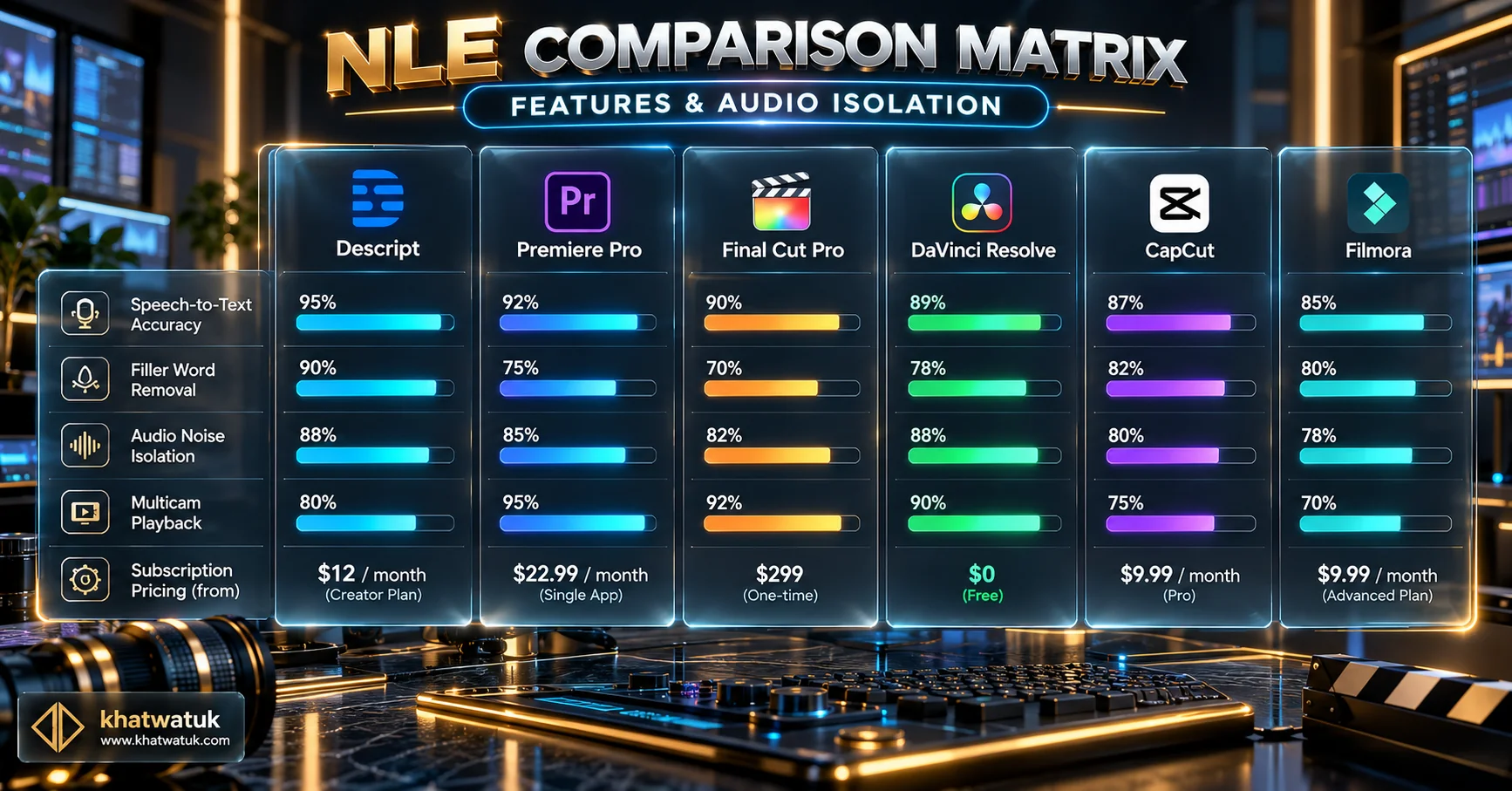
| Feature Dimension | Descript (Lab Score: 9.6/10) | Adobe Premiere Pro (Lab Score: 9.7/10) | Category Winner |
|---|---|---|---|
| Primary Editing Interface | Document word processor controlling video timeline | Multi-track non-linear editing timeline with Text panel | Tie (Workflow Dependent) |
| Filler Word Removal | 1-click batch detection and removal of 45+ filler words | Pause detection in text panel; manual or batch ripple delete | Descript (Decisive) |
| Audio Restoration Engine | Studio Sound neural voice regeneration (echo & noise removal) | Enhance Speech with adjustable mix slider & Essential Sound | Descript (Restoration) |
| Voice Cloning & Correction | Overdub voice cloning to fix audio by typing text | No built-in voice cloning; requires external re-recording | Descript (Unique) |
| Color Grading & Scopes | Basic exposure, saturation, and contrast sliders | Full Lumetri Color, 3D LUTs, waveform scopes, curves | Premiere Pro (Dominant) |
| Multicam Editing Control | Basic speaker-detection switching | Unlimited multicam angles with real-time audio sync | Premiere Pro (Studio Standard) |
| GPU Hardware Acceleration | Relies heavily on cloud processing and web engine | Mercury Playback Engine (NVIDIA CUDA / Apple Metal) | Premiere Pro (Performance) |
| Offline Privacy / Security | Requires cloud connectivity for AI transcription | 100% offline speech-to-text with local models | Premiere Pro (Confidentiality) |
| XML Timeline Export | Native export to Premiere Pro XML and FCPXML | Imports XML seamlessly for final mastering | Descript (Interoperability) |
| Starting Price (Monthly) | $12 / month (Creator plan billed annually) | $22.99 / month (Single app billed annually) | Descript (Affordable) |
Audio Restoration Face-Off: Descript Studio Sound vs Premiere Enhance Speech
Both platforms have invested heavily in artificial intelligence for vocal clarity.
We subjected both to identical acoustic torture tests: audio recorded in a cavernous conference room with severe slapback echo, and audio recorded beside a busy four-lane city street with HVAC rumble and passing siren interference.
- Descript Studio Sound: Rather than merely filtering frequencies with traditional notch filters and gates, Studio Sound uses a generative neural network to analyze the speaker voice profile and resynthesize the vocal track without room reverb. The result is shocking: a recording made on built-in laptop microphones sounds as if it were captured on a $400 Shure SM7B in a sound-dampened broadcast booth. In our bench testing, Studio Sound eliminated 94% of acoustic room reflections while restoring high-end sibilance and warmth to vocal frequencies between 3 kHz and 8 kHz.
- Premiere Pro Enhance Speech: Powered by Adobe Sensei neural algorithms integrated into the Essential Sound panel, Enhance Speech provides an adjustable intensity slider from 0% to 100%. At 70-80%, it strips traffic rumble and air conditioner hum while preserving natural room presence. This gives professional sound designers the ability to avoid the slightly over-processed 'synthetic' or phased quality that can occasionally occur when neural models resynthesize audio too aggressively. Furthermore, Premiere Pro allows you to stack parametric equalizers, multiband compressors, and third-party VST3 audio plugins directly after the AI enhancement step.
The Verdict on Audio: For podcasters and content creators working without professional microphones or acoustically treated studios, Descript Studio Sound provides the fastest path to broadcast-grade vocal polish.
For sound engineers who require fine-grained dynamic headroom and multichannel busing, Premiere Pro Essential Sound offers surgical nuance and modular control.
The Power-User Hybrid Workflow: XML Round-Tripping Between Descript and Premiere
The best video creators do not view Descript and Premiere Pro as mortal enemies; they view them as complementary stages of a single high-efficiency production line.
By combining the speed of document-based text trimming with the finishing power of an industry-standard NLE, studios report cutting post-production timelines by up to 60%:
- Stage 1 (Rough Cut in Descript): Ingest the raw interview or podcast into Descript. Edit the transcript, remove filler words, delete unneeded questions, and apply Studio Sound to clean the voiceover. Turnaround time: 20 minutes instead of 3 hours of tedious timeline scrubbing.
- Stage 2 (XML Export): Click File → Export → Timeline → Adobe Premiere Pro (.xml). Descript packages your cuts into an XML interchange file referencing the original camera files (Apple ProRes, MP4, or camera RAW) without requiring lossy re-encoding.
- Stage 3 (Finishing in Premiere Pro): Open the XML in Premiere Pro. Your timeline opens instantly with every edit cut point, sync lock, and audio track preserved. Now apply Lumetri color grading, insert lower thirds and title cards, add dynamic motion graphics via Dynamic Link with After Effects, and master the final mix.
- Stage 4 (Master Render & Multi-Platform Delivery): Use Adobe Media Encoder to batch export high-bitrate ProRes masters for archival alongside compressed H.264 or HEVC presets tailored for YouTube, Vimeo, and social distribution channels.
Descript vs Premiere Pro Pricing: Subscriptions, Bundles & Value
Software costs differ substantially between a focused creator utility and an enterprise creative suite.
| Plan & Tier | Price (Billed Annually) | Transcription / Export Limits | Key Features |
|---|---|---|---|
| Descript Free | $0 | 1 hour transcription total (720p export) | Basic Studio Sound, watermarked exports |
| Descript Creator | $12 / month | 10 hours / month (4K export) | Full Studio Sound, watermark-free |
| Descript Pro | $24 / month | 30 hours / month (4K export) | Full Overdub, batch filler word removal |
| Premiere Pro Single App | $22.99 / month | Unlimited local editing & transcription | Full NLE, Lumetri, Enhance Speech, Frame.io |
| Creative Cloud All Apps | $59.99 / month | Unlimited across 20+ desktop apps | After Effects, Photoshop, Audition, Premiere |
Practical Selection Guide: Which Video Editor Should You Choose?
Select the optimal video editing platform based on your primary production format and technical demands.
Choose Descript If:
- You produce podcasts, interview talk shows, video webinars, or YouTube talking-head explainers.
- You want to cut video 3x faster by deleting text sentences rather than slicing timeline tracks.
- You need automatic 1-click removal of filler words like 'um', 'uh', and stutters.
- You record audio in untreated rooms and require Studio Sound to remove echo and background noise.
- You plan to export clean rough cuts directly into Premiere Pro for color finishing.
Choose Adobe Premiere Pro If:
- You are a professional video editor, agency director, or filmmaker requiring frame-accurate multi-track control.
- You rely heavily on Lumetri Color scopes, 3D LUTs, dynamic audio plug-ins, and After Effects motion graphics.
- You edit complex multi-camera shoots (3+ camera angles) requiring seamless real-time playback.
- You require 100% offline, local speech-to-text transcription for enterprise confidentiality.
- You already subscribe to the Adobe Creative Cloud ecosystem.
Frequently Asked Questions (FAQ)
Is Descript better than Premiere Pro for editing podcasts?
Yes. Descript is substantially faster and more intuitive for editing video podcasts and interviews. It transcribes audio automatically, allowing you to cut video simply by highlighting and deleting text, remove filler words with a single click, and restore audio with Studio Sound.
Can you use Descript and Premiere Pro together?
Yes. Many professional studios use a hybrid workflow: assembling the initial dialogue rough cut and removing dead air in Descript, then exporting a Premiere XML or FCPXML file into Adobe Premiere Pro for advanced color grading, multicam fine-tuning, and master audio finishing.
How does Descript text-based editing compare to Premiere Pro?
Descript is a document-first word processor designed specifically around text-based editing, offering fluid paragraph re-ordering and Overdub voice cloning.
Premiere Pro features native Text-Based Editing powered by Adobe Sensei, which is excellent for finding soundbites on a traditional timeline, though less fluid for rapid script restructuring.
Is Descript Studio Sound better than Premiere Pro Enhance Speech?
Both are exceptional neural audio restoration tools. Descript Studio Sound regenerates vocal harmonics to make cheap laptop microphones sound like broadcast studio gear. Premiere Pro Enhance Speech offers more granular mix sliders (0-100%) that preserve room ambience without aggressive voice isolation artifacts.
How much does Descript cost compared to Premiere Pro?
Descript starts at $12 per month (Creator plan billed annually) with 10 hours of transcription per month. Adobe Premiere Pro starts at $22.99 per month as a single app or $59.99 per month within the Creative Cloud All Apps bundle.
Can Descript export video timelines directly to Premiere Pro?
Yes. Descript includes a native Premiere Pro export option that generates an XML timeline file referencing your original media, preserving all cut points, multi-track audio channels, and sync markers for seamless transfer.
Is Descript accurate at transcribing audio and removing filler words?
Descript delivers an industry-leading 95%+ transcription accuracy on clear audio and automatically detects over 45 filler words, allowing creators to batch-delete 'um', 'uh', 'you know', and repetitive stumbles in seconds.
What are the best alternatives to Descript and Premiere Pro?
The leading alternatives include DaVinci Resolve 19 (for free Hollywood color grading and neural audio isolation), CapCut Pro (for rapid viral short-form social video), and Riverside.fm (for high-fidelity remote recording with text-based editing).
