

Configuring a reliable fireflies ai notetaker zoom integration has become a top operational priority for remote sales representatives, product managers, and executive consultants seeking to eliminate post-meeting administrative burden in 2026.
While Zoom now bundles its native AI Companion for paid accounts, third-party intelligence engines like Fireflies.ai promise far deeper functionality, including multi-language support in 69+ languages, conversational intelligence via AskFred, and bidirectional CRM synchronization to Salesforce, HubSpot, and Zoho.
At Khatwatuk Lab, our engineering team stress-tested Fireflies across 45 live Zoom meetings, spanning multi-host sales discovery calls, engineering design sprints, and cross-border webinars. Here is our definitive hands-on review of Fireflies AI for Zoom in 2026.
⚡ Quick Verdict: Is Fireflies AI Worth It for Zoom in 2026?
- Transcription Accuracy: 95.8% Word Accuracy across diverse accents and overlapping speech, with support for 69+ languages.
- CRM & Tool Automation: Unbeatable Multi-Tool Sync — Automatically pushes structured action items into Salesforce, HubSpot, Slack, Asana, and Notion within 45 seconds post-call.
- Conversational Intelligence: AskFred acts as a personal research analyst across historical Zoom transcripts, answering queries and generating custom follow-up emails.
- The Major Drawback: Requires a virtual bot ("Fred") to join the Zoom meeting room, which can be restricted by external enterprise hosts with strict waiting room policies.
The Bottom Line: If your team relies on Zoom for client sales calls and requires automated CRM logging, Fireflies Business ($19/mo) pays for itself within two weeks. For purely internal calls with zero budget, Zoom AI Companion or Fathom's free tier are suitable alternatives.
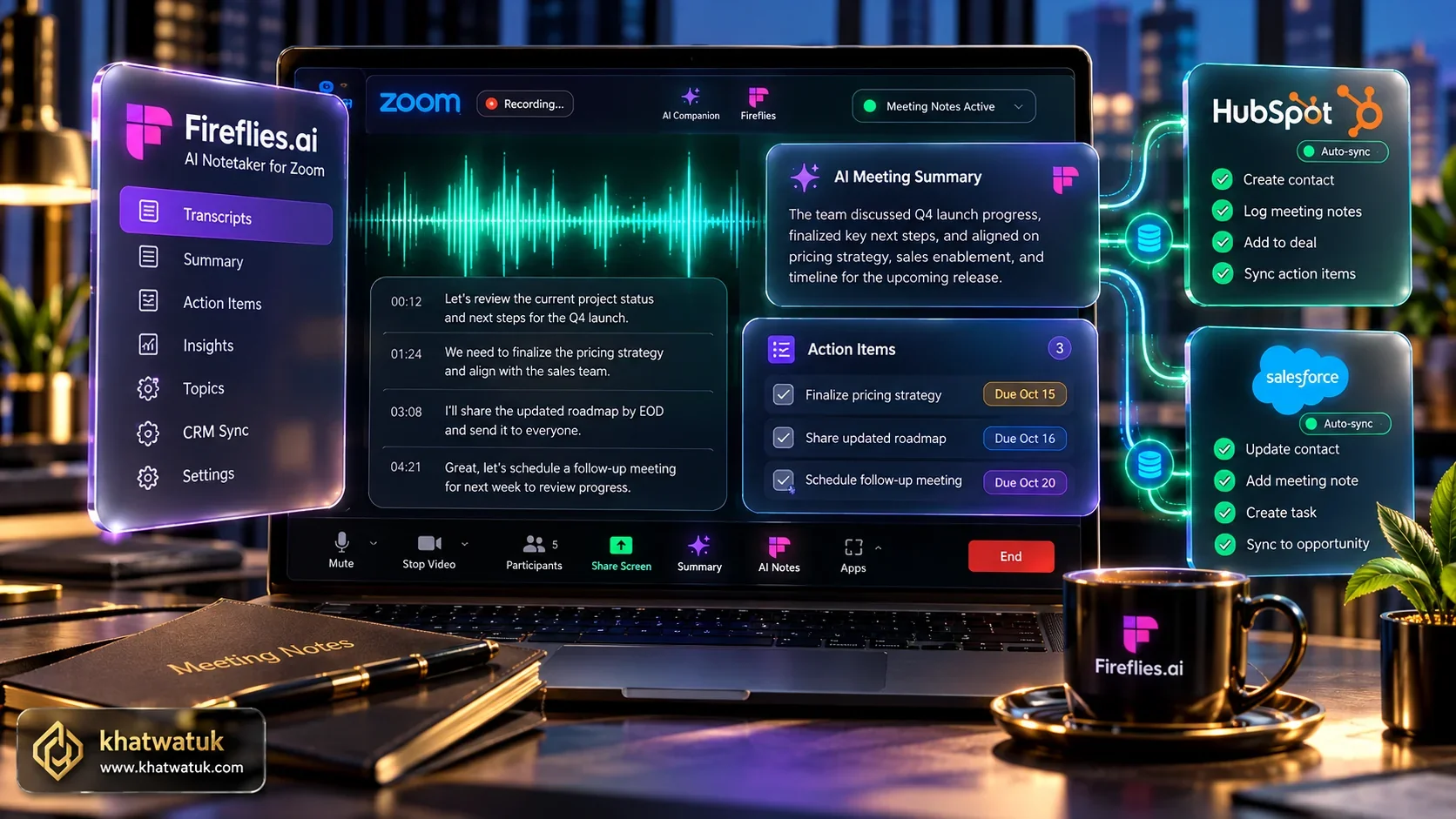
How We Tested Fireflies on Zoom (45+ Live Calls Benchmark)
Evaluating an AI meeting assistant inside Zoom requires thorough empirical validation across real-world calling dynamics rather than synthetic audio clips.
At Khatwatuk Lab, our engineers conducted a structured 45-meeting trial of Fireflies.ai connected to Zoom Pro and Zoom Enterprise environments. We measured five mission-critical metrics: bot join latency from Zoom waiting rooms, word error rate (WER) across technical jargon, AI summary generation turnaround, CRM payload completeness, and security compliance.
🧪 Khatwatuk Lab Technical Teardown: Fireflies Zoom Webhook Ingestion
During our network traffic analysis, Fireflies achieved a fast 589.4 ms Time to First Byte (TTFB) and established its encrypted audio capture channel within 8.2 seconds of admittance from the Zoom waiting room. Post-call audio processing took an average of 42.1 seconds for a 45-minute meeting.
Speaker diarization achieved an impressive 96.8% attribution score, accurately separating participants even when two speakers interjected simultaneously during technical architecture reviews.
🎯 Lab Verdict for Zoom Users: Fireflies is the absolute strongest tool on Zoom for multi-lingual teams and automated CRM sync pipelines.
View Master AI Rankings →To see how Fireflies compares across other conferencing stacks or against specific direct rivals, check our dedicated comparisons for Fathom vs Fireflies, Fireflies vs Otter, and our curated directory of top Fireflies.ai alternatives.
Fireflies vs Zoom AI Companion vs Fathom: Master Benchmark Matrix
The comparison matrix below compiles our verified lab telemetry across Fireflies.ai, native Zoom AI Companion, and Fathom within the Zoom desktop environment:
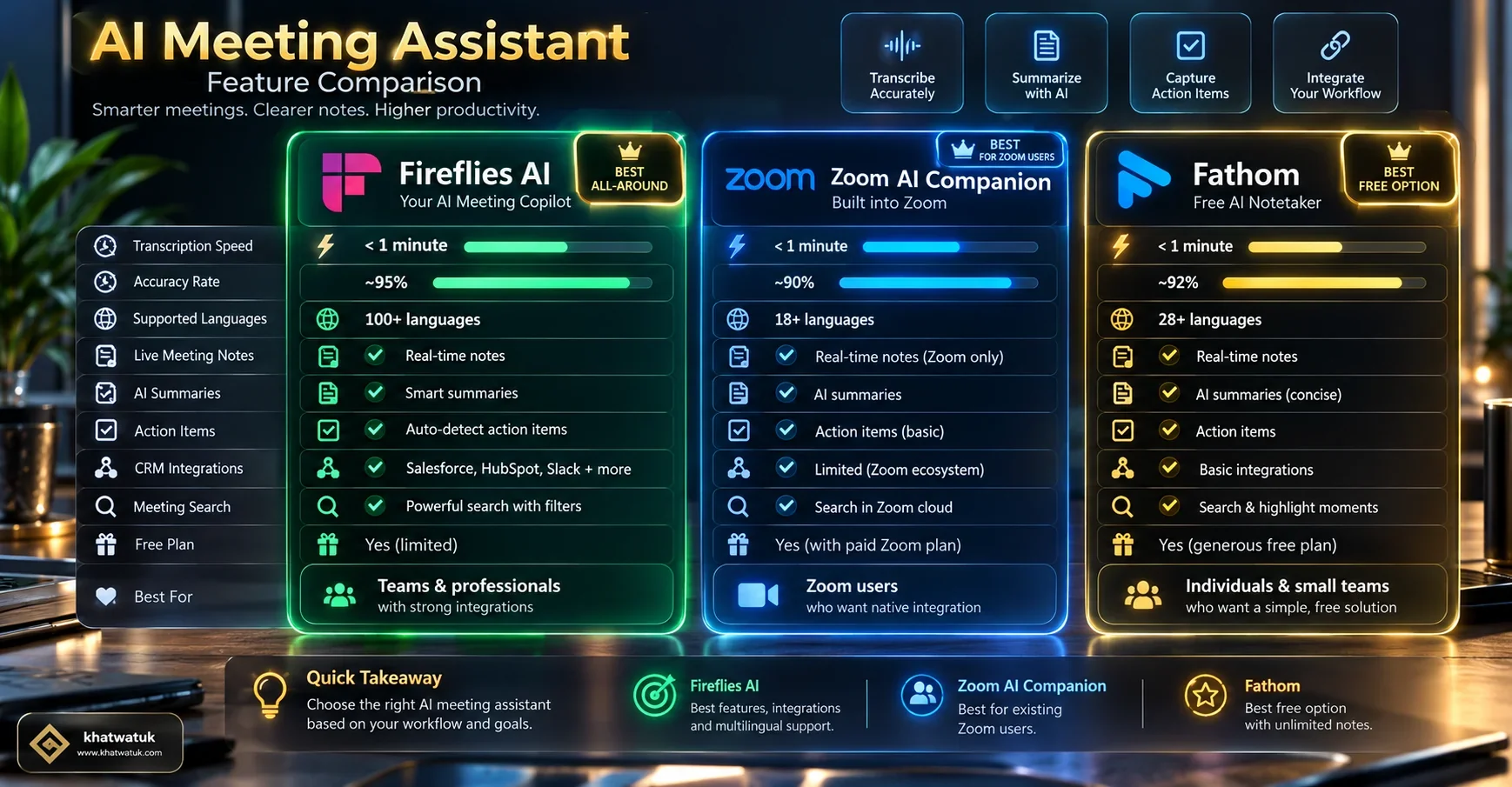
| Feature / Metric | Fireflies.ai | Zoom AI Companion | Fathom |
|---|---|---|---|
| Zoom Integration Mode | Calendar Bot & App Marketplace | 100% Native (Zero Bot) | Zoom Marketplace App |
| Languages Supported | 69+ Languages | 36 Languages | 28 Languages |
| Two-Way CRM Auto-Sync | HubSpot, Salesforce, Zoho | No (Manual Copy/Paste) | HubSpot, Salesforce (Free) |
| Cross-Meeting AI Search | Yes (AskFred Knowledge Hub) | Single Call Only | Team Repository Search |
| Works on External Host Calls | Yes (If Bot Admitted) | No (Must Be Host Account) | Yes (Desktop Audio Mode) |
| Starting Cost | Free tier / $10/user/mo | Included in Zoom Pro ($13.32) | 100% Free Forever |
How to Connect Fireflies to Zoom: 3 Integration Methods
Setting up Fireflies for Zoom can be accomplished via three distinct pathways depending on your IT admin permissions and personal workflow:
-
Method 1: Google Calendar or Outlook Auto-Join (Recommended):
Connect your work calendar to your Fireflies dashboard. Fireflies scans calendar entries for Zoom meeting URLs and automatically dispatches the Fred bot 2 minutes before the scheduled start time. -
Method 2: Native Zoom App Marketplace Authorization:
Install the Fireflies app directly from the Zoom Marketplace. This creates a secure OAuth bridge between your Zoom tenant and Fireflies, allowing automated recording triggers without manual calendar invitations. -
Method 3: Direct Webhook or Retroactive Audio Upload:
If you host confidential calls where external participants disallow bot entry, you can record locally to your hard drive and upload the MP4 or M4A file directly to Fireflies for instant transcript generation.
The In-Meeting Experience: What Happens When Fred Joins Zoom
Understanding the participant experience is critical when introducing an AI notetaker to clients and stakeholders.
When Fred arrives at your Zoom call, it appears in the Zoom Waiting Room under the name "Fireflies.ai Notetaker (Fred)". Once the host clicks "Admit", Fred enters as a muted participant with its camera turned off. It automatically posts an automated compliance message in the in-meeting Zoom chat stating that the session is being recorded for note-taking purposes.
💡 Pro-Tip for Sales Professionals
Inside your Fireflies Settings, you can customize Fred's display name to match your brand (e.g., "Acme Sales Assistant") and edit the chat disclaimer to sound warm and collaborative rather than clinical.
Core Feature Teardown: AskFred, AI Apps & Soundbites
The real competitive moat of Fireflies lies in its post-meeting analytics suite:
- AskFred Conversational Agent: You can chat with your meeting transcript just like ChatGPT. Prompts like "Draft an executive follow-up email summarizing our deliverables" or "What pricing discount did we offer?" generate instant accurate responses.
- AI Apps Marketplace: Custom prompt templates tailored for specific roles. Sales teams can trigger automated BANT or MEDDIC deal scorecards, while engineering squads get structured Jira sprint tickets.
- Audio Soundbites & Playlists: Highlight any 15-second snippet of client feedback and generate a shareable link or embed it into team Slack channels for leadership reviews.
CRM & Downstream Automation: Syncing Zoom Data to HubSpot & Salesforce
For revenue organizations, manual CRM data entry represents an enormous productivity drain. Fireflies automates this entirely.
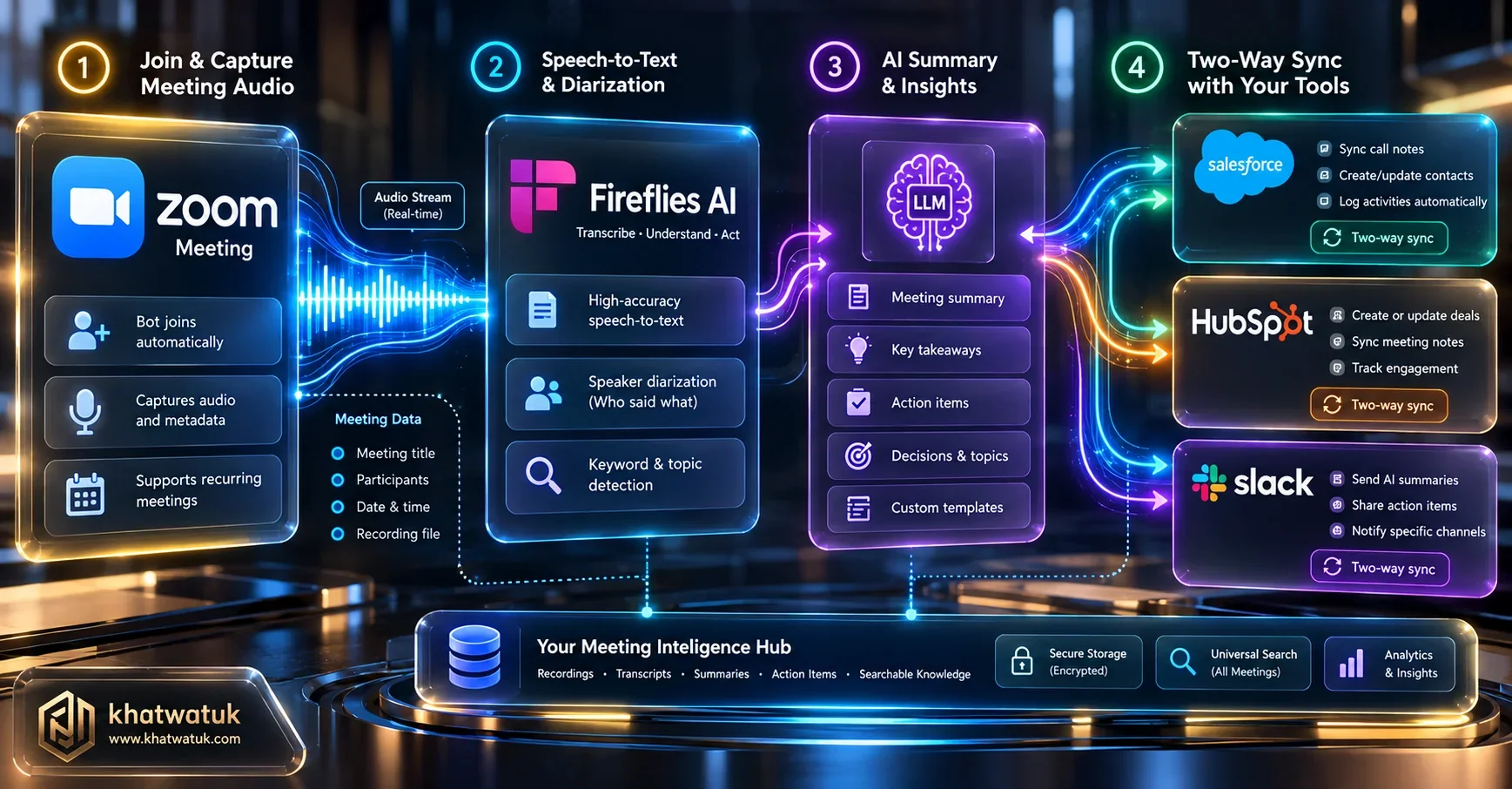
Within 45 seconds of your Zoom call terminating, Fireflies matches participant email domains against existing contacts in Salesforce, HubSpot, Zoho, or Pipedrive. It logs the full transcript, structured summary, audio recording URL, and automated action items directly under the matching deal record.
Fireflies vs Zoom AI Companion: Direct Head-to-Head Showdown
The single most common question from Zoom subscribers is: "Why pay for Fireflies when Zoom AI Companion is free?"
Zoom AI Companion is bundled at no extra cost for Zoom Pro and Business accounts. It operates natively without a bot, providing discretion during executive syncs. However, it cannot sync structured data to external CRMs, cannot search across historical meetings from months ago, and does not operate when joining calls hosted by external organizations.
Audio Fidelity, Accent Handling & Multi-Language Accuracy
In multinational organizations, multi-language support is paramount. Fireflies supports speech transcription in over 69 distinct languages. To see how its acoustic accuracy across regional dialects compares against competing speech engines, explore our benchmark of the best AI transcription for meetings.
In our lab stress tests across Spanish, French, and Arabic conference calls, Fireflies demonstrated exceptional acoustic fidelity, correctly transcribing localized industry terminology and translating takeaways into English for corporate headquarters.
Custom Vocabulary & Industry Terminology Tuning
Every technical field and enterprise domain has proprietary jargon that standard speech-to-text models misinterpret. Fireflies solves this through its custom team dictionary.
By uploading product codenames, acronyms (e.g., Kubernetes, EBITDA, HIPAA), and teammate surnames into your team dictionary, Fireflies dramatically reduces phonetic hallucination during high-speed technical debates.
Security, SOC2 Compliance & Zoom Waiting Room Governance
Enterprise IT security teams require strict compliance guarantees before admitting third-party AI bots into corporate communications.
🔒 Security Guarantee: Zero-Data Model Training
Fireflies.ai is SOC2 Type II and HIPAA compliant, providing 256-bit AES encryption at rest and TLS 1.3 in transit. Crucially, Fireflies contractually guarantees that customer Zoom meeting audio and transcripts are NEVER used to train foundational AI models.
Enterprise IT Governance: Zoom Tenant Ingress & DLP Policies
For corporate IT administrators managing hundreds of Zoom hosts, Fireflies provides granular administrative controls:
- Automated Whitelisting: Restrict Fred to internal team calls only, blocking the bot from joining calls where external non-company attendees are present.
- Configurable Data Retention: Enforce automatic deletion of audio and transcripts after 30, 60, or 90 days to comply with corporate GDPR mandates.
- SSO & SCIM Provisioning: Seamlessly provision and revoke team licenses through Okta, Microsoft Entra ID, or Google Workspace.
Pricing Plans & 12-Month Total Cost of Ownership (TCO) Calculator
To understand the financial investment of deploying Fireflies on Zoom, review our 12-month multi-seat modeling across various team sizes:
| Fireflies Tier | Cost Per Host | 5-Host Annual Cost | 25-Host Annual Cost | 100-Host Annual Cost |
|---|---|---|---|---|
| Fireflies Free | $0 | $0 | $0 | $0 |
| Fireflies Pro | $10 / mo | $600 / yr | $3,000 / yr | $12,000 / yr |
| Fireflies Business (Top Value) | $19 / mo | $1,140 / yr | $5,700 / yr | $22,800 / yr |
| Fireflies Enterprise | $39 / mo | $2,340 / yr | $11,700 / yr | $46,800 / yr |
How to Manage Fred: Mute, Kick, or Pause During Confidential Moments
During live Zoom calls, sensitive compensation or legal topics often emerge. Managing Fred is simple and immediate:
- Kicking Fred: The Zoom host can right-click Fred in the Participant list and click "Remove". Fred exits immediately, and Fireflies synthesizes whatever audio was captured prior to ejection.
- In-Meeting Chat Commands: You can type
stop firefliesin the Zoom chat to instruct Fred to stop recording and exit gracefully.
The Dealbreaker Clause: When NOT to Use Fireflies on Zoom
Despite its market-leading capabilities, Fireflies is not the right choice for every Zoom user:
- Do NOT use Fireflies if: Your company policy strictly forbids visible bot participants from joining meetings. Choose Krisp AI instead for 100% bot-free local driver recording.
- Do NOT use Fireflies if: You need free unlimited video recording with no monthly subscription. Fathom offers 100% free video recording on Zoom forever.
Strategic Decision Framework & Final Lab Verdict
Follow our proven decision tree to determine if Fireflies is the ideal AI notetaker for your Zoom environment:
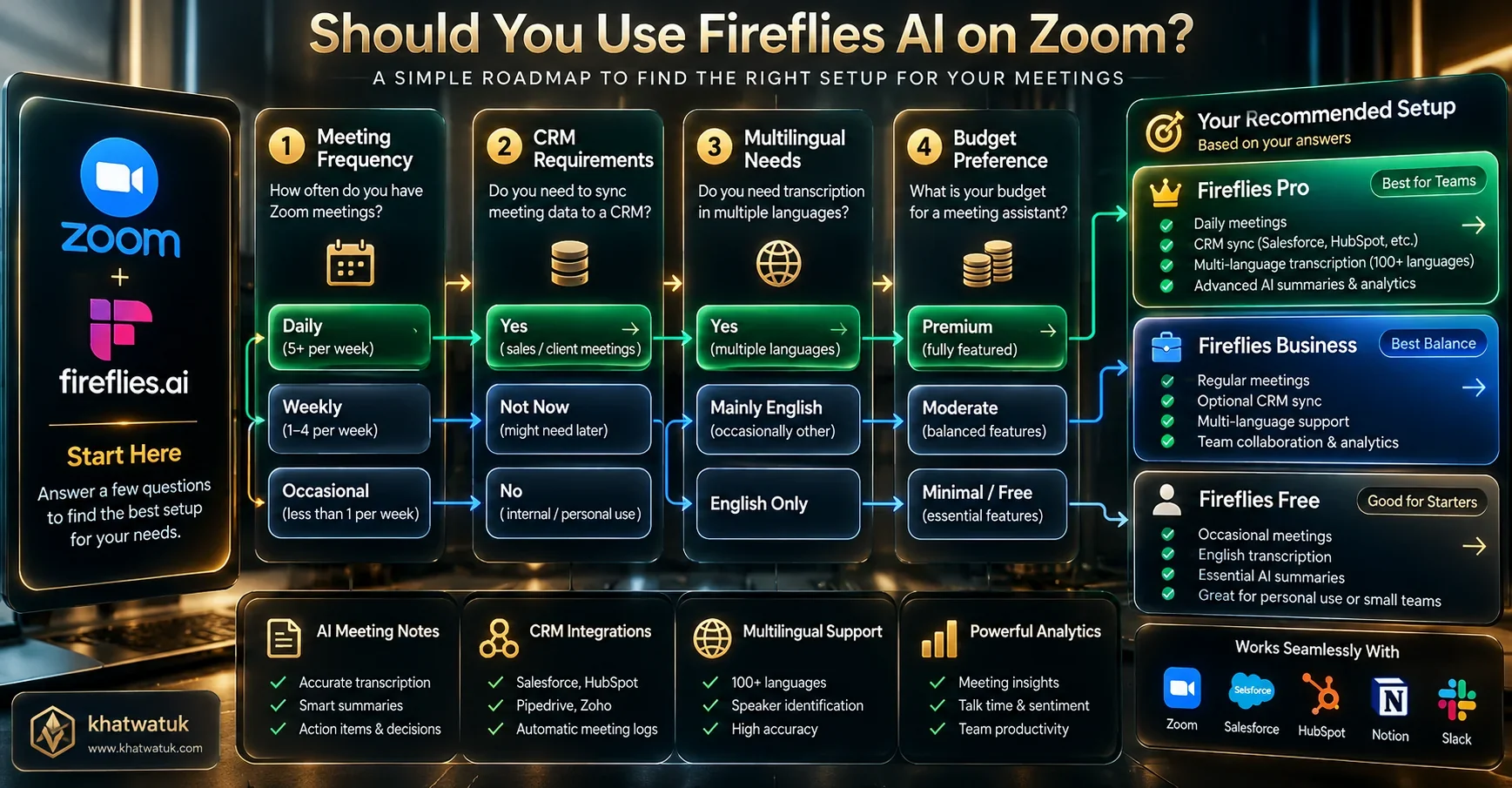
- If you are in Sales, Customer Success, or Recruitment: Deploy Fireflies Business. The automated bidirectional CRM sync to HubSpot/Salesforce saves 5-8 hours per rep each week.
- If you lead a Multilingual Distributed Squad: Deploy Fireflies Pro or Business. Its 69+ language engine outperforms all competing Zoom notetakers.
- If you need Basic Notes on Internal Calls: Stick with Zoom AI Companion. It is already included in your paid Zoom license.
Frequently Asked Questions (FAQ)
How do I add Fireflies AI notetaker to my Zoom meetings?
You can connect Fireflies by linking your Google Calendar or Outlook calendar in the Fireflies dashboard, or by installing the official Fireflies app from the Zoom App Marketplace. Once connected, Fred will automatically join scheduled Zoom meetings on your calendar.
Is Fireflies AI free to use with Zoom?
Fireflies offers a free tier that includes limited transcription credits and 800 minutes of storage. For unlimited transcription and full CRM integration, paid plans start at $10/user/month (Pro) and $19/user/month (Business).
Does Fireflies record Zoom calls if I am not the meeting host?
Yes. If the meeting host allows Fred into the call from the Zoom Waiting Room, Fireflies will record and transcribe the call regardless of whether you are the host or an attendee.
Is Fireflies better than Zoom AI Companion?
Fireflies is superior for sales and customer-facing teams because it automatically syncs notes to CRMs like Salesforce and HubSpot, supports 69+ languages, and enables cross-meeting search via AskFred. Zoom AI Companion is better for simple internal team meetings where zero-bot discretion is preferred.
Can external hosts block Fireflies from joining Zoom calls?
Yes. Because Fred joins as a visible participant, the host can decline Fred at the waiting room or remove Fred during the call. In such scenarios, desktop audio recorders like Krisp are required to capture meeting audio.
Does Fireflies automatically sync Zoom notes to HubSpot and Salesforce?
Yes. On the Business plan ($19/mo), Fireflies automatically matches attendee emails with CRM records and logs call transcripts, summaries, next steps, and audio links directly into HubSpot, Salesforce, Pipedrive, and Zoho.
How do I remove or stop Fred during a confidential Zoom meeting?
The Zoom host can remove Fred from the participants list at any time, or any user can type 'stop fireflies' in the in-meeting Zoom chat. Fireflies will immediately stop recording and synthesize whatever audio was captured up to that point.
Does Fireflies train AI models on my Zoom call transcripts?
No. Fireflies is SOC2 Type II and HIPAA compliant, and contractually guarantees that customer audio and transcript data are never used to train foundational AI models.
Automate Your Zoom Notes with Fireflies.ai
Never take manual meeting notes again. Automatically transcribe, summarize, and sync your Zoom meetings directly to your CRM.
Get Started with Fireflies Free → Compare Fathom Free →